
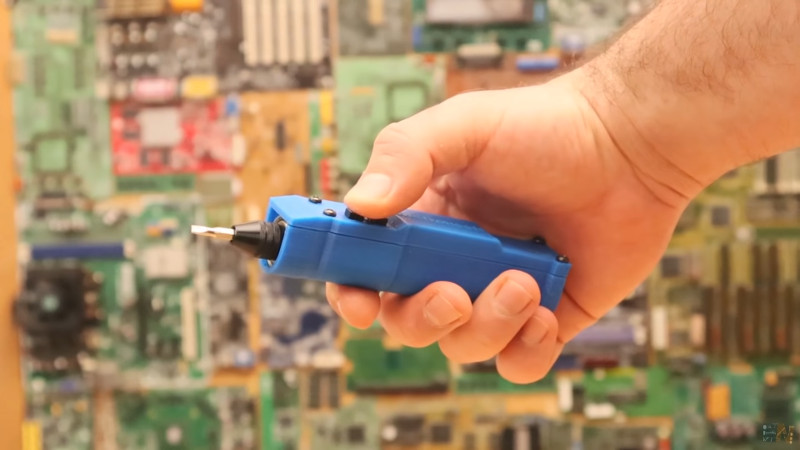
There are two types of people in this world: those who lose the tiny screwdriver that came with their electronics kit, and those who lie about never losing it. A 3D printed electric screwdriver is a smart little solution for makers, tinkerers, repair fans, and anyone who has ever stared at twelve identical screws and thought, “Surely civilization has advanced beyond wrist-powered suffering.”
The beauty of this project is not just that you can build a compact cordless screwdriver. It is that you can design the handle, choose the motor, tune the grip, place the buttons exactly where your thumb wants them, and create a tool that feels personal instead of factory-generic. With a small DC geared motor, rechargeable battery, basic charging module, forward/reverse switching, a bit holder, and a well-designed 3D printed shell, you can make a practical desktop tool for light assembly, electronics repair, model building, keyboard mods, RC hobbies, and small household fixes.
This is not meant to replace a construction-grade drill driver. It is a precision-friendly, low-torque electric screwdriver for small screws, delicate parts, and repetitive jobs where speed matters more than brute force. Think laptops, toys, 3D printer maintenance, small enclosures, cabinet hinges, and all those tiny screws that seem to multiply whenever you take something apart.
Note: This article is educational and safety-focused. When working with motors, soldering, lithium batteries, or charging boards, follow component datasheets, use protected cells, avoid short circuits, and ask an experienced adult or technician for help if you are unsure.
Why 3D Print an Electric Screwdriver?
Buying an electric screwdriver is easy. Printing your own is more fun, more customizable, and, frankly, much better for your maker ego. A DIY 3D printed electric screwdriver lets you control the size, balance, shape, color, and repairability of the tool. If the handle feels too thick, redesign it. If the button is awkward, move it. If the battery compartment is too tight, adjust the model and print version two. Commercial tools rarely offer that kind of freedom.
The project also teaches useful skills: mechanical design, print tolerances, electronics layout, battery safety, motor selection, ergonomic thinking, and post-processing. It is a small object, but it combines many maker disciplines in one satisfying package. The final result is something you can actually use, not just place on a shelf while whispering, “That was a learning experience.”
How a DIY Electric Screwdriver Works
A simple electric screwdriver has a few core systems. The motor provides rotation. A gearbox increases torque and slows the speed to something useful for screws. A battery powers the motor. A switch controls direction, allowing the bit to drive screws in or remove them. The 3D printed body holds everything together, protects the electronics, and gives your hand a comfortable grip.
Most compact builds use a small geared DC motor, such as an N20 or N30 gear motor, because these motors are affordable, compact, and available in different RPM ratings. A high-speed motor may look exciting on paper, but screws do not need a tiny rocket engine. For small screws, controlled speed and usable torque matter more than screaming RPM. A geared motor in the lower-to-medium speed range is usually easier to manage.
Main Parts You Need
1. A Geared DC Motor
The motor is the heart of the screwdriver. Choose a geared motor rather than a bare high-speed motor. The gearbox gives the tool enough turning force for light fastening tasks. A motor that spins too fast can strip screws, chew plastic, or launch tiny hardware into another dimension. A slower motor gives you better control and a more professional feel.
2. A Bit Holder or Hex Shaft
Most small screwdrivers use 4 mm precision bits or standard 1/4-inch hex bits. Precision bits are better for electronics, eyeglasses, toys, and compact assemblies. Standard hex bits are easier to find and more versatile for household jobs. Your choice affects the front nose design, shaft support, and bearing size, so decide early.
3. Rechargeable Battery
Many DIY builds use a single-cell lithium-ion or lithium-polymer battery. These batteries are compact and rechargeable, but they require proper charging and protection. Use a battery with protection circuitry or a suitable battery management module. Never charge a bare lithium cell with random power. That is not “DIY spirit”; that is inviting chaos to your workbench.
4. Charging Module
A USB charging board makes the screwdriver convenient. Common modules are designed for single-cell lithium batteries and may include charge management and protection features depending on the model. Check the module specifications carefully. The charging port should be accessible from the outside of the case, preferably with enough plastic around it to prevent wiggling or stress.
5. Forward and Reverse Control
An electric screwdriver needs both directions. You can use a small switch arrangement or a motor driver circuit to reverse polarity to the motor. The user interface should be simple: one control for forward, one for reverse, or a directional switch with a trigger. Centering the controls where the thumb naturally rests makes the finished tool feel less like a science fair accident and more like a real product.
6. Bearings, Screws, and Small Hardware
A front bearing or bushing can help support the output shaft and reduce wobble. Tiny machine screws can hold the enclosure halves together. Heat-set inserts are excellent if you want a stronger, cleaner assembly, especially if you plan to open the case later for repairs.
Choosing the Best Filament
For a decorative prototype, PLA is fine. It is easy to print, widely available, and dimensionally friendly. For a tool body, PETG is often a better choice because it handles impact and flex better than PLA. ABS or ASA may also work well for higher heat resistance, but they are more demanding to print and usually need better ventilation and printer control.
A screwdriver handle takes squeezing, twisting, vibration, and occasional drops. That means the material should be tough enough to survive real use. PETG is a strong everyday choice for functional parts because it is less brittle than PLA and more forgiving when the tool is bumped around a drawer. If your printer handles PETG reliably, it is a smart default for this project.
Designing the 3D Printed Body
The enclosure should be designed around the actual parts, not imaginary parts from a magical land where every component is exactly the size promised in the listing. Measure the motor, battery, switches, charging module, wires, shaft, and screws before modeling. Add clearance for wiring and assembly. A case that fits perfectly in CAD may become a tiny plastic prison after printing.
A good body usually has two halves: a main shell and a cover. This makes it easier to insert components and repair the tool later. Add internal ribs to hold the motor straight, battery supports to prevent rattling, and small channels for wires. The front nose should align the motor shaft with the bit holder. Even a small misalignment can create wobble, noise, and uneven screw driving.
Ergonomics Matter
A printed screwdriver should feel comfortable, not like holding a melted TV remote. Avoid a perfectly round handle if your printer creates slippery surfaces. A slightly faceted or oval body gives better grip and helps you know the orientation of the tool without looking. Add shallow grooves, raised texture, or rubber-like grip inserts if you want extra control.
Use Practical Tolerances
FDM 3D printing is not perfect. Leave clearance around snap-fit parts, button holes, battery compartments, and the motor mount. For many hobby printers, clearances around 0.3 mm to 0.6 mm are reasonable starting points for parts that need to slide or fit together, but every printer behaves differently. Print a small test section before committing to the full body.
Recommended Print Settings
For a strong screwdriver body, use more walls instead of relying only on infill. Three to five perimeters can make the shell feel much sturdier. Infill around 30% to 50% is usually enough for a compact hand tool, especially if the model includes ribs and thickened stress areas. The front nose, motor mount, screw posts, and button openings deserve extra attention because these areas handle the most force.
Print orientation matters. Try to orient the body so twisting forces do not split the layers apart. If the handle is printed vertically, it may look clean but could be weaker across layer lines. Printing the halves flat may improve strength in the hand-grip direction and make the interior easier to build accurately. Use supports only where needed, because cleaning support scars inside a tight electronics enclosure is nobody’s idea of a relaxing evening.
Assembly Overview
Start by dry-fitting every part before soldering or gluing anything. Place the motor in its mount, test the shaft alignment, insert the battery, check the charging port position, and press the buttons into their openings. If anything is too tight, sand gently or revise the model. Do not force components into the case; electronics are not emotionally strengthened by trauma.
Next, plan the wiring layout. Keep wires short enough to fit, but long enough that you can open the case without ripping connections loose. Use heat-shrink tubing where practical. Make sure no bare wire can touch the battery terminals or motor casing. A small internal divider between the battery and moving shaft area is a nice safety feature.
After wiring, test the motor direction before closing the enclosure. Confirm that forward drives the bit clockwise and reverse spins counterclockwise. Check that the charging port is accessible and that the buttons do not stick. Only then should you close the case with screws or inserts.
Testing the Tool
Begin with easy jobs. Drive a small screw into a soft plastic test piece or a pre-drilled pilot hole. Listen for motor strain. If the screwdriver stalls immediately, the motor may need more torque, the battery may be weak, or the gearing may be too fast. If the bit wobbles, inspect the shaft alignment and front support. If the handle gets warm, stop and check the electrical load.
The goal is smooth, controlled fastening. A good DIY electric screwdriver should start predictably, stop quickly, and feel balanced in the hand. It should not smell hot, rattle like a jar of coins, or require a motivational speech before each screw.
Common Mistakes to Avoid
Using a Motor That Spins Too Fast
Fast motors are tempting, but speed can ruin control. For screwdriver work, torque and precision matter more. Choose a geared motor that turns slowly enough to avoid stripping screws.
Making the Case Too Tight
Always leave room for wires, solder joints, heat-shrink, and small differences in printed dimensions. A case that closes in CAD may not close after real components are installed.
Ignoring Battery Safety
Use the correct charger, protected battery, and proper wiring. Do not puncture, crush, overcharge, short, or overheat lithium cells. Build the battery compartment so the cell is secure but not squeezed.
Skipping Test Prints
Print the motor mount, button area, and front nose as small test pieces first. This saves time, filament, and your dignity.
Smart Upgrades
Once the basic screwdriver works, you can improve it. Add an LED near the bit for better visibility. Add a magnetic bit holder so bits stay in place. Add a rubber pad or TPU grip section. Use heat-set inserts for a more durable case. Design a charging dock. Add a small clutch-like slip mechanism if you enjoy mechanical challenges. You can even print a bit storage compartment in the handle, although that may make the tool larger.
Another useful upgrade is a manual-turning grip. Some commercial electric screwdrivers allow you to finish tightening by hand. For a DIY version, the body and shaft connection must be strong enough to handle manual torque. This is where print orientation, stronger materials, and proper shaft support become important.
Who Should Build This Project?
This project is ideal for intermediate makers who already understand basic 3D printing and simple electronics. Beginners can still try it, but should keep the design simple and get help with soldering and lithium battery handling. It is especially useful for people who repair electronics, assemble small kits, maintain 3D printers, build keyboards, work with RC models, or simply enjoy tools that look like they escaped from a clever garage laboratory.
Real-World Experiences: What You Learn When You Actually Build One
The first thing you learn when 3D printing your own electric screwdriver is that the handle shape matters more than expected. On a screen, nearly every design looks comfortable. In your hand, the truth arrives quickly. A handle that is too round may spin slightly when torque increases. A handle that is too square may feel like gripping a tiny brick. The sweet spot is usually a rounded polygon or oval form with a slight taper near the front, giving your fingers a natural stop point.
The second lesson is that the motor mount deserves more respect than any other part of the model. If the motor is even slightly loose, the screwdriver feels cheap. If it is too tight, the motor may be difficult to install or could transfer vibration into the shell. A good design holds the motor firmly along its length and supports the front shaft. A tiny amount of wobble at the motor becomes a very visible wobble at the bit.
Battery placement also changes the feel of the tool. Put the battery too far back and the screwdriver feels tail-heavy. Put it too far forward and the nose dips like a tired bird. A balanced design places the battery close to the center of the grip while keeping enough room for the charging board and wiring. If you are using a long cylindrical cell, the handle may need to be longer. If you are using a flat pouch cell, the handle can be slimmer, but the battery needs gentle support and protection from sharp edges.
Button placement is another detail that separates a useful tool from a novelty print. Top-mounted buttons look clean, but side buttons may be easier to press depending on how you hold the screwdriver. Two separate buttons for forward and reverse can feel intuitive, but a slide switch plus trigger may reduce accidental direction changes. The best layout depends on whether the tool is used like a pen, a flashlight, or a traditional screwdriver.
Print quality affects assembly more than appearance. A beautiful outer shell means little if the screw posts crack or the lid does not close. It is worth slowing down the print, increasing wall count, and checking dimensional accuracy before printing the final version. PETG may string more than PLA, but it often feels better for a working tool because it tolerates bumps and flex. Sanding button holes and lightly cleaning the case seam can make the finished screwdriver feel much more polished.
Finally, this project teaches patience. Version one may be too bulky. Version two may have a charging port that sits half a millimeter too low. Version three may finally click together and make you grin like you just invented electricity. That is the real reward of the project: not only owning a custom electric screwdriver, but understanding every choice inside it.
Conclusion
Building a 3D printed electric screwdriver is a practical, rewarding maker project that combines design, printing, electronics, and problem-solving in one compact tool. It is small enough to finish without turning your workspace into an industrial zone, but complex enough to teach real skills. With the right geared motor, safe battery setup, thoughtful enclosure design, and durable filament, you can create a rechargeable screwdriver that is useful for electronics repair, hobby assembly, and everyday small screw tasks.
The best part is customization. Your screwdriver can be slim, chunky, colorful, ergonomic, modular, repairable, or delightfully over-engineered. That is the magic of 3D printing: you are not just making a tool; you are making your tool.













