
Yes, you can hide your Facebook friends list on Android, but there is one important catch: Facebook does not give you a perfect “make every social connection vanish from the internet like a magician in a smoky cape” button. What you can do is control who sees your Friends section and your full friends list from your profile. What you cannot fully control is whether a friendship may still be visible through another person’s profile, mutual friends, tags, comments, public interactions, or Facebook’s own social features.
In plain English: you can hide the number of friends shown on your profile from most people by changing your friends list privacy setting to Only me. That is the best option if your goal is to stop strangers, coworkers, nosy relatives, or that one classmate who became a “crypto mentor” from scrolling through your social circle.
This guide explains how to hide your number of friends on Facebook using an Android phone, what the setting actually does, what it does not do, and how to tighten your privacy without turning your profile into a digital panic room.
Can You Really Hide Your Number of Friends on Facebook?
The short answer is yes, mostly. Facebook allows you to adjust who can see your friends list. When you set this audience to Only me, other people should no longer be able to open your profile and browse your full friends list. This also usually prevents the visible friends count from being useful to the public because the Friends section is restricted.
However, Facebook privacy is not one giant light switch. It is more like a house with 47 lamps, two mystery switches, and one bulb that flickers whenever your aunt comments “beautiful dear” on a photo from 2016. Hiding your friends list protects one major area of your profile, but it does not erase every trace of your connections across the platform.
How to Hide Your Friends List on Facebook on Android
Here is the most reliable method for changing your friends list privacy in the Facebook Android app:
Step 1: Open the Facebook App
Launch the Facebook app on your Android phone. Make sure you are logged into the account you want to adjust. This sounds obvious, but many people manage multiple profiles or Pages and then wonder why the wrong settings changed. Facebook enjoys keeping life spicy.
Step 2: Tap the Menu Icon
Tap the Menu icon. On many Android versions, this appears as three horizontal lines near the top right or bottom right of the app, depending on your version and interface layout.
Step 3: Go to Settings & Privacy
Scroll down and tap Settings & privacy, then tap Settings. Facebook may move menus around from time to time, but the general path remains inside the privacy and audience controls.
Step 4: Find Audience and Visibility
Look for the section called Audience and visibility. This is where Facebook groups several important privacy controls, including who can see your posts, how people can find you, and what parts of your profile are visible.
Step 5: Tap “How People Find and Contact You”
Inside Audience and visibility, tap How people find and contact you. This area controls friend requests, search visibility, contact discovery, and your friends list audience.
Step 6: Tap “Who Can See Your Friends List?”
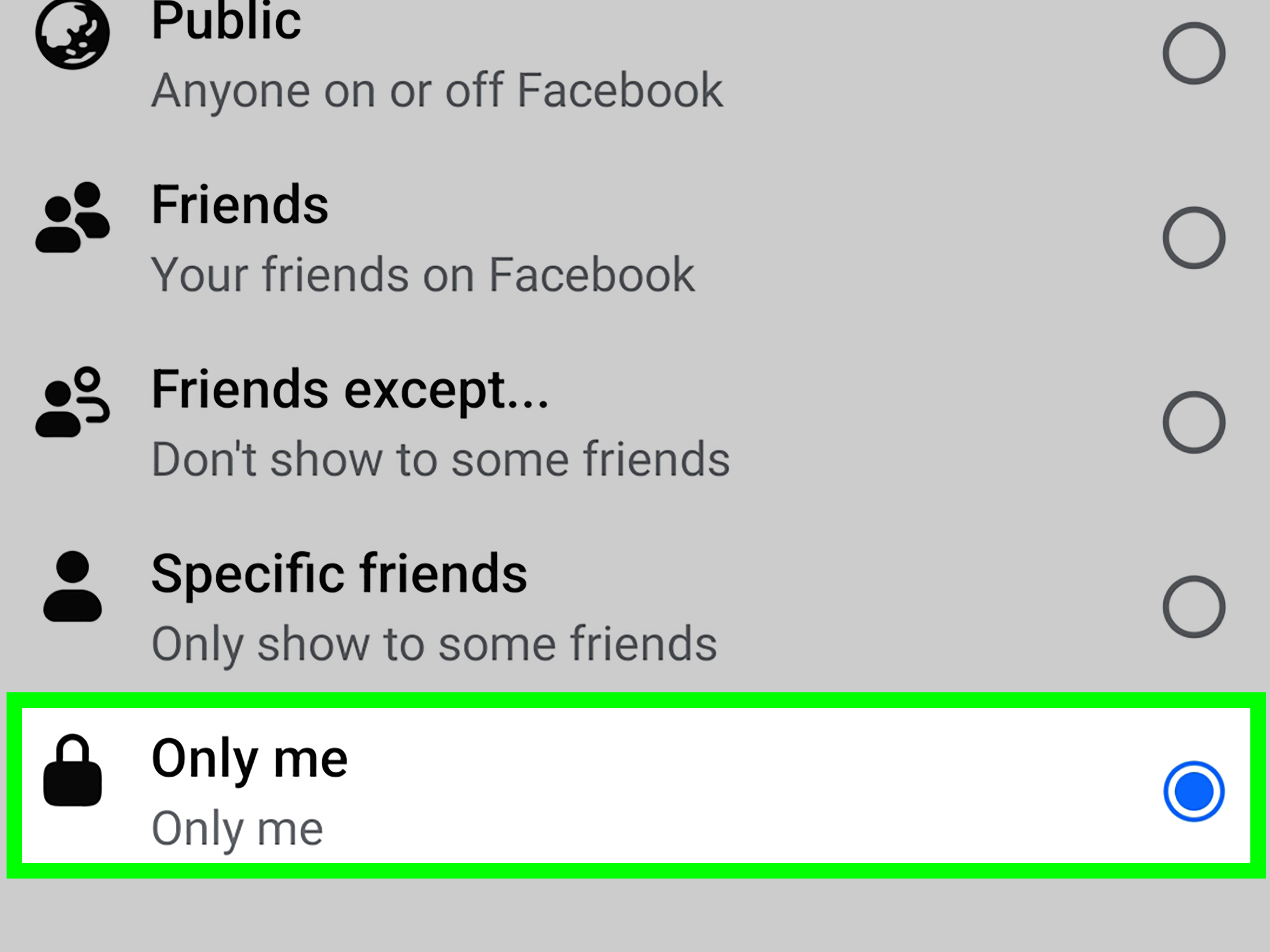
Select Who can see your friends list?. Facebook will show audience options such as Public, Friends, Friends except…, Specific friends, and Only me. These options may vary slightly depending on your region, app version, or account type.
Step 7: Choose “Only Me”
To hide your friends list as much as possible, choose Only me. This means you are the only person who can see the full list directly from your profile. If you want a softer privacy setting, choose Friends or Friends except…, but for maximum privacy, Only me is the cleanest option.
Does This Hide the Number of Friends Too?
In many cases, yes. If people cannot access your Friends section, they usually cannot view your complete friend count in the same direct way. But Facebook may still show social context, such as mutual friends, public interactions, or visible friendship information from another person’s profile.
For example, imagine you set your friends list to Only me. Great move. Gold star. But your friend Alex keeps their friends list public. Someone visiting Alex’s profile may still see that Alex is friends with you. This does not mean your setting failed; it means Facebook friendship is a two-sided connection, and the other side has its own privacy settings.
What “Only Me” Actually Hides
Setting your friends list to Only me helps hide your full social circle from profile visitors. It can prevent strangers from browsing your network, reduce unwanted friend requests, and make it harder for scammers to map your relationships. This is especially useful if you use Facebook for family, local groups, Marketplace, professional networking, or community pages.
The setting can also reduce social pressure. Some people do not want others judging their friend count. Others simply dislike the idea of a public scoreboard attached to their personal life. Your friendships are not a baseball stat sheet. Nobody needs box-score access to your social world.
What It Does Not Completely Hide
Even after you hide your friends list, some information may still be visible in other ways. Facebook may show mutual friends when two people have shared connections. Public comments, tags, group activity, likes, old posts, profile pictures, and shared photos may also reveal relationships indirectly.
Your public profile information remains public by design. This may include your name, profile picture, cover photo, username, and other basic identifiers. So while you can hide your friends list, you should not assume your entire profile becomes private. Think of it as closing the curtains, not moving to a bunker under a mountain.
Why People Hide Their Facebook Friends Count
There are plenty of normal reasons to hide your number of friends on Facebook. Privacy is not suspicious. It is not dramatic. It is not “acting weird.” It is the digital version of closing your front door when you get home.
1. To Avoid Social Comparison
Friend counts can feel oddly personal. Some users do not want people comparing numbers, judging popularity, or asking why they only have 211 friends while someone else has 4,923 acquaintances and at least 600 people they met once at a wedding buffet.
2. To Reduce Scams and Impersonation
Scammers often look for visible friend networks. If they can see your relatives, coworkers, or close contacts, they may try impersonation tricks. Hiding your friends list makes it harder for bad actors to study your social graph.
3. To Separate Personal and Professional Life
If you use Facebook for work, local business, school, or community groups, you may not want every contact to see your personal connections. Privacy settings help create a healthier boundary between “professional adult” and “person tagged in a blurry karaoke photo from 2014.”
4. To Stop Nosy Browsing
Some people simply browse too much. You know the type. They click one profile, then another, then another, and suddenly they are reconstructing your high school social history like a detective with a corkboard. Hiding your friends list slows that down.
How to Check If Your Friends List Is Hidden
After changing the setting, use Facebook’s View As feature. Go to your profile, open the profile options menu, and choose View As. This shows how your profile appears to the public. If your Friends section is not visible to the public, your setting is working for public viewers.
For a more realistic test, ask a trusted friend to view your profile from their account. This helps you understand what friends can still see. If you chose Only me, they should not be able to browse your full friends list from your profile.
Extra Privacy Settings Android Users Should Review
Hiding your friends list is a good start, but it should not be your only Facebook privacy move. If you are already in the settings menu, you might as well tidy up the rest. Digital privacy is like cleaning a kitchen: once you wipe one counter, suddenly the whole room looks guilty.
Review Who Can Send You Friend Requests
In the same “How people find and contact you” area, check who can send you friend requests. If you receive random requests from strangers, changing this from Public to a narrower option may help.
Limit Search by Phone Number and Email
Facebook may allow people to find you through your phone number or email depending on your settings. If privacy matters to you, restrict these options. This is especially important if your phone number is connected to work, banking, or family contacts.
Control Search Engine Visibility
Facebook may provide an option related to whether search engines outside Facebook can link to your profile. Turning this off can reduce how easily your profile appears in public search results.
Use Privacy Checkup
Facebook’s Privacy Checkup can help you review important account settings, including who can see what you share and how people can find you. It is not glamorous, but neither is flossing, and both save you from future regret.
Check Old Posts
If your old posts are public, hiding your friends list will not protect everything. Review old posts, photo albums, tagged content, and profile details. A private friends list paired with public posts is like locking the front door while leaving the garage wide open with a neon sign that says “come on in.”
Common Mistakes When Hiding Friends on Facebook
Mistake 1: Thinking “Only Me” Hides Mutual Friends Everywhere
Only me hides your friends list on your profile. It does not guarantee that mutual friend indicators disappear everywhere. Facebook may still show shared connections when relevant.
Mistake 2: Forgetting About Tags
If friends tag you in public posts or photos, people may still infer your relationships. Review tag settings and timeline review if you want more control over what appears on your profile.
Mistake 3: Ignoring Public Comments
If you comment on public posts, anyone who can see those posts may see your comment. This can reveal connections, interests, groups, and activity patterns.
Mistake 4: Using Third-Party “Privacy” Apps
Be careful with apps or browser extensions that claim to show hidden friends, profile viewers, secret visitors, or magical Facebook insights. Facebook does not provide a feature that lets people track who views their profile, and suspicious tools may compromise your account.
Can You Hide Individual Friends?
Facebook does not offer a simple setting that lets you hide one specific friendship from everyone while leaving your other friendships visible. You can hide your overall friends list, restrict post audiences, use friend lists, or block specific people, but friendship visibility can still depend on both accounts involved.
If you need stronger privacy from a particular person, consider using Restricted, unfriending, or blocking. The Restricted list limits what that person can see when you post to Friends, though they may still see public posts and posts where they are tagged. Blocking is the strongest option if you want to prevent someone from interacting with your profile.
Is Hiding Your Friends List Worth It?
Yes, for most people, hiding the friends list is worth it. It takes less than a minute, improves privacy, and reduces unnecessary exposure. It will not make your account invisible, but it closes one of the biggest windows into your personal network.
If you are a teacher, student, freelancer, healthcare worker, public-facing employee, local business owner, or just someone with a strong allergy to online nosiness, this setting is especially useful. Your Facebook friends list can reveal family ties, workplace relationships, political circles, dating history, hobbies, and community connections. That is a lot of information for a simple tab on a profile.
Real-Life Experiences: What It Feels Like to Hide Your Facebook Friends Count on Android
Many users first look for this setting after an awkward moment. Maybe a coworker mentions a relative they found through your profile. Maybe a stranger sends friend requests to three people in your network after chatting with you in a group. Maybe someone asks, “Why are you friends with that person?” and suddenly Facebook feels less like a social app and more like a courtroom with birthday reminders.
One common experience is relief. After switching the friends list audience to Only me, your profile feels calmer. People can still interact with your posts if allowed, but they cannot casually browse your entire network. It is a small change, yet it creates a stronger sense of control. You are no longer handing every visitor a guest list to your digital life.
Another experience is surprise. Some users expect the friends count and every mutual connection to disappear completely. Then they notice that mutual friends may still appear in certain places. This can feel confusing at first, but it makes sense once you understand that Facebook friendship involves two profiles. Your privacy setting controls your side of the display, not everyone else’s settings.
Android users may also notice that Facebook’s menu layout changes. One month the setting seems easy to find; the next month it feels hidden behind a maze guarded by a raccoon with a clipboard. If you cannot find the exact wording, search inside Settings for “friends list” or look under Audience and visibility. Facebook often tests layouts, but the privacy control generally remains available.
For people who use Facebook Marketplace, hiding the friends list can feel especially practical. Marketplace interactions often involve strangers. There is no reason a person buying a used coffee table needs to inspect your cousin list, college friends, and former coworkers. The same applies to public groups. You may want to join parenting groups, hobby groups, local housing groups, or neighborhood discussions without making your entire network easy to explore.
There is also an emotional benefit. Social media can make people feel watched, measured, or compared. Friend counts can create unnecessary pressure, especially for younger users or anyone rebuilding their social life after a move, breakup, job change, or personal reset. Hiding the number of friends can remove one tiny but annoying scoreboard from the internet. And honestly, the internet already has enough scoreboards.
The best experience comes from combining this setting with a broader privacy check. Hide your friends list, then review old posts, tagged photos, contact lookup settings, and public profile details. After that, use View As to see what strangers can see. This routine takes a few minutes, but it can prevent years of awkward oversharing.
The practical lesson is simple: hiding your number of friends on Facebook on Android is not about secrecy; it is about boundaries. You can enjoy Facebook, keep up with people, join groups, sell an old chair, and laugh at memes without making your social graph available to every passerby. Privacy is not rude. Privacy is the digital equivalent of having curtains, a lock, and the good sense not to let strangers inventory your living room.
Conclusion
So, can you hide your number of friends on Facebook on Android? Yes, you can hide your friends list by changing the audience setting to Only me. This is the strongest built-in option for keeping your Friends section private from profile visitors. It can reduce unwanted browsing, protect your social circle, and make your profile feel less exposed.
Just remember the limitation: hiding your friends list does not erase every possible sign of your connections. Mutual friends, public interactions, tags, and another friend’s privacy settings may still reveal some relationships. For best results, combine this setting with Privacy Checkup, View As, restricted audience controls, and careful review of old posts.
Facebook privacy is rarely perfect, but it is still worth improving. A few taps on Android can make your profile quieter, cleaner, and less inviting to digital snoops. And that is a wineven if Facebook keeps rearranging the settings menu like furniture in a haunted house.













