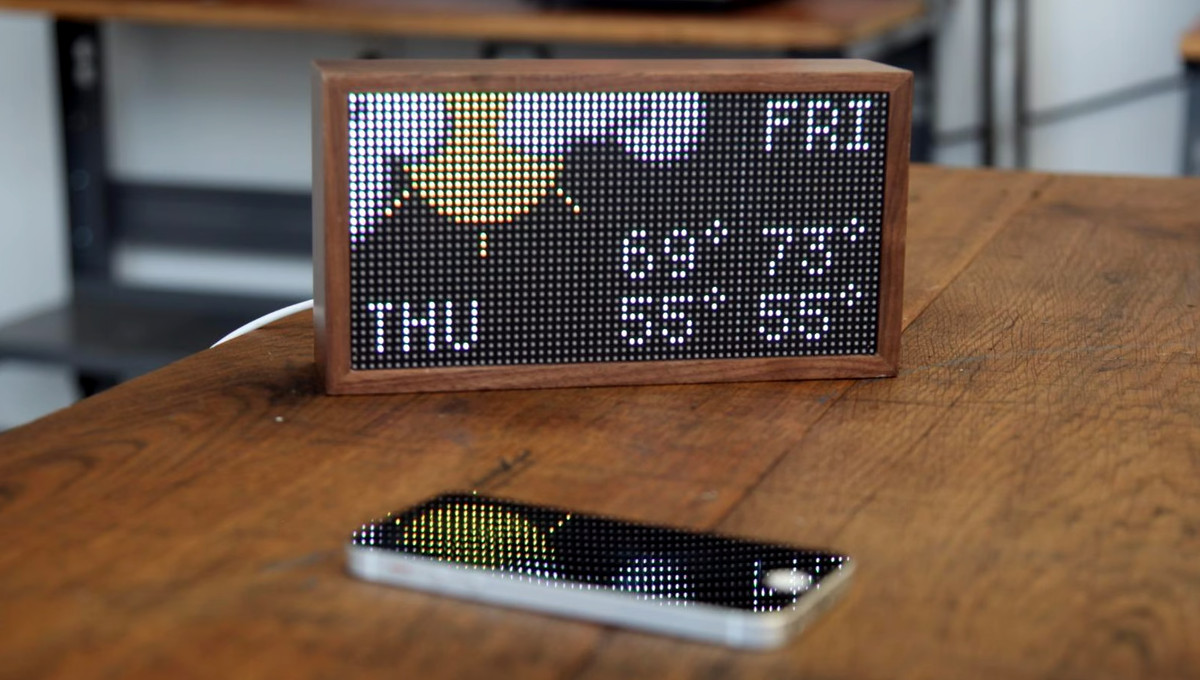
Tidbyt was never trying to be the loudest smart display in the room. It did not arrive with a giant touchscreen, a voice assistant that interrupts dinner, or a camera pointed at your living room like a tiny corporate owl. Instead, it offered something wonderfully modest: a retro-style LED matrix that showed weather, transit, sports scores, calendars, stock prices, messages, and other bite-sized information in glowing pixel art.
For many owners, that was the charm. Tidbyt felt like the love child of a train-station departure board, a desktop toy, and a very polite smart home dashboard. But as with many internet-connected gadgets, its usefulness depended heavily on cloud services. When the Tidbyt team joined Modal and new device shipments stopped, the community began asking the question every smart device owner eventually fears: what happens when the servers go away?
That is where open source enters the story wearing a cape, probably one stitched together from old USB-C cables. Projects such as Tronbyt, along with Tidbyt’s earlier developer tools like Pixlet and the Hardware Development Kit, aim to keep existing Tidbyt devices useful by replacing cloud dependence with local control, community-maintained software, and self-hosted infrastructure.
What Is Tidbyt, and Why Did People Love It?
Tidbyt is a programmable smart display built around a low-resolution RGB LED matrix. The original concept was simple but surprisingly powerful: instead of making users unlock a phone to check small pieces of information, Tidbyt put those updates in ambient view. It could sit on a desk, shelf, kitchen counter, or office wall and rotate through quick visual snapshots.
Its 64×32 pixel display was not meant to compete with a tablet. That would be like asking a haiku to replace a novel. The magic was in constraint. Pixel art weather icons, subway arrivals, GitHub notifications, sports scores, crypto prices, and calendar reminders looked charming because the display forced everything to be concise.
The product also appealed to developers. Tidbyt apps were commonly built with Pixlet, a framework and command-line tool that lets developers create applets for pixel-based displays using Starlark, a Python-like configuration language. Pixlet could render apps into animations or images and push them to a Tidbyt device. In other words, Tidbyt was not just a clock. It was a tiny stage for creative data.
The Cloud Problem: When Smart Devices Get Nervous
The awkward part of many smart gadgets is that “smart” often means “dependent on somebody else’s server.” A device may be perfectly healthy on your desk, plugged in, connected to Wi-Fi, and ready to glow. But if the backend service is discontinued, the gadget can become a decorative brick with excellent posture.
Tidbyt’s official platform depended on company-operated cloud infrastructure. Apps were managed through the Tidbyt ecosystem, and the device relied on backend services to receive the graphics it displayed. That design made setup friendly for regular users, but it also created a long-term risk. If the official backend stopped receiving maintenance or eventually shut down, existing devices could lose much of their functionality.
This is not a Tidbyt-only issue. It is one of the biggest weaknesses in modern IoT hardware. Consumers buy physical products, but the product experience is often rented from a cloud service. When the business model changes, the device owner may be left holding an object that technically works but no longer has the software oxygen it needs.
How Modal Changed the Conversation
In late 2024, Modal announced that Tidbyt was joining the company. The announcement stated that Tidbyt had shipped around 100,000 devices and that the service would remain running for existing customers, while no new devices would be shipped. That reassurance mattered, but the “no new devices” part still changed the mood.
For longtime owners, the concern was not necessarily that their Tidbyt would stop working tomorrow. The concern was the future. Without new hardware sales and with the original team moving into another company’s infrastructure work, the product’s long-term path became less certain. Communities around niche hardware are very good at reading the room. When the room starts smelling like “server shutdown someday,” developers begin cloning repos, building alternatives, and labeling power cables.
The good news is that Tidbyt was unusually well positioned for rescue. The hardware was not an exotic black box. It used familiar components such as an ESP32 and an LED matrix. The software ecosystem already had open source pieces, especially Pixlet and the Hardware Development Kit. That gave the community something to build on instead of starting from zero.
Enter Tronbyt: A Community Lifeboat for Tidbyt
Tronbyt is an open source effort designed to let Tidbyt-like devices run without relying on Tidbyt’s official backend. It combines replacement firmware with a self-hosted server and web interface, allowing owners to manage apps locally. The project originally grew from the desire to run Tidbyt apps and Starlark scripts more flexibly, but its importance increased when the future of the official ecosystem became uncertain.
The core idea is refreshingly practical. Instead of the device depending on Tidbyt’s cloud to deliver display frames, a Tronbyt-flashed device can pull WebP images from a local or self-hosted server. That server manages apps, renders graphics, and serves the display output. The device asks for the next thing to show, receives the image, and lights up accordingly.
For privacy-conscious users, this is attractive because data can remain on the local network. For preservation-minded users, it is even more attractive because the device can keep working even if the original cloud service disappears. For hobbyists, it is basically a box of candy labeled “please tinker responsibly.”
What Tronbyt Tries to Fix
1. Cloud Dependency
The biggest benefit is independence. A self-hosted backend reduces the risk of a working device becoming useless due to a business decision. Owners can run the server themselves, update it, and keep their displays alive on their own terms.
2. App Management
Tronbyt includes a web interface for adding, configuring, and previewing apps. This matters because a smart display is only as useful as the information it can show. A friendly interface lowers the barrier for users who are technical enough to run Docker but not interested in turning every morning weather check into a command-line ceremony.
3. Community App Discovery
One recurring complaint in developer communities is that useful community apps can be hard to find or maintain in a centralized ecosystem. Tronbyt’s app fork and community-driven approach help surface, fix, and extend apps that might otherwise be buried, abandoned, or stuck waiting for approval.
4. Custom Hardware Support
Tronbyt is not limited to original Tidbyt hardware. The broader idea can support other 64×32 LED matrix setups, including Raspberry Pi-based projects. That opens the door to DIY builds, larger experiments, and long-term reuse of the software beyond one discontinued product line.
Pixlet Still Matters
Pixlet is one of the reasons the Tidbyt community had a head start. It gives developers a way to build applets for constrained pixel displays without manually drawing every frame like a monk illuminating a medieval manuscript. Apps are written in Starlark and rendered into images or animations suitable for the LED matrix.
In the official Tidbyt ecosystem, Pixlet helped developers create community apps. In the open source survival ecosystem, Pixlet remains important because it provides the rendering language and toolkit that many existing apps already use. Tronbyt and similar projects can build around that foundation instead of forcing developers to rewrite everything from scratch.
This is the hidden superpower of open developer tooling. Even when a product’s business path changes, the tools can outlive the company’s original roadmap. Pixlet turned Tidbyt from a closed gadget into a programmable platform. That programmability is what gives the community room to maneuver now.
The Hardware Development Kit: A Door Left Open
Tidbyt’s Hardware Development Kit, or HDK, is another important piece of the puzzle. It provides community-supported firmware for Tidbyt hardware and allows a device to be flashed so it can fetch display images from a specified URL. That sounds simple, but simple is exactly what device preservation needs.
The HDK comes with warnings. Flashing custom firmware can damage the device, void support expectations, or create a temporary state of “why is it blank and why am I sweating?” This is not a casual upgrade for someone who just wants tomorrow’s weather. But for technical users, it offers a path away from full cloud dependence.
Community forks have also emerged to fix limitations, improve reliability, and smooth the flashing process. That is open source doing what open source does best: finding sharp edges, sanding them down, and then writing a README that still somehow assumes you know what three acronyms mean.
Why Open Source Is the Right Tool for This Job
Open source is not magic. It will not automatically make old hardware immortal, and it will not come to your house to troubleshoot Wi-Fi at 11:47 p.m. But it is especially good at solving three problems that Tidbyt owners now face: transparency, continuity, and collective maintenance.
Transparency matters because users can see how the system works. If a display pulls a WebP image from a local server, that architecture is understandable. Continuity matters because community projects can continue even if a company stops selling devices. Collective maintenance matters because one person’s bug fix can help thousands of other people avoid the same headache.
For Tidbyt, open source also aligns with the spirit of the product. The device attracted people who enjoyed small, programmable, charming technology. A community-run future feels more natural than locking those devices in a drawer because the official business model changed.
The Trade-Offs: Not Everything Is Pixelated Sunshine
Running a self-hosted Tidbyt replacement is not as simple as opening the original mobile app. Users may need to flash firmware, run Docker, configure network settings, choose app refresh intervals, and understand that local control comes with local responsibility.
Some official features may not work the same way. Apps that rely on OAuth credentials stored in the original cloud may need to be rebuilt or redesigned. Notifications may behave differently. Mobile app convenience may be replaced by web-based management. And because community projects move quickly, documentation may occasionally lag behind the software.
Still, these trade-offs are reasonable for users who care about keeping hardware alive. A self-hosted setup may require more effort, but it also removes the most fragile part of the original system: dependence on a single company-operated backend.
Why This Story Matters Beyond Tidbyt
The Tidbyt situation is a miniature version of a much larger technology problem. Homes are filling up with connected devices: speakers, cameras, light panels, thermostats, picture frames, appliances, and tiny displays that tell us it might rain. Many of them depend on remote services. When those services end, the hardware can become electronic waste.
Open source frameworks, replacement firmware, and self-hosted backends offer a better ending. They can extend product lifespans, reduce e-waste, and give owners more control over devices they already paid for. This is especially important for niche hardware with passionate communities. A company may no longer be able to justify maintaining a product, but a dedicated community might happily keep it going for years.
Tidbyt’s open source afterlife also shows why companies should consider exit plans for connected hardware. If a product depends on cloud services, responsible stewardship should include documentation, source releases, local modes, or community handoff options. Nobody expects every gadget startup to last forever. But users should not need an archeology degree to keep a clock working.
Real-World Examples of What Users Can Do
A Tidbyt owner who wants to prepare for the future has several possible paths. The easiest is to keep using the official service while it remains available and follow community discussions. This requires no immediate technical work and is sensible for casual users.
A more proactive owner can experiment with Pixlet locally, learn how apps are rendered, and test custom applets in a browser. This builds familiarity without immediately flashing hardware. Developers can also contribute fixes to community app repositories, especially for apps that have broken due to API changes.
The most committed users can explore Tronbyt or related self-hosted setups. This may involve running a server locally, flashing firmware, adding a device through a web interface, and configuring apps. It is more involved, but it gives the owner a working path that does not depend on the original backend.
DIY enthusiasts can go even further and build Tidbyt-like displays with LED matrices and small computers. These projects may not match the polish of the original enclosure, but they prove that the idea behind Tidbyt is larger than one product. Ambient pixel dashboards are useful, fun, and surprisingly addictive.
Experience Notes: Living With a Device That Depends on the Cloud
Anyone who has owned a cloud-connected gadget knows the strange emotional arc. At first, everything feels delightful. You plug it in, connect an app, choose a few settings, and suddenly a small object in your home feels alive. It tells you the weather before you ask. It shows your calendar without demanding eye contact. It becomes part of the furniture, then part of the routine.
That is exactly why the Tidbyt story resonates. Devices like this are not mission-critical in the way a laptop or phone might be, but they become familiar. A Tidbyt on a desk can become the thing you glance at before a meeting. In a kitchen, it can become a tiny family bulletin board. In a workshop, it can show server status, delivery updates, or whether the local train is behaving itself, which is always a bold assumption.
The trouble begins when the owner realizes that the object is not fully theirs in the practical sense. The physical display is on the shelf, but the intelligence lives somewhere else. The app store, rendering pipeline, user accounts, integrations, and update system may all depend on remote services. When the company’s priorities change, the device’s future changes too.
This creates a different kind of ownership anxiety. Nobody wants to feel that a useful gadget has an invisible expiration date. A lamp does not stop being a lamp because the manufacturer moved on to artificial intelligence infrastructure. A toaster does not require a backend roadmap. But smart devices often sit in a strange middle ground: physically durable, digitally fragile.
That is why community rescue projects feel so satisfying. They restore a sense of ownership. Flashing firmware and running a local backend may sound intimidating, but the principle is simple: the device should be able to ask a server you control for the image it needs to display. Once that loop works, the product becomes less dependent on corporate continuity and more dependent on community curiosity.
There is also a learning benefit. Users who experiment with Tronbyt, Pixlet, or DIY LED matrix builds often discover how approachable the underlying technology can be. A smart display is not mysterious when broken into parts: a matrix panel, a controller, Wi-Fi, a renderer, and a schedule of images. The magic is still there, but now it is magic with labeled wires.
From a practical perspective, the best experience is usually gradual. A user can start by backing up favorite app configurations, learning which apps matter most, and following community documentation. Then they can test Pixlet locally. After that, they can consider a self-hosted server. Flashing firmware should come only when the user is comfortable with the risks and understands the recovery path.
The broader lesson is that delightful devices deserve durable software. Tidbyt worked because it made small information beautiful. Tronbyt and similar projects matter because they try to preserve that beauty after the original business story changes. That is not just hardware hacking; it is digital caretaking. And in a world full of disposable smart gadgets, caretaking feels refreshingly rebellious.
Conclusion: Tidbyt’s Best Chance Is the Community
Tidbyt’s future may no longer look like a traditional consumer hardware roadmap, but that does not mean existing devices are doomed. Thanks to open source tools, replacement firmware, self-hosted servers, and a technically curious user base, Tidbyt has a plausible second life.
Tronbyt is important because it addresses the central weakness of cloud-connected hardware: dependence on a service the user does not control. Pixlet remains important because it gives developers a familiar way to build apps. The HDK matters because it opens a firmware-level path to local display control. Together, these pieces show how community software can keep charming hardware out of the junk drawer.
The story is also a reminder for the smart home industry. If a company sells connected hardware, long-term trust depends on more than launch-day polish. Users need an exit path, a local mode, or enough open tooling for the community to keep devices alive. Otherwise, today’s futuristic gadget becomes tomorrow’s very stylish paperweight.
Tidbyt’s pixels may be tiny, but the lesson is big: when hardware is hackable, documented, and loved, it has a fighting chance. And when an open source community decides a gadget is worth saving, even a small LED display can shine for a long time.
Note: This article is based on publicly available information from Tidbyt, Modal, Hackaday, Hackaday.io, GitHub repositories, Kickstarter project pages, developer documentation, and community discussions about Tidbyt, Pixlet, HDK, Tronbyt, and self-hosted smart display workflows.