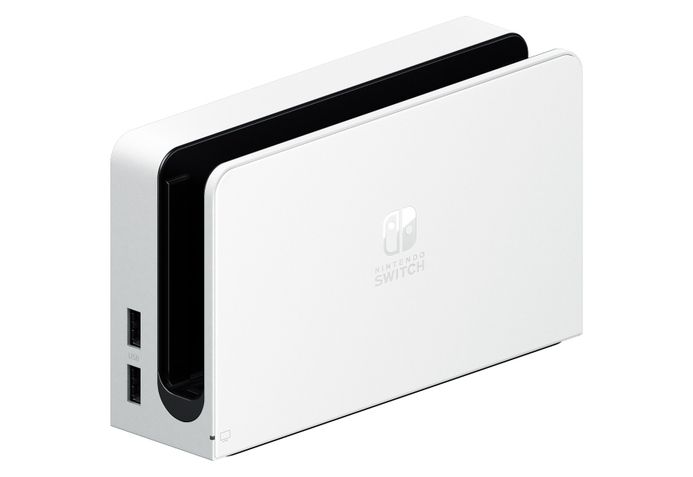
For years, Nintendo Switch owners have lived with a very specific household problem: one console, multiple TVs, and one lonely dock doing laps between the living room, bedroom, game room, and that one monitor you swear is “basically a TV.” The good news is simple: you can buy just the Nintendo Switch OLED dock, if you want. Not the whole OLED console. Not another pair of Joy-Con controllers. Not a second copy of your favorite kart-racing friendship destroyer. Just the dock.
That may sound like a small accessory update, but for Switch players, it is surprisingly useful. The OLED Switch dock is the dock that comes with the Nintendo Switch OLED Model, and it adds one feature the original dock badly needed: a built-in wired LAN port. That means a cleaner setup for TV-mode online play, especially if your Wi-Fi has the emotional stability of a Goomba near a cliff.
Of course, this is still Nintendo, so the story comes with fine print. The standalone OLED dock does not include the Switch console, Joy-Con controllers, AC adapter, or HDMI cable. In other words, this is not a complete “plug it in and go” kit unless you already have the missing pieces. But for the right player, it can be a smart upgrade, a practical replacement, or a convenient second-dock solution.
What Is the OLED Switch Dock?
The Nintendo Switch OLED dock is the TV docking station originally released with the Nintendo Switch OLED Model. Its main job is familiar: hold the Switch console, connect it to a TV through HDMI, provide power through the Nintendo Switch AC adapter, and let you play in TV mode.
The biggest difference from the original Switch dock is the built-in LAN port. Instead of buying a separate USB Ethernet adapter, you can connect an Ethernet cable directly to the dock for a wired internet connection. For casual couch gaming, that might sound like a luxury. For online players, it can feel like the difference between smooth multiplayer and shouting, “I pressed dodge!” at a screen that clearly disagrees.
Key Features at a Glance
- Designed for Nintendo Switch TV mode
- Includes a built-in wired LAN port
- Available separately from the OLED console
- Compatible with the Nintendo Switch OLED Model
- Can also work with the original Nintendo Switch
- Does not include an AC adapter or HDMI cable
- Not designed for Nintendo Switch Lite, which does not support TV output
Why Buying Just the OLED Switch Dock Matters
At first, buying a dock by itself sounds like something only a very specific kind of gamer would care about. But the Switch is not a normal console. Its entire magic trick is moving from handheld mode to TV mode without turning the living room into a cable-management documentary. A second dock makes that magic trick work in more places.
If you have one TV downstairs and another upstairs, a separate OLED dock means you can move only the console. No crawling behind furniture. No hunting for the HDMI cable that somehow migrated into a box of old phone chargers. No unplugging the original dock while promising yourself this is “temporary” for the next six months.
For families, it is even more useful. One dock in the living room and another in a bedroom or playroom can reduce arguments over where the Switch “belongs.” For students, it can mean one dock at home and one near a dorm monitor. For people who travel between two homes, it can turn the Switch into an even better grab-and-go system.
The Built-In LAN Port Is the Big Upgrade
The headline feature of the OLED Switch dock is the wired LAN port. The original Nintendo Switch dock depended on Wi-Fi unless you used a separate USB LAN adapter. That worked, but it added one more accessory, one more cable, and one more thing to forget when reorganizing your entertainment center.
A wired connection can be especially helpful for online games where stability matters. Think competitive matches, co-op raids, ranked battles, or any multiplayer session where one connection hiccup can turn victory into a dramatic slideshow. Wired internet does not magically make you better at games, sadly, but it can reduce some of the network weirdness that makes online play feel unfair.
For games like Super Smash Bros. Ultimate, Splatoon, Mario Kart 8 Deluxe, Monster Hunter Rise, and other online-heavy titles, a wired setup is often the cleaner choice. You still depend on your internet provider, router, distance to servers, and the game’s own network design, but Ethernet gives your Switch a steadier path than Wi-Fi in many homes.
Can You Use the OLED Dock With an Original Nintendo Switch?
Yes, the OLED dock can work with the original Nintendo Switch. Nintendo’s own guidance says the original Switch dock and the OLED Model dock can be used interchangeably with compatible systems. That makes the standalone OLED dock interesting even if you do not own the OLED console.
This is the quiet genius of the accessory. You might not care about upgrading to the OLED Switch because you mostly play on a TV. After all, the OLED screen is beautiful in handheld mode, but it does not change what your TV displays. However, the dock itself can still give your original Switch setup a built-in LAN port and a slightly refreshed design.
There is one important note: a system update may be required to use the wired LAN port properly with an original Switch. That is not unusual for Nintendo accessories, but it is worth knowing before you plug everything in and start accusing your router of betrayal.
What Is Not Included With the Standalone OLED Dock?
This is the part shoppers should read twice before clicking buy. The standalone OLED dock is just the dock. It does not include the Nintendo Switch OLED console, Joy-Con controllers, an AC adapter, or an HDMI cable.
That means you need a compatible Nintendo Switch console, a Nintendo Switch AC adapter, and an HDMI cable to complete the setup. Many players already have these items, but not everyone has extras. If you are buying the dock as a second setup for another room, check whether you also need another official AC adapter. HDMI cables are easy to find, but the power adapter is more specific, and using the right power source matters.
Before You Buy, Make Sure You Have:
- A compatible Nintendo Switch or Nintendo Switch OLED console
- A Nintendo Switch AC adapter
- An HDMI cable
- An Ethernet cable if you want to use wired LAN
- A TV or monitor with an HDMI input
Who Should Buy the OLED Switch Dock?
The OLED Switch dock is not for everyone, but it makes excellent sense for several types of players.
1. Players Who Want a Second TV Setup
This is the easiest recommendation. If you often move your Switch between two screens, a second dock saves time and prevents cable chaos. Leave one dock in the living room and one in another room, then move only the console. It is a small change that feels surprisingly luxurious.
2. Online Players Who Want Ethernet Built In
If you play online often, the built-in LAN port is the reason to consider the OLED dock over an older dock. It keeps the setup cleaner and removes the need for a separate USB Ethernet adapter.
3. Owners of the Original Switch With a Worn-Out Dock
If your original dock is scratched, unreliable, or has been knocked off the TV stand one too many times, the OLED dock can work as a replacement. It gives you the familiar TV-mode function plus the Ethernet upgrade.
4. Families With Shared Consoles
A second dock can reduce household friction. The Switch can move from room to room without someone unplugging the family TV setup five minutes before movie night.
Who Should Skip It?
You may not need the OLED Switch dock if your current dock works perfectly, you play mostly handheld, or you have no interest in wired internet. If your Switch lives permanently in one place and your Wi-Fi is reliable, the upgrade may feel nice but unnecessary.
It is also not useful for Nintendo Switch Lite owners. The Switch Lite is a handheld-only system and does not output video to a TV through a dock. Buying an OLED dock for a Switch Lite would be like buying a garage for a bicycle: impressive, but not exactly functional.
OLED Dock vs. Original Switch Dock
The original Switch dock and the OLED dock share the same basic purpose, but the OLED version has a cleaner, more modern feel and the built-in LAN port. For many players, that port is the deciding factor.
The original dock can still do the job. It connects your Switch to the TV, charges the console, and supports standard TV-mode play. If you already own one and never play online, there is no urgent reason to replace it. But if you were already planning to buy another dock or add wired internet, the OLED dock becomes more appealing.
Simple Comparison
| Feature | Original Switch Dock | OLED Switch Dock |
|---|---|---|
| TV output | Yes | Yes |
| Built-in LAN port | No | Yes |
| Works with original Switch | Yes | Yes |
| Works with Switch OLED | Yes | Yes |
| Works with Switch Lite | No TV output | No TV output |
Does the OLED Dock Improve Graphics?
No, the OLED dock does not turn your Switch into a 4K machine. It does not add extra processing power, boost frame rates, or make older games suddenly look like they were built for a high-end gaming PC. The Switch still outputs up to 1080p in TV mode.
This is important because some buyers hear “OLED dock” and imagine a secret performance upgrade hiding inside the plastic shell. The OLED screen improvement belongs to the handheld console itself, not the dock. When you use TV mode, your display is the TV, not the Switch screen.
The dock’s real benefit is convenience and connectivity. If you buy it, buy it for the built-in LAN port, the cleaner setup, and the ability to keep another TV ready for Switch play. Do not buy it expecting sharper graphics or magical next-generation power. That particular fairy is not in this castle.
How to Set Up the OLED Switch Dock
Setting up the OLED dock is straightforward if you already know the Switch routine.
- Place the dock near your TV or monitor.
- Connect the Nintendo Switch AC adapter to the dock’s power input.
- Connect an HDMI cable from the dock to your TV or monitor.
- Optional: connect an Ethernet cable to the LAN port.
- Insert your compatible Switch console into the dock.
- Select the correct HDMI input on your TV.
- Update your system if prompted.
Once everything is connected, the dock should behave like any standard Switch dock. The only extra step is configuring a wired connection if you plan to use Ethernet. For many players, the Switch will detect the wired connection automatically when everything is plugged in correctly.
Is the OLED Switch Dock Worth Buying?
The OLED Switch dock is worth buying if you need a second dock, want an official replacement, or care about wired internet in TV mode. It is less exciting if you only play handheld or already have a stable setup that never moves.
The best way to think about it is this: the dock is not a flashy upgrade. It is a quality-of-life accessory. It will not make your games prettier, faster, or more dramatic. It will make your setup cleaner, your room-swapping easier, and your wired internet connection simpler.
For some people, that is exactly the kind of upgrade that gets used every day. Accessories do not have to be glamorous to be valuable. Sometimes the best gaming purchase is the one that quietly stops a recurring annoyance.
Buying Advice: Official Dock or Third-Party Dock?
There are many third-party Switch docks and compact adapters on the market, and some are cheaper or more portable than Nintendo’s official dock. However, official hardware has one major advantage: peace of mind. The Nintendo Switch uses USB-C, but it has not always behaved like a generic USB-C device in every situation. That history has made some players cautious about unofficial docks and chargers.
If you are buying for a main TV setup, the official OLED dock is the safer recommendation. It is designed for the system, supports TV mode properly, and avoids the uncertainty that can come with cheaper accessories. If you are buying a travel dock, a third-party option may be tempting, but choose carefully and prioritize reputable brands with strong reviews.
Real-World Experience: Living With an Extra OLED Switch Dock
After using a second dock setup, the biggest surprise is not the LAN port. It is how quickly you stop thinking about the dock at all. That sounds like faint praise, but it is actually the point. A good dock should disappear into your routine. You pick up the Switch, walk to another room, drop it into the dock, and keep playing. No cable archaeology. No moving furniture. No “where did I put the adapter?” mystery quest.
In a living room, the OLED dock feels like the permanent home base. It sits near the TV, ready for multiplayer nights, family gaming sessions, or long single-player stretches on the couch. In another room, the second dock becomes a convenience station. Maybe it is connected to a computer monitor. Maybe it is in a bedroom. Maybe it is in a small game corner where the chair is suspiciously comfortable and productivity goes to nap.
The built-in LAN port becomes more noticeable when your household Wi-Fi is busy. Streaming, phones, laptops, smart TVs, tablets, and mystery devices named “Living Room Bulb 3” all compete for attention. A wired Switch connection removes one variable. Online matches feel more consistent, downloads can feel steadier, and the setup looks neater than using a separate Ethernet adapter hanging from the dock like a tiny plastic backpack.
For families, the extra dock can also reduce wear and tear. Constantly unplugging and replugging the original dock is not ideal. HDMI cables bend, power cables get tugged, and someone eventually drops a cable behind the entertainment center, where it joins the ancient kingdom of lost AA batteries. Keeping two docks permanently connected makes the Switch feel more like a true hybrid system instead of a portable console with one sacred charging throne.
The experience is especially good for players who split time between solo and group play. You can keep one dock on the main TV for party games and another near a personal monitor for focused sessions. A game like The Legend of Zelda: Tears of the Kingdom feels great on a big screen, but so does a late-night indie game on a smaller monitor where nobody asks why you are still awake collecting digital mushrooms.
There are small annoyances. Since the standalone dock does not include an AC adapter or HDMI cable, the total cost can climb if you need to buy everything separately. That is the part that makes the purchase feel less like a bargain and more like joining a cable-themed subscription service. Also, the dock is not tiny. If your real goal is travel portability, a compact third-party adapter might be more convenient, though it may not offer the same official-hardware confidence.
Still, as a home accessory, the OLED Switch dock makes sense. It solves a real problem without asking you to buy another console. It is practical, boring in the best way, and useful every time you move your Switch from one screen to another. Not every gaming upgrade needs fireworks. Some upgrades just let you play faster, cleaner, and with fewer trips behind the TV. Honestly, that is its own kind of victory screen.
Conclusion
The standalone OLED Switch dock is not the loudest Nintendo accessory, but it may be one of the most practical for longtime Switch owners. It gives players a way to add another TV setup, replace an aging dock, or get built-in wired LAN without buying the full OLED console. Just remember that it does not include the AC adapter or HDMI cable, and it will not improve graphics or performance.
If you play online, move your Switch between rooms, or simply want a cleaner entertainment setup, the OLED dock is a sensible buy. If your Switch rarely leaves one TV and Wi-Fi works perfectly, you can probably skip it. Either way, it is nice to have the option. In the kingdom of gaming accessories, convenience is often the real power-up.