There is something wonderfully stubborn about Pong. It has no sprawling open world, no cinematic dragon, no character with 47 upgrade trees, and absolutely zero need for a 90GB update before bedtime. It is just a ball, two paddles, a score, and the pure panic of watching a pixel bounce toward your side of the screen like it has personal issues with you.
That simplicity is exactly why building a handheld Pong game is one of the best DIY electronics projects for beginners and hobbyists. It teaches the essentials of embedded programming, buttons, displays, timing, collision detection, power management, and enclosure design without requiring a laboratory, a giant budget, or a heroic tolerance for mystery smoke.
This guide walks through the full idea behind creating a pocket-sized Pong console using common maker hardware such as an Arduino Nano, Arduino Uno, Raspberry Pi Pico, OLED screen, push buttons, buzzer, battery module, and a 3D-printed or hand-built case. Think of it as retro gaming meets electronics class, with fewer boring lectures and more tiny beeps.
Why Build a Handheld Pong Game?
A handheld Pong game is small enough to fit in your pocket but rich enough to teach real engineering concepts. The original Pong helped spark the arcade video game boom in the 1970s, and its design remains a perfect learning project because every part of the game is visible and understandable. The ball moves. The paddle blocks. The score changes. The player celebrates. The other player blames the button.
Modern maker boards make the project approachable. Instead of building a cabinet full of hard-wired logic, today’s DIY version can run on a tiny microcontroller with a compact OLED or TFT display. That means you can focus on the fun parts: writing the game loop, designing controls, improving response time, and making the device feel like something you would actually want to play.
Choosing the Right Hardware
The best handheld Pong game starts with hardware that matches your skill level. You do not need the most powerful board on the shelf. Pong is lightweight, which is polite programmer language for “this game will run on almost anything that can count and draw rectangles.”
Microcontroller Options
An Arduino Nano is a popular choice because it is compact, breadboard-friendly, and easy to program. It gives you enough digital pins for buttons, a display, a buzzer, and a few extras. An Arduino Uno is larger, but it is excellent for prototyping because the pin layout is beginner-friendly and the board is famously well documented. A Raspberry Pi Pico is another strong option, especially if you want more memory, faster processing, and the flexibility of MicroPython or C/C++.
For a truly polished handheld game console, boards such as Adafruit PyGamer demonstrate what a purpose-built maker gaming device can look like: built-in controls, display, speaker, and a handheld-friendly layout. You do not need to buy a dedicated game board, but studying one can give you smart design ideas.
Display Choices
For a classic minimalist build, a 0.96-inch 128×64 SSD1306 OLED display is hard to beat. It is inexpensive, crisp, and commonly supported by Arduino libraries. The screen is monochrome, but Pong is not exactly begging for cinematic color grading. A black-and-white display actually fits the retro style beautifully.
If you want a more colorful version, a small TFT display can add brighter graphics, splash screens, and menu effects. However, color screens usually require more memory and more careful drawing code. For a first build, the OLED route keeps the project simple and satisfying.
Controls
The simplest control layout uses two push buttons: one for moving the paddle up and one for moving it down. A two-player version can use four buttons, while a single-player version can use two buttons and a computer-controlled opponent. If you want smoother paddle movement, an analog joystick or small potentiometer can replace the buttons.
Buttons sound simple until they start bouncing like caffeinated popcorn. Mechanical switches can register several rapid on-off signals from one press, so your code should include button debouncing. Debouncing can be done with a short delay, a timing check using millis(), or a dedicated library. The goal is simple: one press should mean one clean input, not a tiny electronic drum solo.
Sound and Feedback
A small passive buzzer can add beeps for paddle hits, wall bounces, and scoring. It is not required, but it gives the game instant personality. Even a very simple sound effect makes the device feel more alive. Add a short beep when the ball hits a paddle and a slightly different tone when someone scores. Congratulations: your project now has drama.
Planning the Game Logic
The core of a handheld Pong game is the game loop. This loop reads input, updates the ball, checks collisions, changes the score, redraws the display, and repeats many times per second. It is the heartbeat of the whole project.
The Ball
The ball needs an X position, a Y position, an X speed, and a Y speed. Each frame, the program adds the speed values to the position values. If the ball hits the top or bottom of the screen, reverse the Y speed. If it hits a paddle, reverse the X speed. If it passes a paddle, update the score and reset the ball near the center.
The Paddles
Each paddle is usually a small vertical rectangle. The player’s buttons move the paddle up or down, while the code prevents it from leaving the screen. In a single-player build, the computer paddle can follow the ball’s Y position. To keep the game fair, do not make the computer paddle perfect. Give it a reaction speed limit, or it will become the world’s smallest unbeatable villain.
Collision Detection
Collision detection checks whether the ball overlaps with a paddle or wall. For a rectangular paddle and square ball, the math is simple: compare the ball’s edges with the paddle’s edges. If the ball is moving toward the paddle and their rectangles overlap, reverse the ball direction.
You can make the game more interesting by changing the ball’s angle depending on where it hits the paddle. A hit near the paddle’s center can bounce straight back, while a hit near the edge can send the ball upward or downward more sharply. This tiny feature makes Pong feel less robotic and more skill-based.
Wiring the Handheld Pong Game
A typical OLED-based Arduino build uses I2C wiring, which keeps the display connection simple. The OLED usually needs power, ground, SDA, and SCL. On many Arduino Uno-style boards, SDA and SCL are connected to the analog pins A4 and A5. On other boards, the pins may differ, so always check your board documentation before wiring.
Buttons can be wired between a digital input pin and ground when using internal pull-up resistors. In that setup, the pin reads HIGH when the button is not pressed and LOW when pressed. This feels backward at first, like electronics is playing a prank, but it is common and reliable.
A basic parts list may include:
- 1 microcontroller board such as Arduino Nano, Arduino Uno, or Raspberry Pi Pico
- 1 small OLED or TFT display
- 2 to 4 tactile push buttons
- 1 passive buzzer
- Jumper wires or hookup wire
- Breadboard for prototyping
- Rechargeable battery module or USB power bank
- Case material such as 3D-printed plastic, acrylic, wood, or sturdy project box
Programming the Game
For Arduino-based builds, the Arduino IDE is the most common starting point. Libraries such as Adafruit SSD1306 and Adafruit GFX are often used for monochrome OLED displays. These libraries handle the low-level screen communication so you can focus on drawing the ball, paddles, score, and menu text.
The code should be organized into clear sections: setup, input reading, game update, collision handling, drawing, scoring, and reset. Keeping these sections separate makes the project easier to debug. It also prevents the program from turning into a spaghetti monster with semicolons.
Frame Rate Matters
A playable Pong game does not need a gaming PC frame rate, but it does need consistent timing. If the loop runs too fast, the ball becomes a tiny missile. If it runs too slowly, the game feels like Pong after a large lunch. A simple frame delay or timing check can keep the speed stable.
Memory Matters Too
Small microcontrollers have limited memory. Avoid huge graphics, unnecessary strings, and complicated effects unless your board can handle them. A Pong game is mostly shapes, which is perfect for low-memory devices. Rectangles and lines are your friends. Large bitmap animations are the guests who eat all the snacks.
Designing the Handheld Case
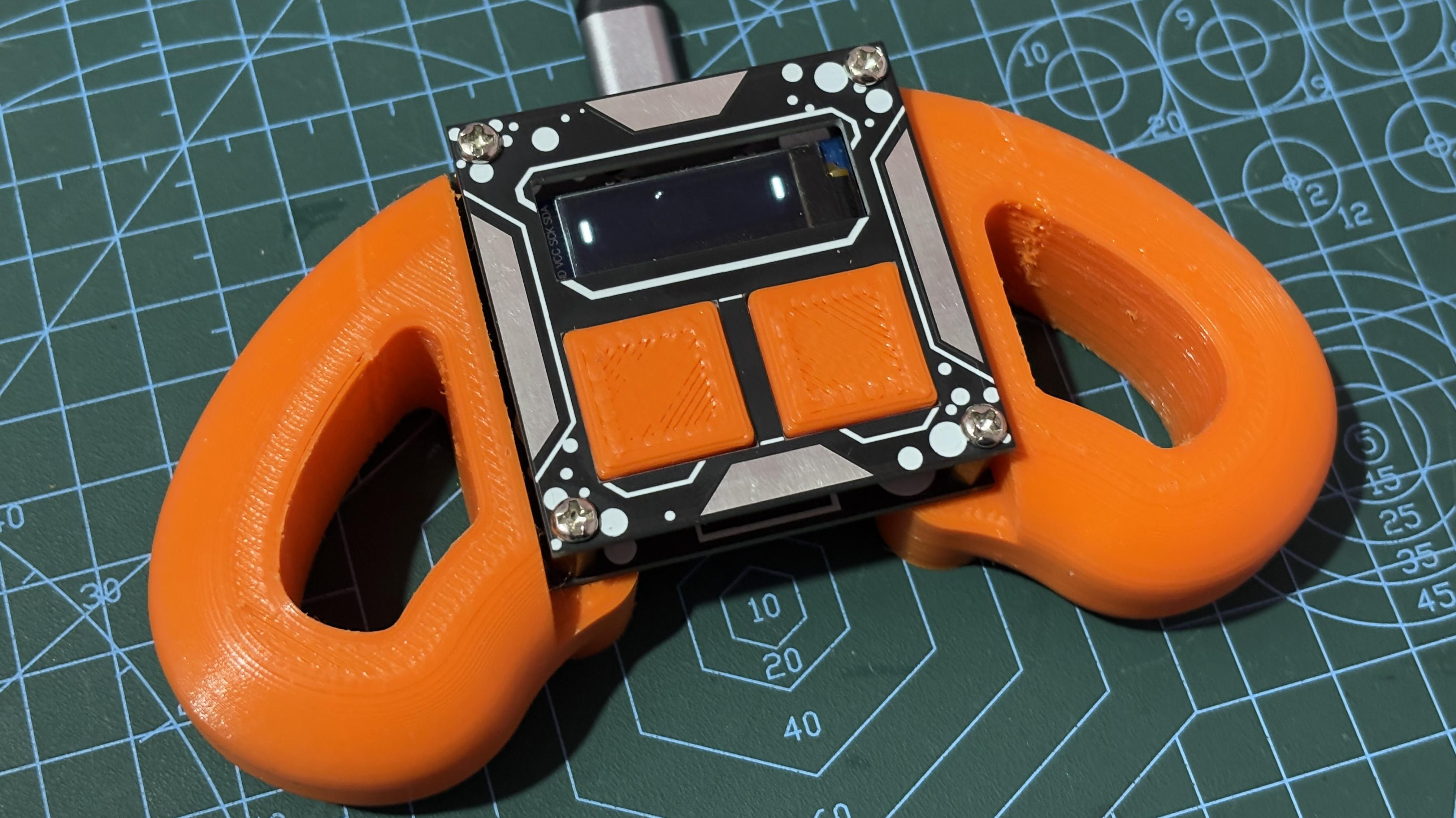
The enclosure is where the project becomes a real handheld console instead of “wires having a meeting.” A good case holds the screen, buttons, board, battery, and speaker securely while still feeling comfortable in the hands.
If you have a 3D printer, design a simple front plate with cutouts for the OLED screen and buttons. Keep the buttons far enough apart that they are easy to press. If you do not have a 3D printer, a small plastic project box, laser-cut acrylic, or even carefully cut foam board can work for a prototype.
Comfort and Layout
Place the screen in the center and buttons where thumbs naturally rest. For a single-player version, buttons can sit on the right side. For a two-player version, put one set of controls on each side, or rotate the screen layout so players can hold the device from opposite ends.
Leave room for the USB port so the device can be programmed or charged without disassembly. Also leave small openings for sound if you use a buzzer. A sealed buzzer inside a tight case may sound like a cricket trapped under a pillow.
Powering the Project Safely
Power can be as simple as plugging into USB, but a handheld game feels better with a battery. A USB power bank is the easiest beginner-friendly option because it handles charging and protection internally. For a slimmer build, many makers use a single-cell lithium polymer battery with a proper charging and protection module.
Battery safety matters. Use the correct charger, avoid short circuits, do not puncture or crush the battery, and inspect wiring before sealing the case. If you are new to rechargeable lithium batteries, start with USB power or use a supervised, well-documented battery module. The goal is handheld Pong, not handheld fireworks.
Testing and Debugging
Test the project in stages. First, confirm the display works with a simple “Hello” message. Next, test each button and print its state to the serial monitor. Then draw the paddles. Then animate the ball. Finally, add collision detection and scoring.
This step-by-step approach saves time because you know exactly where a problem appears. If everything is wired at once and nothing works, you are left staring at the device like it owes you an explanation.
Common Problems
If the display stays blank, check the I2C address, wiring, voltage, and library settings. If buttons behave randomly, review pull-up settings and debounce logic. If the ball flickers, reduce unnecessary screen clearing or optimize the drawing routine. If the game feels unfair, adjust paddle size, ball speed, and computer opponent reaction time.
Fun Upgrades for Your Handheld Pong Game
Once the basic version works, the project becomes a playground for improvements. You can add a title screen, difficulty levels, sound settings, two-player mode, a high-score system, or a sleep mode to save battery. A tiny menu with “Start Game,” “Difficulty,” and “Sound On/Off” makes the device feel much more polished.
You can also experiment with visual style. Add a dotted center line, rounded paddles, a countdown before serving, or a tiny victory message. A simple “Player 1 Wins” screen is enough to transform the project from a coding exercise into a real mini console.
What This Project Teaches
Building a handheld Pong game teaches more than retro gaming nostalgia. It introduces the core ideas behind embedded systems: reading inputs, controlling outputs, managing limited resources, responding in real time, and designing for human hands. It also teaches patience, which is what you develop after realizing one loose wire can defeat an entire afternoon.
The project is small, but the skills scale up. The same concepts appear in robots, wearables, smart sensors, custom controllers, and portable gadgets. Pong may be simple, but it is a doorway into hardware design and interactive programming.
Extra Experience Notes: Lessons from Building a Handheld Pong Game
The first experience most builders have with a handheld Pong game is discovering that “simple” does not always mean “instant.” Pong looks easy on the screen, but every pixel has a job. The ball needs timing. The paddles need boundaries. The buttons need clean input. The display needs refreshing. The battery needs safe power. Suddenly, two rectangles and a square become a tiny engineering department.
One of the most useful lessons is to prototype before building the case. It is tempting to design the enclosure first because cases are fun and make the project feel real. But the breadboard stage is where the truth lives. You may discover that the button pins should move, the screen is easier to read at a different angle, or the buzzer is louder than expected. A cardboard mockup can help you test hand comfort before committing to plastic or acrylic.
Another experience worth remembering is that button feel matters more than you might expect. Cheap tactile switches work, but if they are too stiff or too tiny, the game becomes awkward. Pong depends on quick reactions, so the controls should feel responsive. If the buttons wobble inside the case, add support behind them. If they sit too low, use button caps. A small physical improvement can make the whole project feel twice as professional.
Display placement also changes the experience. A screen that looks fine on the desk may be harder to see inside a case, especially under bright light. OLED screens usually have excellent contrast, but the viewing angle and front-panel cutout still matter. Leave a clean border around the display and avoid covering the active area with the enclosure. Nothing says “homemade” like a scoreboard hiding behind plastic because the cutout was measured with optimism instead of a ruler.
Sound is another surprisingly emotional part of the build. A tiny beep when the ball hits the paddle gives the game feedback and rhythm. Without sound, Pong can feel quiet and flat. With sound, every rally feels like a tiny arcade battle. Still, add a way to disable audio if possible. Your project may be charming, but nobody wants to hear 400 paddle beeps during a car ride.
The biggest lesson is that finishing beats overcomplicating. Many builders start with Pong and immediately imagine adding Snake, Tetris, menus, Bluetooth, Wi-Fi, RGB lighting, and possibly a cup holder. Those upgrades are fun, but the best first goal is a stable, playable Pong game in a comfortable case. Once that works, every improvement becomes easier because you have a solid base.
In the end, building a handheld Pong game is rewarding because it feels personal. You are not just downloading a game; you are creating the device, the controls, the rules, and the feel of play. It is a small project with a big maker spirit. And when that first rally works smoothly, even if the case is a little crooked and the buzzer sounds like a polite mosquito, you will know you built something real.
Conclusion
Building a handheld Pong game is one of the most enjoyable ways to learn electronics, coding, and product design in one compact project. It combines a microcontroller, display, buttons, sound, battery planning, and enclosure design into a device that is simple enough for beginners yet flexible enough for serious tinkering.
The beauty of Pong is that it does not hide behind complexity. Every improvement is easy to understand: smoother controls, faster drawing, better sound, smarter AI, cleaner wiring, and a nicer case. Whether you build it with an Arduino Nano, Arduino Uno, Raspberry Pi Pico, or a dedicated handheld maker board, the project gives you a practical foundation for bigger DIY game console ideas.
Start with the basics, test each part, keep the design clean, and upgrade only after the core game feels good. Before long, you will have a pocket-sized retro console that proves great projects do not need to be huge. Sometimes all you need is a bouncing pixel, two paddles, and the courage to debug one more wire.