Search for a BGA hand soldering video and you will quickly discover two things: first, people on the internet are brave; second, Ball Grid Array soldering is not the same as touching a soldering iron to a visible lead and calling it a day. BGA packages hide their solder balls underneath the chip, which is wonderfully compact for modern electronics and slightly rude to anyone trying to repair them by hand.
Still, BGA work is not magic. It is a controlled process involving heat, flux, alignment, surface preparation, patience, inspection, and a healthy respect for the fact that tiny solder balls do not care about your confidence. A good video should show more than a shiny chip being waved under hot air. It should explain what is happening, why the board is being preheated, how the solder balls collapse, and how the technician confirms that the job actually worked.
This guide breaks down what viewers should learn from a reliable BGA hand soldering video, what tools are typically used, which mistakes ruin boards, and why “hand soldering” a BGA usually means using a hot air rework station rather than a standard soldering iron. Think of it as the friendly companion commentary track for the repair video you wish every beginner watched before melting their first graphics chip into modern art.
What Is BGA Soldering?
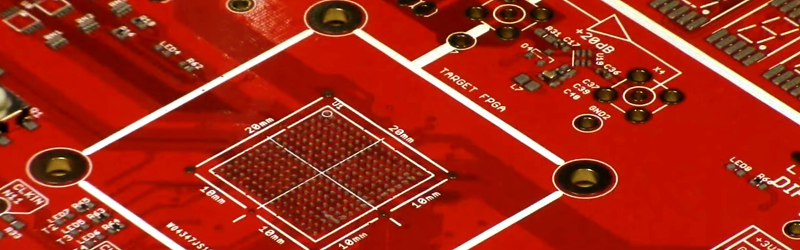
BGA stands for Ball Grid Array. Instead of having gull-wing leads around the edges like many surface-mount components, a BGA package uses an array of solder balls underneath the chip. These balls connect the component to matching pads on the printed circuit board, or PCB.
The big advantage is density. BGAs allow manufacturers to fit many connections into a small footprint, which is why they appear in smartphones, laptops, game consoles, memory modules, processors, wireless modules, and advanced embedded systems. The big disadvantage is visibility. Once the chip is sitting on the board, the solder joints are hidden. You cannot simply look at the side and say, “Yep, joint number 473 looks adorable.”
That hidden-joint design is why BGA soldering depends so heavily on process control. With leaded packages, a technician can inspect and touch up individual pins. With BGA, the entire package must be aligned, heated, reflowed, cooled, and tested as one system. The chip either lands correctly or it becomes a tiny expensive coaster.
Why a BGA Hand Soldering Video Is Useful
A well-made BGA hand soldering video helps viewers see timing, tool movement, paste behavior, flux activation, solder ball collapse, and component alignment in ways that text alone cannot. This matters because BGA rework is full of small visual cues. Solder may suddenly turn glossy. The chip may settle slightly when the balls liquefy. Flux may bubble aggressively before calming down. None of these things are obvious from a checklist.
However, not every video is a good teacher. Some clips show dramatic success without explaining the setup, the board type, the solder alloy, the nozzle size, or the inspection method. Others make BGA rework look like a casual weekend hobby, which is technically true in the same way that juggling chainsaws is a casual hobby for someone who owns a very confident insurance policy.
The best videos usually include the full workflow: removing the old component, cleaning the pads, applying flux or solder paste, aligning the BGA, preheating the board, reflowing with controlled hot air, cooling gradually, cleaning residue, and testing the board. Bonus points if the video discusses X-ray inspection, thermal profiles, moisture sensitivity, and when not to attempt the repair at all.
Can You Really Hand Solder a BGA?
Yes, but the phrase needs clarification. In normal electronics language, hand soldering often means using a soldering iron. For BGA packages, an iron is mostly used for preparation tasks, such as cleaning pads with solder wick or removing old solder from a chip during reballing. The actual soldering is usually performed with hot air, an infrared or convection rework station, a preheater, and controlled temperature settings.
For very small BGA components, skilled technicians sometimes use hot air and a microscope with excellent results. For larger BGAs, high-density boards, multilayer motherboards, expensive processors, or moisture-sensitive parts, professional equipment becomes much more important. A bottom preheater helps reduce thermal shock and prevents the top heater from having to blast the board like a dragon with a repair invoice.
The short answer: yes, BGA can be soldered in a hand-rework environment, but it should not be treated like beginner soldering. It requires practice boards, controlled heat, the right consumables, and a willingness to inspect results honestly.
Essential Tools Shown in a Good BGA Hand Soldering Video
Hot Air Rework Station
A hot air rework station provides controlled airflow and temperature. For BGA work, the nozzle should match the component size closely enough to heat the package evenly without roasting nearby parts. Too much airflow can nudge the chip out of alignment. Too little heat may leave solder balls partially melted, creating weak or open joints.
PCB Preheater
A preheater warms the board from below. This reduces thermal stress, shortens the time needed for top-side heating, and helps larger ground planes reach reflow temperature. Many BGA failures come from uneven heating, especially on thick multilayer boards that behave like tiny heat sinks with trust issues.
Microscope or High-Magnification Camera
A microscope is essential for alignment, pad inspection, cleaning, and checking for visible issues around the package. It will not reveal hidden solder joints under the BGA, but it helps prevent obvious mistakes before the chip is soldered down.
Flux
Flux improves wetting, reduces oxidation, and helps solder flow properly. Tacky flux is common in BGA rework because it helps hold the component in place during alignment. Too little flux can cause poor wetting. Too much flux can boil, splatter, or leave residue that needs cleaning.
Stencil and Solder Paste
For placing a new BGA on a bare PCB, a solder paste stencil may be used to apply consistent deposits to each pad. For reballing a removed chip, a BGA stencil helps position new solder balls on the package. Consistency matters. One missing ball can create an open connection; one extra blob can bridge pads and turn troubleshooting into a detective novel nobody asked to write.
Solder Wick, Soldering Iron, and Cleaning Supplies
Although the iron does not directly solder the hidden BGA balls, it is still important. Technicians use it with solder wick to remove old solder from PCB pads and prepare a flat, clean surface. Isopropyl alcohol, lint-free swabs, ESD-safe brushes, and proper fume extraction also belong on the bench.
Step-by-Step BGA Hand Soldering Process
1. Inspect the Board and Confirm the Fault
Before heating anything, confirm that the BGA is actually the problem. Many beginners jump straight to reflowing because a forum post said “probably the GPU.” Professional repair starts with diagnosis: visual inspection, power rail checks, resistance measurements, thermal camera observations, and board history. Reflowing a healthy chip will not fix a shorted capacitor, but it can add a brand-new problem for your collection.
2. Protect Nearby Components
Kapton tape, aluminum shielding, or custom heat shields can protect nearby connectors, plastic parts, microphones, cameras, and small passives. Heat travels, and it is not polite. A BGA video should show how the technician keeps the surrounding area safe, especially on dense consumer electronics boards.
3. Preheat the PCB
Preheating brings the board to a stable temperature before top-side reflow. This helps prevent warping and reduces the temperature difference between the BGA package and the PCB. The exact preheat temperature depends on the board, component, solder alloy, and rework equipment. The key idea is controlled gradual heating, not surprise flamethrower energy.
4. Apply Flux
Flux is applied around the chip or onto prepared pads. In reballing, flux may be applied to the component pads before solder balls are placed through a stencil. The goal is to promote clean wetting and reliable solder joints, not to flood the board until it looks like it survived a syrup incident.
5. Align the BGA
Alignment is one of the most important steps. The chip must be placed so its solder balls match the PCB pad array. Many BGAs have a pin-one marker, dot, bevel, or package marking. A good video should clearly show orientation and alignment before heating begins. If the chip is rotated incorrectly, the result is not a repair. It is a very small, very warm tragedy.
6. Reflow with Controlled Hot Air
The technician gradually heats the BGA until the solder balls reach liquidus and reflow. During this stage, the component may settle slightly as the balls collapse and surface tension pulls it into alignment. This self-centering effect is helpful, but it is not a miracle worker. If the chip starts far off target, solder surface tension will not rescue it like a superhero in a cape made of tin.
7. Cool the Board Gradually
After reflow, the board should cool without being bumped. Moving the chip while the solder is still molten can create bridges, opens, or disturbed joints. Rapid cooling may also increase stress. A good BGA hand soldering video should show patience here. The repair is not finished when the hot air turns off; it is finished when the joints have solidified properly.
8. Clean and Inspect
After cooling, flux residue is cleaned according to the flux type and board requirements. Visual inspection can reveal alignment problems, surrounding component damage, solder balls squeezed out at the edges, or scorching. For true joint inspection, X-ray is the gold standard because the connections are hidden underneath the package.
9. Test the Board
Functional testing matters. A board that powers on once is not automatically fixed. Reliable testing may include current draw checks, boot testing, stress testing, thermal cycling, memory tests, signal checks, and long-duration operation. If the BGA controls power, memory, graphics, wireless communication, or storage, the test plan should match the role of the chip.
BGA Reflow vs. BGA Reballing
Many videos use the words reflow and reballing as if they are interchangeable, but they are different processes.
BGA reflow means reheating the existing solder joints until they melt and reconnect. This may temporarily restore a connection if the failure is caused by a cracked joint. However, if the solder balls are oxidized, contaminated, collapsed incorrectly, or mechanically damaged, simple reflow may not last.
BGA reballing means removing the chip, cleaning off the old solder balls, applying new balls, and then soldering the component back onto the board. Reballing is more labor-intensive but can be more reliable when old solder joints are compromised. In many professional repairs, reballing or replacement is preferred over simply reheating the same tired solder and hoping it signs a long-term lease.
Common Mistakes Beginners Make
Using Too Much Heat
Excessive heat can warp the board, delaminate the PCB, damage internal vias, crack the package, or kill nearby components. More heat is not more skill. It is just faster regret.
Skipping Preheat
Without preheating, the top heater has to work harder, and the temperature gradient across the board can become severe. This is especially risky on thick boards, large ground planes, and lead-free assemblies.
Poor Pad Cleaning
Old solder, lifted pads, burned flux, or uneven surfaces can prevent proper seating. The pad field should be flat, clean, and intact before the BGA is placed.
Misalignment
A small alignment error can cause opens or bridges under the chip. The larger and denser the BGA, the less forgiving the process becomes.
No Inspection Plan
Because BGA joints are hidden, “it looks good from the outside” is not a complete inspection. At minimum, the board needs electrical and functional testing. For critical work, X-ray inspection is strongly recommended.
What Makes a BGA Hand Soldering Video Trustworthy?
A trustworthy video does not just show the exciting part where the chip floats into place. It explains the preparation, equipment, temperatures, airflow, board support, safety precautions, and post-repair testing. It also admits limitations. Any technician who says BGA work is always easy may be selling confidence by the gallon.
Look for videos that show close-up footage under magnification, clear component orientation, careful board cleaning, preheating, controlled hot air movement, and final testing. Better videos also discuss why the repair was necessary, whether the chip was reballed or replaced, and what failure symptoms were present before the work began.
The most educational videos often include mistakes. Watching a technician correct a shifted chip, clean bridged pads, or explain why a reflow failed can teach more than a perfect one-take success. Real electronics repair is not a magic trick. It is a process, and sometimes the process wears safety glasses and mutters under its breath.
Safety and Practical Advice
BGA soldering involves high temperatures, fumes, delicate electronics, and sometimes expensive devices. Work in a ventilated area with fume extraction. Use ESD protection. Keep flammable materials away from the hot air path. Avoid breathing flux smoke. Let boards cool before touching them. And never practice your first BGA repair on a customer board, rare laptop motherboard, or beloved game console unless you enjoy suspense with financial consequences.
Start with scrap boards. Practice removing and reinstalling small BGAs before attempting valuable hardware. Learn how your hot air station behaves. Study how different board thicknesses absorb heat. Compare leaded and lead-free solder behavior. Keep notes. Repeat the process until the motions are boring. In soldering, boring is beautiful. Boring means controlled, repeatable, and less likely to end with a burnt USB port.
Experience Notes: What BGA Hand Soldering Teaches You the Hard Way
Anyone who has spent time watching or attempting BGA hand soldering quickly learns that the process is less about heroic hand skill and more about discipline. The first temptation is to focus on the hot air nozzle, because that is the dramatic part. Heat goes in, flux smokes, the chip moves, and it feels like the entire repair is happening right there. But most successful BGA work is decided before the nozzle ever gets close to the board.
The real experience begins with preparation. A clean bench matters. Lighting matters. A stable board holder matters. The right nozzle matters. Even the angle of your tweezers matters, because one nervous bump can turn careful alignment into a tiny game of electronic shuffleboard. Beginners often underestimate how much time professionals spend simply making the work area predictable.
One useful lesson is that flux is helpful, but it is not a miracle potion. A small, controlled amount can make solder wet beautifully. Too much can bubble under the component, shift the package, or leave residue that complicates testing. Watching experienced technicians apply flux is strangely educational. They are not decorating a cupcake. They are placing just enough chemistry exactly where it needs to work.
Another lesson is that the board has a personality. A thin phone board heats quickly and punishes overconfidence. A thick laptop motherboard may absorb heat like a cast-iron skillet. A large ground plane can keep part of the BGA cooler than expected, causing uneven reflow. That is why preheating and profiling matter. When a video skips those details, it may still be entertaining, but it is not telling the whole story.
Alignment also teaches humility. BGA packages can self-center slightly during reflow because molten solder wants to minimize surface energy. That tiny settling motion is satisfying to watch, almost like the chip is politely finding its seat. But self-centering only works when the part is already close. If the chip is placed badly, surface tension will not fix the mistake. It will simply make the mistake shinier.
Cooling is another area where patience wins. After the solder melts, the natural instinct is to celebrate, poke, inspect, or move the board. Do not. Let the joints solidify. Let the board cool steadily. Many bad joints are created after the “hard part” appears to be over. In BGA work, victory laps should be delayed until after testing.
Testing is where optimism meets reality. A board may power on and still have intermittent faults. A memory chip may pass a quick boot and fail under load. A wireless module may connect once and then drop out when warm. Serious repair work requires more than a thumbs-up moment on camera. It needs repeatable function, stable current behavior, and sometimes X-ray confirmation.
The biggest experience-based takeaway is simple: BGA soldering rewards calm process over flashy technique. The best technicians move slowly, measure carefully, and know when to stop. They do not chase every failure with more heat. They inspect, diagnose, and choose the least destructive path. That may not look as exciting as a dramatic reflow montage, but it is exactly what makes the repair survive after the camera turns off.
Conclusion
A BGA hand soldering video can be an excellent learning tool when it shows the complete process: diagnosis, preparation, preheating, flux application, alignment, controlled reflow, cooling, inspection, and testing. The key is understanding that BGA repair is not ordinary hand soldering. It is precision rework performed with hot air, proper equipment, and careful process control.
For beginners, the best path is to study high-quality videos, practice on scrap boards, and respect the limits of visual inspection. For technicians, the goal is repeatability: the same controlled process, the same careful setup, and the same honest testing every time. BGA soldering may look mysterious at first, but with the right approach, it becomes less like black magic and more like cooking with thermodynamicsstill spicy, but much less terrifying.