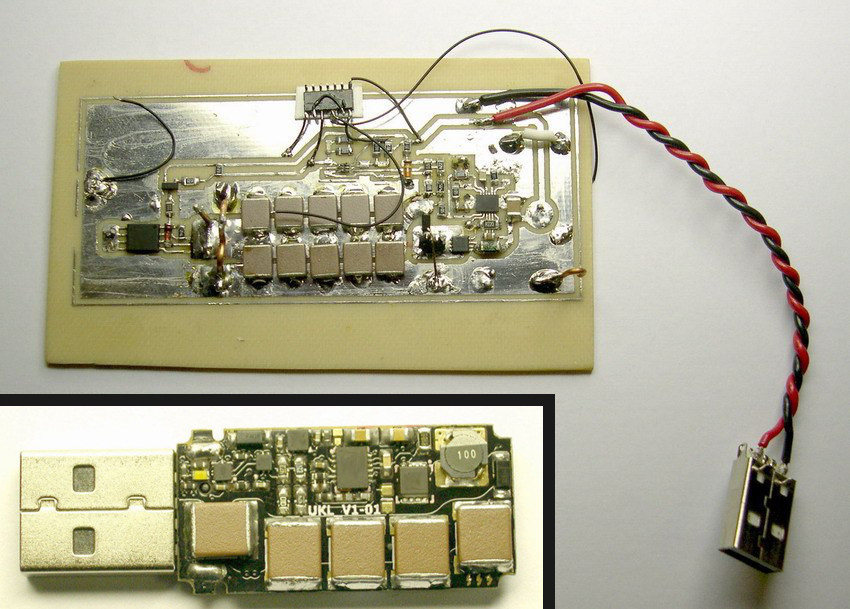
Note: This article is for cybersecurity awareness and device-safety education only. It does not provide instructions for building, buying, testing, or using destructive USB hardware.
A USB flash drive is supposed to be boring. You plug it in, move a few files, forget where you put it, find it in a backpack three months later, and repeat the ancient ritual of digital clutter. But a so-called killer USB drive is not interested in your vacation photos or that spreadsheet named “final_final_REALLY_final.xlsx.” It is designed to do something much nastier: physically damage electronics by abusing the trust built into the humble USB port.
The phrase “killer USB drive is designed to fry laptops” sounds like a headline from a hacker movie where everyone types in sunglasses. Unfortunately, the underlying idea is real. Security researchers, hardware testers, and tech journalists have documented devices that look like ordinary USB sticks but can deliver damaging electrical pulses into computers, phones, TVs, routers, or other equipment with exposed ports. It is a reminder that cybersecurity is not only about passwords, malware, and suspicious emails from “Prince Invoice Department.” Sometimes the threat is hardware-shaped and small enough to fit on a keychain.
Before panic sets in, take a breath. Most random USB drives are not tiny lightning cannons. The bigger lesson is practical: unknown USB devices should not be trusted simply because they look familiar. USB is useful precisely because it is universal, but that same universality makes it an attractive playground for attackers, pranksters, and people whose hobbies should perhaps include more houseplants.
What Is a Killer USB Drive?
A killer USB drive is a malicious or destructive USB device built to damage the hardware it connects to. Unlike a normal flash drive, it is not primarily designed to store data. Instead, it may draw power from the USB port, internally manipulate that energy, and send an unsafe electrical surge back through parts of the connection that were never meant to handle it.
In plain English: a laptop’s USB port expects polite conversation. A killer USB drive shows up with a foghorn.
The exact technical designs vary, and responsible discussions avoid turning the concept into a recipe. The important point is that computers are engineered around electrical limits. USB ports provide power and data communication within defined specifications. When a hostile device deliberately violates those expectations, protective components may fail, ports may stop working, motherboards may be damaged, and the repair bill may develop a villain origin story.
Why USB Ports Are So Trusting
USB became popular because it solved a real problem: connecting devices used to be a cable jungle. Printers, keyboards, cameras, storage drives, phones, microphones, game controllers, and charging cables all needed simpler ways to talk to computers. USB made connection easy, fast, and mostly automatic.
That convenience comes with a trade-off. When you connect a USB device, your computer tries to identify it quickly. Is it storage? A keyboard? A mouse? A network adapter? A webcam? A charging accessory? In many cases, the operating system accepts the device class and loads the needed driver or permission prompt. Most of the time, this is wonderful. Your keyboard works. Your mouse moves. Your flash drive appears. Civilization continues.
But attackers love automatic trust. A malicious USB device may pretend to be something harmless. A BadUSB attack, for example, may abuse USB firmware so a device behaves like a keyboard and sends commands faster than a human could type. A killer USB is different because the danger is physical damage rather than data theft, but both problems share the same family tree: the computer trusts the connected hardware more than it probably should.
Killer USB vs. BadUSB: Same Port, Different Trouble
People often mix up USB Killer, BadUSB, and ordinary malware on flash drives. They are related in the sense that all involve USB risk, but they are not the same thing.
Malware on a USB Drive
This is the classic problem. A flash drive contains infected files, malicious scripts, or software that tries to run when opened. Modern operating systems are better at limiting automatic execution, but users can still be tricked into opening dangerous files.
BadUSB Attacks
BadUSB is more slippery. Instead of hiding only in stored files, the malicious behavior can live in the device firmware. A USB gadget may claim to be a keyboard, network card, or another trusted device. That means antivirus software scanning the visible files may not catch the real issue.
Killer USB Drives
A killer USB drive focuses on hardware destruction. It may not care about stealing files, installing spyware, or logging passwords. Its goal is blunt: damage the connected device. It is the digital equivalent of bringing a toaster to a poetry reading and plugging it directly into the microphone.
Can a USB Drive Really Fry a Laptop?
Yes, a malicious hardware device can damage a laptop under the right conditions. That does not mean every laptop will explode in a dramatic puff of movie smoke. Real outcomes depend on the device, the laptop design, the port protection, the motherboard layout, and whether the machine has electrical safeguards that can absorb or isolate the abuse.
Some devices may lose only the affected USB port. Others may suffer motherboard failure. Thin modern laptops can be especially frustrating to repair because many components are soldered, compact, and expensive to replace. A damaged port is not always a simple “swap one tiny part” situation. Sometimes the repair technician gives you the same expression a dentist gives before saying, “So, how attached are you to this molar?”
USB-C adds another layer of complexity. Modern USB-C ports can carry power, data, video, and accessory communication. The standard itself includes rules and protections, but bad cables, noncompliant accessories, counterfeit chargers, and malicious devices can still create risk. The more capable a port becomes, the more important it is to use trustworthy hardware.
Why Would Anyone Make a Laptop-Frying USB Device?
The charitable explanation is hardware stress testing. Manufacturers, repair labs, and security researchers sometimes need controlled ways to test whether devices can survive electrical abuse, electrostatic discharge, or hostile peripherals. In a controlled lab, destructive testing can reveal weaknesses and improve future designs.
The less charitable explanation is vandalism. A killer USB drive can be used to destroy equipment that does not belong to the user. That is not “hacking” in the cool cinematic sense. It is property damage wearing a tiny plastic costume.
There is also the attention economy. Devices that destroy electronics tend to attract views, clicks, and dramatic thumbnails. “Watch this laptop die” is unfortunately more clickable than “Let us review sensible endpoint security policies.” The internet is many things, but subtle is not usually one of them.
Real-World Scenarios Where USB Risk Matters
The average home user may never encounter a killer USB drive. Still, risky USB behavior is common. People pick up flash drives at conferences. Employees borrow cables. Students share storage devices. Someone finds a USB stick in a parking lot and thinks, “Free storage!” which is how both horror movies and incident reports begin.
Businesses face bigger stakes. A single unknown USB device can introduce malware, trigger data loss, bypass network controls, or damage expensive workstations. Industrial environments, hospitals, schools, law firms, and government offices are especially sensitive because they handle valuable data and often depend on specialized equipment that is costly to replace.
Even public charging stations raise related concerns. Many public USB ports are harmless, but security agencies and cybersecurity professionals routinely advise travelers to use their own chargers, power banks, or charge-only cables. The reason is simple: a USB connection can carry both power and data unless it is specifically limited. When your phone asks whether to trust a connected computer, the correct answer in an airport terminal is usually, “Absolutely not, little rectangle.”
How to Protect Your Laptop from Killer USB Devices
You do not need to seal your laptop in concrete and communicate only by carrier pigeon. Sensible habits reduce most USB-related risk.
1. Never Plug In Unknown USB Devices
This is the golden rule. If you find a USB drive in a parking lot, hotel lobby, classroom, taxi, conference swag bag, or mysterious envelope, do not plug it into your personal or work computer. Curiosity is great for science. It is less great for motherboard survival.
2. Use Trusted Cables and Chargers
Buy cables and chargers from reputable brands and reliable retailers. Avoid damaged, counterfeit, or suspiciously cheap accessories. A cable should not feel like it was assembled during a thunderstorm by raccoons.
3. Use a USB Data Blocker When Charging in Public
A USB data blocker, sometimes called a charge-only adapter, prevents data transfer while allowing power. It is a simple travel accessory for airports, hotels, libraries, and shared workspaces.
4. Keep Operating Systems Updated
Updates cannot stop every hardware-destruction device, but they can improve defenses against malicious USB behavior, driver abuse, and unauthorized accessory communication. Modern macOS, Windows, Android, and iOS versions include stronger prompts and controls than older systems.
5. Disable or Restrict USB Access in Business Settings
Organizations should use endpoint security tools, device control policies, USB allowlisting, and removable media rules. Employees who do not need USB storage for work should not have unrestricted access. This is not about mistrusting employees; it is about not letting one forgotten thumb drive become the office’s most expensive paperweight.
6. Physically Block Unused Ports
For kiosks, shared machines, lab equipment, and public-facing computers, physical port blockers can help. They are not glamorous, but neither is replacing a motherboard because someone wanted to “see what this does.”
7. Train People Without Scaring Them Silly
Security training works best when it is memorable and practical. “Do not plug in mystery USB sticks” is easy to understand. Add examples, short reminders, and clear reporting steps. Avoid turning every training session into a 90-minute doom parade with clip art skulls.
What Should You Do If You Already Plugged In a Suspicious USB?
First, unplug it safely if the device is still connected and the computer is operating normally. If you are at work, contact IT immediately. Do not keep experimenting. Do not plug it into a second machine to “check.” That is how one problem becomes a group project.
If the laptop suddenly shuts off, smells burnt, loses USB functionality, or refuses to boot, stop using it and seek professional repair help. Continuing to power-cycle damaged electronics may worsen the problem. If the concern is malware rather than physical damage, disconnect from networks, preserve evidence, and let security staff investigate.
For personal devices, run a reputable security scan if the machine still works, review recent account activity, and change important passwords from a separate trusted device if you suspect compromise. If the suspicious USB came from a public place, do not return it to circulation. Treat it like mystery leftovers in the office fridge: maybe harmless, but nobody should be encouraged.
Are Modern Laptops Safe from Killer USB Drives?
Modern laptops are better protected than many older machines, but “better protected” does not mean invincible. Manufacturers add safeguards such as overcurrent protection, port controllers, fuses, and accessory approval features. USB-C compliance testing also helps ensure legitimate cables and accessories behave properly.
However, a malicious device is not trying to follow the rules. It is specifically designed to break assumptions. That is why prevention matters. Software can ask whether a new accessory should communicate, but it may not stop a purely electrical attack that happens at the hardware level. Security is layered: safe behavior, good hardware design, endpoint controls, physical protection, and common sense all work together.
For Businesses: Build a USB Safety Policy That People Can Actually Follow
A strong removable media policy should be clear, enforceable, and realistic. If employees truly need USB drives for fieldwork, photography, manufacturing, diagnostics, or client transfers, banning every USB device may push the behavior underground. A better approach is to approve specific devices, scan them through dedicated stations, encrypt storage, log usage, and restrict unknown hardware.
Companies should also separate charging from data access. Provide wall chargers and power strips so employees do not rely on random USB ports. For shared computers, use port locks or controlled hubs. For sensitive departments, use endpoint management tools that allow only approved device classes and block suspicious behavior such as unexpected keyboard emulation.
The best policy is boring in the right way. Employees should know exactly what to do with a found USB drive: do not plug it in, label where it was found, and hand it to IT or security. No drama. No detective montage. No “I just wanted to see if it had memes.”
Experiences and Lessons from the USB Danger Zone
Anyone who has spent time around offices, schools, repair shops, or shared workspaces has seen the same pattern: USB devices are treated like office candy. Someone needs a file transferred quickly, so a drive appears. Someone forgot a charger, so a cable is borrowed. Someone finds a thumb drive in a drawer and says, “This is probably fine.” That phrase, “probably fine,” has done more damage to technology than spilled coffee ever dreamed of doing.
One common experience is the conference giveaway problem. Branded USB drives used to be handed out like pens. Many were legitimate, but the habit trained people to accept unknown storage devices from strangers in polo shirts. Today, many security-conscious organizations avoid giving away USB drives at all. Cloud links, QR codes, and official download pages are safer. They are also less likely to turn a marketing campaign into an incident response meeting with stale donuts.
Another familiar scenario happens in classrooms and labs. Students share files, presentations, and project materials using whatever drive is available. The intent is innocent, but the risk is real. A school computer may be used by dozens of people per day. If one device is infected or malicious, it can affect more than one user. Even when there is no killer USB involved, removable media can spread malware or expose private data. A simple rule helps: use approved cloud storage or school-issued drives, and never use found media.
Repair technicians also see the aftermath of questionable accessories. Not every damaged USB port comes from a malicious device. Some failures come from worn cables, bent connectors, liquid damage, cheap chargers, or forceful plugging that treats the port like a tiny garage door. The lesson is the same: ports are not magic holes of infinite forgiveness. They are precision connectors. Use quality accessories, inspect cables, and stop using anything that becomes hot, loose, corroded, or physically damaged.
Travel adds another layer. Airports and hotels are full of tempting USB charging ports. The safer habit is to carry a wall charger and a power bank. A charge-only adapter is cheap insurance. When a phone or laptop displays a trust prompt, decline unless you intentionally connected to your own computer. Your device is not being rude; it is setting boundaries, and frankly, we should all be proud of it.
The biggest lesson from real-world USB experiences is not fear. It is discipline. The dangerous part is not that every USB drive is evil. The dangerous part is that USB devices look ordinary, and ordinary-looking things bypass our suspicion. A killer USB drive is dramatic, but the daily security lesson is simple: trust should come from the source, not the shape. If you did not buy it, approve it, receive it from a known IT process, or understand why it is being connected, leave it unplugged.
Conclusion: Tiny Port, Big Responsibility
A killer USB drive is designed to fry laptops by exploiting the physical trust built into USB connections. It is a strange, destructive reminder that cybersecurity is not only about hackers in hoodies or passwords with exclamation points. Hardware can be hostile too.
The good news is that everyday protection is simple. Do not plug in unknown USB devices. Use trusted chargers and cables. Keep systems updated. Use data blockers when charging in public. For organizations, enforce device control policies and train employees with clear rules they can follow.
USB technology is not the enemy. It is one of the most useful connection standards ever created. But like any useful tool, it deserves respect. Treat random USB devices the way you would treat an unlabeled sandwich on a bus seat: technically possible to engage with, but spiritually unwise.