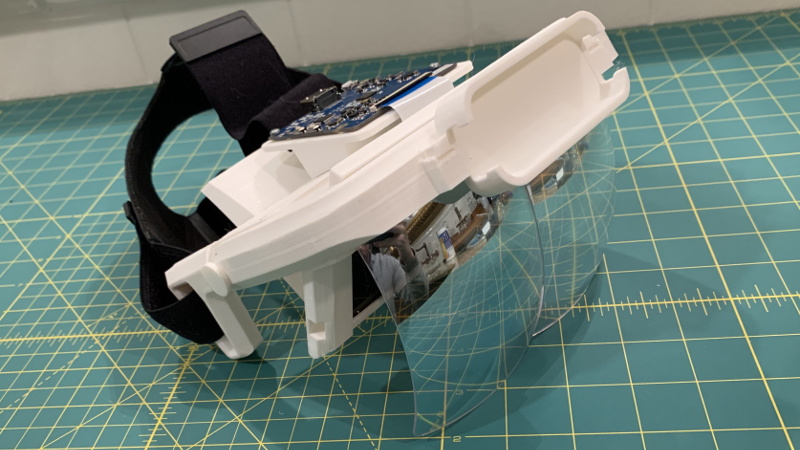
The Triton AR headset is the kind of project that makes hardware tinkerers lean forward, squint thoughtfully, and say, “Wait… I could actually build that?” Instead of arriving as a sealed, polished, mystery-box gadget from a giant tech company, Triton takes a more garage-friendly route. It combines commercial off-the-shelf components, 3D printed parts, salvaged-style optics, and open project documentation to create a DIY augmented reality headset that makers can study, modify, and rebuild without needing a secret lab guarded by people in black turtlenecks.
At its core, Triton is about accessibility. Augmented reality hardware can be expensive, closed, and difficult to experiment with. The Triton Project, created by Graham Atlee, takes a different approach: use parts that already exist, print the custom structure, document the process, and let developers explore AR interfaces without being locked into a proprietary ecosystem. It is not trying to be the sleek pair of AR glasses everyone wears to buy cereal in the future. It is more like a developer playground strapped to your facepractical, flexible, a little chunky, and charmingly honest about what it is.
What Is the Triton AR Headset?
The Triton AR headset is an open-source, 3D printed augmented reality headset designed around readily available hardware. The project uses printed mechanical parts to hold and align components such as a display panel, optical reflectors, a head strap, and optional hand-tracking hardware. The result is a wearable display system that can show digital imagery over the user’s view of the real world.
The phrase “blends stock and printed parts” describes the entire philosophy beautifully. Triton does not ask builders to manufacture precision optics from scratch, because that would be less “weekend maker project” and more “accidentally opened a small aerospace company.” Instead, the design repurposes commercial AR-style reflectors from an existing headset product and pairs them with a 6-inch 2K LCD display. Around those parts, the builder prints a custom frame, known in the project as the Halo, along with brackets, mounts, holders, and cases that turn loose components into a working AR platform.
Why Triton Matters in DIY Augmented Reality
Augmented reality has always had a problem: the demos look magical, but the hardware often arrives with a luxury price tag, limited availability, or a software ecosystem that feels like it was built inside a locked filing cabinet. Triton matters because it lowers the barrier to experimentation. Developers, students, researchers, and curious makers can inspect the design, print the parts, source components, and begin testing AR interactions at a fraction of the cost of many commercial headsets.
This is especially useful for people interested in AR user interfaces. Triton was built with hand-based interaction in mind. With a Leap Motion controller mounted on the front, the headset can support natural gesture input, opening the door to palm menus, finger-based pointing, virtual buttons, and other spatial interface experiments. In other words, it gives creators a way to ask, “What should AR feel like?” without waiting for a trillion-dollar company to answer on their behalf.
The Hardware Recipe: Off-the-Shelf Meets 3D Printing
Commercial Parts That Do the Heavy Lifting
The official Triton build uses several off-the-shelf parts. The major components include a 6-inch 2K LCD display, AR glass reflectors, an HTC Vive-style head strap, screws, padding, hook-and-loop straps, and optional Leap Motion hand tracking. These are the pieces that are easiest to buy but hardest to recreate accurately at home. Optics and displays, in particular, are not areas where most hobbyists want to freestyle unless they enjoy expensive sadness.
The display is especially important. Triton’s design uses a single panel angled above the wearer’s eye line. That is one of the major structural differences between Triton and Leap Motion’s Project North Star, another influential open-source AR headset. The display reflects into the optical combiners, allowing the user to see generated imagery while still looking through to the real world. This kind of optical arrangement is often described as a free-space combiner or birdbath-style approach, and it remains popular in experimental AR because it can offer a bright, wide image without requiring custom waveguides.
Printed Parts That Make It All Fit
The custom printed parts are where Triton becomes Triton. The official project materials describe the design as consisting of 24 modular parts, with 17 custom 3D printed pieces. These include the central Halo, the head press, display tray, display brackets, strap holders, peg system, Leap Motion case, LCD driver mount, top cover, and other support pieces. The 3D printed structure solves the physical puzzle: where the screen goes, how the reflectors mount, where the strap connects, how the electronics sit, and how the whole thing stays stable enough to wear.
The Halo is the centerpiece. It acts as the structural hub where the reflectors, display brackets, strap system, and other pieces attach. In a commercial product, this would likely be injection molded. In Triton, it is printed, tested, sanded, adjusted, and occasionally negotiated with using small tools and patience. That is part of the charm. It turns hardware design into something visible and learnable.
Design Philosophy: Modular, Hackable, Replicable
Triton’s design goals read like a love letter to the maker community. It aims to be hackable, modular, comfortable, replicable, and expandable. Those words matter. A hackable headset invites modification. A modular headset lets users remove, replace, and add parts. A replicable headset can be shared through files and guides instead of being trapped in a factory. Expandability gives developers permission to attach sensors, test software, and push the hardware beyond its original plan.
This design philosophy is why Triton is more than a DIY display strapped to a headband. It is an argument for open AR hardware. Instead of treating the headset as a finished appliance, Triton treats it as a platform. Want to experiment with hand tracking? Add the Leap Motion. Want to connect a different HDMI source? Try it. Want to explore WebXR, three.js, Electron, or custom JavaScript interfaces? The software side of the project points in that direction. Triton is not a showroom sculpture. It is a workbench with lenses.
Software: The Other Half of the AR Equation
Hardware gets the attention because it has screws, screens, and the exciting possibility of dropping something on the floor. But AR needs software just as badly. Triton’s software path includes a desktop launcher intended to send AR content to the headset display and support Leap Motion-based interaction. The project documentation describes the Triton AR Launcher as a Windows-focused desktop app built with web technologies, including Electron, three.js, and leap.js.
This choice is smart for an experimental headset. Electron allows desktop apps to be built with JavaScript, HTML, and CSS. Three.js helps render 3D scenes in the browser-style environment. Leap.js connects hand tracking data to interactive visuals. Together, these tools make Triton appealing to web developers who may not want to dive straight into lower-level graphics programming. It is AR development with fewer locked doors and slightly fewer headaches, which is a major quality-of-life upgrade.
How Triton Compares With Project North Star
Project North Star is an important reference point because it helped inspire Triton and showed that open-source AR hardware could be taken seriously. North Star used custom parts, wide field-of-view optics, and hand tracking to create a powerful developer headset. Triton follows the same spirit but leans harder into accessibility. Its use of a single display panel and commercially available reflector assembly makes it feel more like an off-the-shelf-friendly cousin than a direct rival.
The comparison also highlights an important point: DIY AR is not only about matching commercial specifications. It is about learning. A builder who assembles Triton gains insight into display alignment, optical reflection, mechanical tolerances, comfort, cable routing, software calibration, and gesture input. Those lessons are hard to get from a sealed consumer device. Buying a polished headset teaches you how to use it. Building Triton teaches you why it works.
The Strengths of the Triton AR Headset
It Is Affordable for Experimenters
One of Triton’s biggest strengths is cost. Historical project coverage estimated that basic AR functionality could be achieved for roughly the low hundreds of dollars, depending on parts, shipping, optional accessories, and whether the builder already owns a 3D printer. That price point is not pocket change, but it is far more approachable than many developer-focused AR devices.
It Uses Accessible Components
Triton avoids the trap of requiring rare or custom-manufactured parts for every major subsystem. Builders can source common screws, straps, filament, display hardware, and reflectors. That makes the project easier to reproduce and easier to repair. If a bracket cracks, print another. If padding feels wrong, change it. If a mount needs adjustment, open the CAD files and start politely arguing with geometry.
It Encourages Real Interface Research
The optional hand-tracking setup makes Triton interesting for user experience research. A palm-based menu, virtual paint app, or finger-controlled cursor may sound futuristic, but these interactions become testable when the headset is built. For students and developers, that is valuable. AR is still searching for its equivalent of the mouse, touchscreen, and keyboard. Triton gives people a relatively open way to join that search.
The Limitations: A Friendly Reality Check
Triton is exciting, but it is not magic. It is a DIY AR headset, not a finished consumer device. Builders should expect printing time, sanding, support removal, cable care, display configuration, software setup, and some troubleshooting. The project documentation notes that the printed parts can take more than 20 hours to produce, and some components require careful handling, especially delicate display cables.
Another key limitation is tracking. With a Leap Motion controller, Triton can track hands, but that does not automatically mean it has full world-locked spatial AR like a high-end inside-out tracked headset. Without robust position tracking, digital objects may behave more like heads-up display elements or hand-relative overlays than perfectly anchored real-world objects. That does not make the project less valuable. It simply clarifies what builders should expect. Triton is a platform for experimentation, not a shortcut to a commercial HoloLens-style experience.
Who Should Build a Triton AR Headset?
Triton is best suited for makers who enjoy both hardware and software. If you like 3D printing, electronics, CAD files, display settings, JavaScript experiments, and the occasional moment where a tiny screw disappears into another dimension, Triton will feel familiar. It is also a strong educational project for people studying augmented reality, human-computer interaction, wearable displays, or open-source hardware.
It may not be ideal for someone who wants a plug-and-play AR headset for daily use. Triton is not designed to replace consumer smart glasses. It is bigger, more experimental, and more builder-oriented. But for people who want to understand AR from the inside out, that roughness is not a flaw. It is the whole point.
Practical Build Experience: What It Feels Like to Work With Triton-Style Hardware
Building a headset like Triton is less like assembling a flat-pack bookshelf and more like conducting a tiny engineering orchestra. The display, optics, printed frame, straps, padding, software, and sensors all need to play in tune. One poorly seated cable or slightly warped print can turn a futuristic AR session into a troubleshooting opera. Fortunately, that is also where much of the learning happens.
The first experience most builders notice is that 3D printing rewards patience. Large parts such as the Halo can take hours, and support material may need careful removal. A clean print matters because AR hardware depends on alignment. If the display tray does not slide correctly or the reflector mount is slightly rough, the visual experience can suffer. This is where basic finishing skills help. Light sanding, test-fitting, and checking screw tension can make the difference between “surprisingly comfortable prototype” and “forehead-mounted regret machine.”
The second big lesson is cable management. Wearable hardware moves. Heads turn, straps flex, and connectors experience stress. Triton’s use of a compact LCD panel and driver board means builders need to respect the flex cable. Tugging, folding too sharply, or forcing the display into position can create problems. A careful build treats cables like tiny royalty: supported, protected, and never yanked around like old phone chargers.
Comfort is another practical concern. A DIY AR headset can work perfectly on the bench and still feel awkward after ten minutes on a human head. Padding, strap balance, weight distribution, and front-heavy components all matter. Triton’s use of a Vive-style strap and optional rear padding is a sensible choice because the strap helps spread the load. Even so, builders should expect to adjust fit repeatedly. Wear it, test it, notice pressure points, remove it, adjust, repeat. The glamorous future of AR includes Velcro.
On the software side, the experience is refreshingly approachable for web-minded developers. Because the launcher concept uses web technologies, the project feels less intimidating than a fully custom native graphics stack. A developer can think in terms of windows, screen position, JavaScript, 3D scenes, and input events. That does not mean everything is effortless. Display orientation, resolution, IPD settings, and hand-tracking permissions still need attention. But the stack makes experimentation feel possible, especially for creators who already know browser-based development.
The most rewarding moment comes when the system finally displays graphics through the reflectors and the digital layer appears to float in front of the world. It may not be perfectly calibrated. It may need brightness tweaks. The headset may look like something a cyberpunk mechanic built during lunch. But the experience is powerful because you made it happen. Triton-style projects remind builders that augmented reality is not only a product category. It is a set of design problems that ordinary people can explore with printers, parts, code, and enough persistence to survive a few failed prints.
Conclusion
The Triton AR headset stands out because it makes augmented reality feel reachable. By combining stock components with 3D printed mechanical parts, it gives makers a practical way to experiment with wearable displays, hand tracking, and spatial interfaces. Its use of accessible hardware, open documentation, and web-friendly software tools makes it a meaningful project for developers who want to understand AR beyond marketing demos.
It is not a polished consumer headset, and that is exactly why it is interesting. Triton is a bridge between imagination and experimentation. It shows that AR hardware does not have to live only inside corporate labs or expensive development kits. Sometimes it can begin with a printed Halo, a 2K display, a salvaged-looking reflector, a head strap, and a builder willing to learn one small mistake at a time. For the open-source AR community, that is not just clever design. That is momentum.
SEO Tags
Note: This article is based on publicly available project documentation, maker-community reporting, open-source AR references, and related technical information about 3D printed headset design, WebXR-style development, and hand-tracking interfaces.