A punch down tool may look like a small screwdriver that has been spending too much time at the gym, but it performs one of the most important jobs in a wired network. It seats individual conductors into insulation displacement connector slots, commonly called IDC slots, on keystone jacks, patch panels, and telecommunications blocks.
Used correctly, the tool creates secure electrical contact while trimming away excess wire. Used backward, it neatly cuts the conductor you meant to keep. That is an impressively efficient mistake, but fortunately, it is also easy to avoid.
This tutorial explains how to use a punch down tool on Ethernet cable, how to choose the correct blade, how to follow T568A or T568B wiring labels, and how to test the finished connection. The process is beginner-friendly, requires only a few tools, and becomes surprisingly satisfying once that first clean “click” happens.
What Is a Punch Down Tool?
A punch down tool is a cable-termination tool used to press insulated copper conductors into narrow IDC terminals. The metal contacts inside an IDC slot cut through the wire’s insulation and grip the copper conductor. You normally do not strip the insulation from each individual wire.
The tool is commonly used with:
- Cat5e, Cat6, and compatible Cat6A punch-down keystone jacks
- 110-style Ethernet patch panels
- 110 wiring blocks
- 66 blocks used primarily for traditional voice and telephone wiring
- Structured media and low-voltage distribution modules
Impact punch down tools contain a spring-loaded mechanism. You press the handle downward until the mechanism releases with a click, delivering a controlled burst of force. This seats the conductor more consistently than poking it into place with a screwdriver, butter knife, or whatever other innocent household object happens to be nearby.
Understanding Punch Down Tool Blades
110 Blade
A 110 blade is the usual choice for Ethernet keystone jacks, network patch panels, and 110 wiring blocks. If you are terminating a typical Cat5e or Cat6 wall jack, this is probably the blade you need.
66 Blade
A 66 blade is designed for the wider terminals on 66 blocks. These blocks are traditionally associated with telephone and voice wiring. A 66 blade should not be forced into a 110 IDC slot, even if optimism is running high.
Cutting and Non-Cutting Ends
Many reversible blades have two working ends. The cutting end seats the conductor and trims the excess in one action. The non-cutting end seats the conductor without cutting it, which is useful when the wire must continue to another terminal.
Look for markings such as CUT, a colored stripe, or a small cutting edge on one side of the blade. When terminating a keystone jack, the cutting edge normally faces the loose tail of the conductor, away from the center of the jack.
| Blade or Setting | Common Application | Important Detail |
|---|---|---|
| 110 cutting blade | Ethernet jacks and patch panels | Cutting edge faces the discarded wire tail |
| 110 non-cutting blade | Daisy-chained or continuing conductors | Seats the wire without trimming it |
| 66 blade | Traditional telephone blocks | Not interchangeable with a 110 slot |
| Low impact | Many 110 jacks and panels | Often the safest starting point |
| High impact | Only where the manufacturer specifies it | May be recommended for certain heavier conductors |
Tools and Materials You Will Need
- An impact punch down tool
- The correct 110 or 66 blade
- A compatible keystone jack, patch panel, or wiring block
- Twisted-pair network cable
- A cable jacket stripper
- Electrician’s scissors or flush cutters
- A keystone jack holder or punch-down stand, if available
- A basic network cable tester
- Safety glasses
- Labels or a permanent marker
A jack holder is optional, but it makes the job safer and steadier. Holding a tiny keystone jack in your palm while pressing a sharp tool into it is possible, but “possible” and “pleasant” are not always roommates.
How to Use a Punch Down Tool Step by Step
Step 1: Identify the Termination Hardware
Inspect the jack, patch panel, or block before inserting a blade. Most Ethernet keystone jacks and data patch panels use 110-style IDC terminals. Traditional telephone blocks often use 66 terminals.
Check the product label or installation sheet rather than choosing by appearance alone. Some proprietary jacks use special termination tools or hinged, tool-free mechanisms and should not be attacked with a standard impact blade.
Step 2: Install and Lock the Correct Blade
Insert the appropriate blade into the punch down tool. Many professional tools use a twist-lock design: align the blade with the internal pin, insert it fully, and rotate it approximately one-quarter turn until it locks.
Confirm which side is the cutting side. On some tools, the cutting side aligns with a colored section of the handle. On others, the blade itself is stamped with a label. Check before every termination. A two-second inspection is cheaper than shortening the cable by accident.
Step 3: Choose the Impact Setting
Set the tool according to the instructions for the termination hardware and conductor gauge. Low impact is commonly specified for 110-style jacks and panels. However, certain products designed for larger 23 AWG conductors may call for a higher setting.
Do not assume that maximum force creates maximum quality. Excessive impact can damage an IDC terminal or jack housing. The product manufacturer’s recommendation wins this argument.
Step 4: Prepare the Cable
Disconnect the cable from active equipment and leave enough slack to work comfortably. Use a twisted-pair cable stripper to remove only the amount of outer jacket required by the jack or panel instructions. Depending on the hardware, this may be roughly 1.5 to 3 inches.
Rotate the stripper gently. The goal is to score the jacket without nicking the insulated conductors underneath. Bend the jacket at the score line and remove it. If the cable contains a rip cord, spline, separator, or foil components, trim or arrange them according to the connector instructions.
Inspect the conductors. Replace the damaged section if any wire insulation has been cut deeply or the copper is visible.
Step 5: Select T568A or T568B
Most Ethernet jacks and patch panels display color-coded labels for both T568A and T568B wiring schemes. Either scheme can support a normal straight-through network run when the same scheme is used consistently at both ends.
The main difference is the position of the green and orange pairs. The blue and brown pairs remain in the same positions. Match the existing building standard whenever one already exists. In many U.S. installations, T568B is common, but consistency matters more than personal loyalty to Team Orange or Team Green.
Step 6: Arrange the Pairs
Separate the four twisted pairs and route them toward their matching color-coded IDC slots. Work with one pair at a time and avoid untwisting more conductor than necessary.
Keeping the twists close to the termination helps preserve the cable’s designed signal performance and resistance to crosstalk. Several manufacturers recommend maintaining pair twist to within approximately one-half inch of the contact point, although the connector’s instructions should always take priority.
Place each conductor into the correct slot. The wire should rest naturally in the channel without being stretched tightly across the jack.
Step 7: Support the Jack or Panel
Place a loose keystone jack in a proper holder, punch-down stand, or stable work surface. Make sure the rear of a patch panel is securely mounted or supported.
Do not terminate a jack against a finished table, your knee, or a priceless family heirloom. The impact mechanism is small, but it is enthusiastic.
Step 8: Orient the Cutting Edge
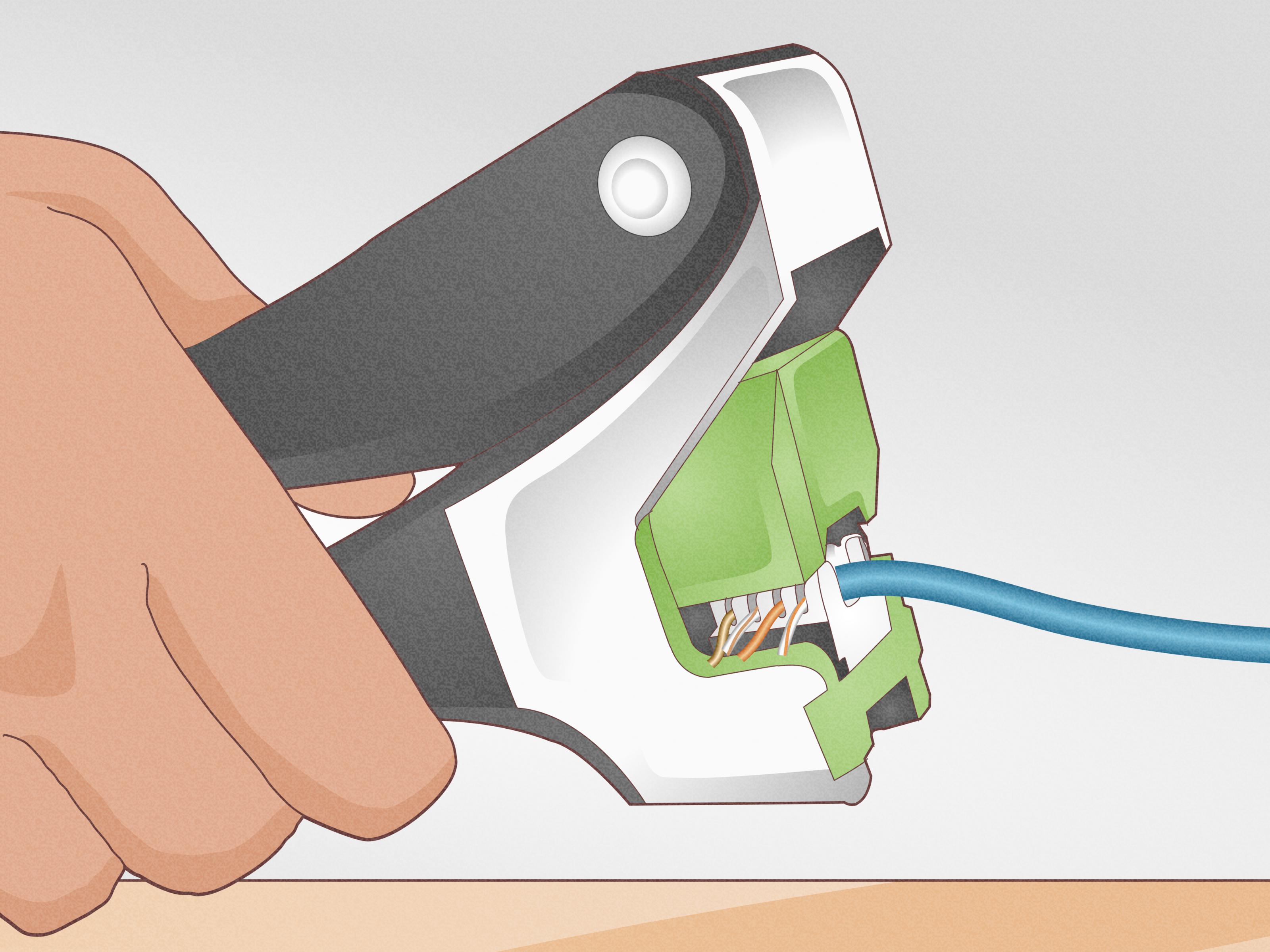
Position the blade over the first conductor with the cutting edge facing the excess wire tail. On a keystone jack, this normally means the cutting edge faces outward, away from the jack body.
If the cutting edge faces inward, the tool may cut the conductor between the IDC contact and the cable. That produces a beautifully trimmed wire that is no longer connected to anything useful.
Step 9: Hold the Tool Straight
Place the blade directly into the IDC slot and keep the punch down tool perpendicular to the terminal. Avoid approaching at an angle. A straight, controlled punch helps drive the conductor evenly to the bottom of the slot and reduces stress on the plastic housing.
Step 10: Press Until the Tool Clicks
Press firmly on the end of the handle with your palm. Continue applying steady downward pressure until the impact mechanism releases with an audible or tactile click.
Lift the tool straight out. The conductor should be fully seated between the IDC contacts, and the loose end should be cut flush when using a cutting blade.
Do not hammer the punch down tool or jerk your wrist. The spring mechanism supplies the impact. Your job is simply to keep the tool aligned and press smoothly.
Step 11: Terminate the Remaining Conductors
Repeat the process for all eight conductors, checking the color label as you go. On crowded jacks, terminating the inner or least accessible pairs first can prevent already seated wires from getting in the way.
Some manufacturers recommend completing one pair before arranging the next. This reduces clutter and makes accidental pair swaps easier to spot.
Step 12: Inspect the Finished Termination
Examine every IDC slot under good lighting. Each conductor should be:
- In the correct color-coded position
- Fully seated at the bottom of the IDC slot
- Trimmed cleanly without a long copper tail
- Free from deep cuts or crushed insulation
- Still twisted close to the termination point
If a conductor appears to bridge across the top of the slot rather than sitting inside it, remove and reseat it. A hook tool can help lift a misplaced conductor without turning the jack into a wrestling match.
Step 13: Install the Cap and Strain Relief
Fit the jack’s retention cap, dust cover, or strain-relief component. Secure the cable jacket as directed so normal movement does not pull directly on the individual conductors.
When securing cables to a patch panel manager, avoid overtightening cable ties. The cable should be supported, not squeezed like it owes the tie money. Hook-and-loop wraps are often easier to adjust.
Step 14: Test the Cable
Connect a network cable tester to both ends of the completed run. At minimum, perform a wire-map test. A basic tester can identify common faults such as opens, shorts, reversals, crossed conductors, and some split-pair conditions.
A simple continuity pass confirms that the conductors reach the expected pins, but it does not certify full Cat5e, Cat6, or Cat6A performance. Commercial installations may require a professional certification tester that measures parameters such as insertion loss, return loss, and crosstalk.
Label the jack and patch-panel port after the cable passes. Future-you, standing in front of 24 identical blue cables, will appreciate the gesture.
Common Punch Down Tool Mistakes
Using the Blade Backward
This is the classic beginner mistake. The cutting edge faces the cable instead of the waste end, severing the conductor that should remain connected. Check blade orientation before pressing.
Mixing T568A and T568B
Using T568A at one end and T568B at the other creates a crossover arrangement. Modern network equipment may sometimes compensate, but accidental inconsistency is still poor installation practice and can complicate troubleshooting.
Untwisting Too Much Wire
Long, straight conductor sections can reduce the performance benefits of twisted-pair cable. Keep each pair twisted until it reaches the IDC area.
Using Excessive Impact Force
High impact is not automatically better. It can damage a delicate jack or distort an IDC terminal when the hardware specifies low impact.
Punching at an Angle
An angled punch may leave the conductor only partially seated or place sideways force on the jack. Hold the tool straight and support the connector securely.
Skipping the Cable Test
A termination can look flawless and still contain a reversed pair, incomplete contact, or damaged conductor. Testing is part of the installation, not an optional celebration afterward.
Troubleshooting a Bad Punch-Down Connection
The Tester Shows an Open Conductor
Inspect the matching pin at both ends. The wire may not be fully seated, may have been cut on the wrong side, or may be broken inside the cable. Reseat the conductor once using the correct setting. If the fault remains, trim back the cable and reterminate the jack.
The Excess Wire Does Not Cut Cleanly
Confirm that you are using the cutting end of the blade. Check that the blade is sharp, properly locked, and positioned against the waste side. A worn blade may seat the conductor while leaving a stubborn wire tail behind.
The Conductor Pops Out
The wire may be too large or too small for the connector, the tool may be misaligned, or the IDC terminal may be damaged. Verify the supported conductor gauge and cable type for the jack.
The Jack Housing Cracks
Stop using that jack. Possible causes include excessive impact force, poor support, an incompatible blade, or punching at an angle. Replace the damaged component rather than trusting a cracked housing inside a wall.
The Link Works but Performance Is Poor
Check for excessive pair untwist, tightly crushed cable, incorrect category components, split pairs, sharp cable bends, or low-quality terminations. A basic tester may show continuity even when the link cannot meet its intended performance category.
Frequently Asked Questions
Can I Use a Screwdriver Instead of a Punch Down Tool?
A screwdriver may push a conductor into an IDC slot, but it does not provide controlled seating depth or clean trimming. It can also spread or damage the metal contacts. A proper punch down tool is inexpensive compared with the time required to diagnose an unreliable connection.
Do I Need to Strip the Individual Ethernet Wires?
No. IDC terminals are designed to displace the insulation and contact the copper conductor when the wire is punched down. Strip only the cable’s outer jacket unless the connector manufacturer specifically instructs otherwise.
Should a 110 Punch Down Tool Be Set to High or Low?
Follow the jack and tool instructions. Low impact is specified for many 110-style terminations, while some products using larger 23 AWG conductors may recommend high impact. There is no universal setting for every combination of tool, cable, and jack.
Can I Punch the Same Wire Twice?
A second straight punch may occasionally be needed when a conductor has not seated fully. Repeated impacts, however, can damage the terminal or weaken the conductor. If a connection remains questionable, remove the wire, inspect the slot, trim the conductor if necessary, and terminate it correctly.
Can a Punch Down Tool Be Used on an RJ45 Plug?
No. Modular RJ45 plugs are normally terminated with a compatible crimping tool. Punch down tools are intended for IDC-style jacks, patch panels, and wiring blocks.
Conclusion: A Clean Punch Beats a Lucky Guess
Using a punch down tool is simple once the fundamentals become automatic: choose the correct blade, follow one wiring scheme, preserve the pair twists, face the cutter toward the waste end, hold the tool perpendicular, press until it clicks, and test every run.
The actual punch takes about a second. Most of the quality comes from what happens before and after it: careful cable preparation, correct conductor placement, visual inspection, strain relief, and verification with a tester. Take those steps seriously and a small hand tool can produce a tidy, dependable network connection that lasts for years.
Experience Notes: What Makes Punch-Down Work Faster and Cleaner
The most common first-time punch-down experience begins with surprise. The tool does not gradually squeeze the wire into place. Pressure builds, the spring releases, and the handle clicks with a tiny mechanical snap. New users sometimes stop pressing just before that release because they think they are using too much force. The conductor then sits halfway inside the IDC slot and fails the test. Once the user understands that the click is the intended finish line, the motion becomes much more confident.
Blade orientation is the next lesson people tend to learn only once. On a loose keystone jack, the cable enters from one side and short wire tails extend beyond the IDC slots. The cutter should face those tails. When the blade is reversed, it cuts the useful side close to the cable jacket. There may not be enough slack to try again, especially inside a wall box. Experienced installers develop a habit of pausing before each punch and mentally saying, “Cut side out.” It sounds almost too simple to matter, which is exactly why it works.
Another practical improvement is using a proper support stand. A beginner often holds the jack between two fingers, places the tool on top, and discovers that the connector rolls sideways just as pressure builds. The result may be a crooked punch, sore fingers, or a jack skittering across the floor. A small termination puck or keystone holder keeps the jack level and leaves both hands in safer positions. On a large project, it also reduces fatigue because the tool can be operated with the palm and forearm instead of a tense wrist.
Cable preparation has an equally large effect on speed. Stripping too little jacket makes it difficult to route the pairs. Stripping far too much leaves long exposed conductors and encourages excessive untwisting. A better approach is to place the cable beside the jack first, visualize where the jacket should end, and then remove only the length required for comfortable routing. The cable jacket should approach the termination area closely enough to support the pairs without crowding the IDC slots.
Working one pair at a time is usually cleaner than exploding all eight conductors into a colorful copper octopus. Route a pair, keep its twists intact, seat both wires in their labeled slots, and then move to the next pair. This method lowers the chance of placing a white-and-green conductor beside the solid orange wire simply because both looked pale under poor lighting. Bright task lighting is a remarkably effective networking tool.
Testing immediately after each termination is another habit that saves time. When a cable tester reports an open or reversal while the jack is still on the workbench, the repair may take a minute. Finding the same problem after the jack has been capped, snapped into a wall plate, screwed into a box, and hidden behind a desk turns a small correction into an archaeological expedition.
The final experience-based lesson is to resist the urge to “improve” a successful punch with several extra hits. A conductor that is fully seated and cleanly trimmed is finished. Repeated impacts do not make the connection more professional; they only increase the chance of damaging the IDC or plastic housing. Inspect it, test it, label it, and move on. Good termination work is not dramatic. It is methodical, repeatable, and just boring enough to be reliable.
Final takeaway: Slow down for cable preparation and blade orientation, then work smoothly. After several conductors, the sequence becomes natural: align, check, press, click, inspect, and test.