If you have ever opened WordPress, stared at a blank page, and immediately developed the thousand-yard stare of a person who just wanted a simple landing page, SeedProd will make immediate sense. It is a WordPress website builder and landing page plugin built for speed, simplicity, and conversion-focused design. In plain English: it helps you launch pages fast without needing to bribe a developer with coffee and vague promises.
But let’s not turn this into a love letter too quickly. SeedProd has real strengths, especially for marketers, small business owners, creators, and agencies that want pages online yesterday. It also has real limitations, especially if you want deep design experimentation, a giant third-party ecosystem, or a builder that feels more like a visual playground than a streamlined marketing tool.
This review breaks down both sides of the story. We will look at what SeedProd does well, where it falls short, who it fits best, and whether it is worth your money in 2026.
What Is SeedProd?
SeedProd started life as a coming soon and maintenance mode plugin, then grew into a broader WordPress builder. Today, it covers drag-and-drop landing pages, theme building, WooCommerce design tools on higher plans, conversion elements, email integrations, and newer AI-assisted features for writing, image generation, and site creation. That evolution matters because it explains why the product still feels very practical at its core. SeedProd did not begin as a “let’s build every possible thing for every possible user” platform. It began as a tool for getting important pages live quickly, and that DNA still shows.
That is mostly a good thing. SeedProd tends to feel focused. Instead of overwhelming users with endless menus and decorative fireworks, it tries to answer a simpler question: how do you build pages that look decent, load quickly, and help you collect leads or launch a site without getting lost in technical weeds?
The Good
1. It is genuinely beginner-friendly
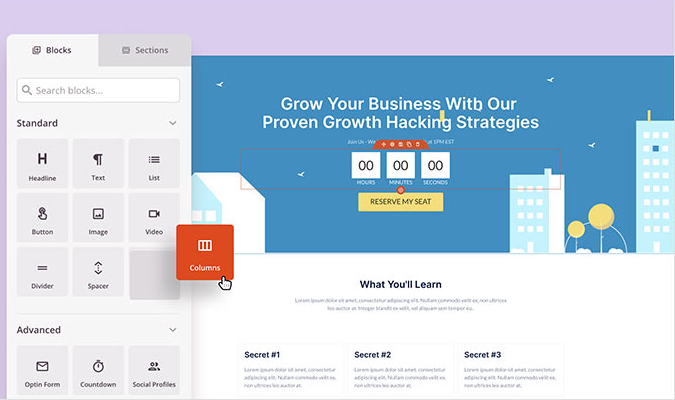
This is SeedProd’s clearest advantage. The interface is made for people who want progress fast. You drag blocks into place, adjust content in a visual editor, preview the layout, and move on with your day. For beginners, that matters more than fancy buzzwords. A builder can have 700 controls and still be useless if using it feels like filing taxes inside a haunted spreadsheet.
SeedProd is not that. It is approachable. Templates, sections, and prebuilt blocks reduce the number of decisions you need to make from scratch. That is a big reason it is often recommended for first-time WordPress users, marketers, and business owners who care more about publishing a page than mastering design theory.
In practical terms, SeedProd is strongest when you want to build:
- landing pages for ads or lead magnets
- coming soon pages before launch
- maintenance pages during updates
- simple promotional microsites
- custom home pages
- focused WooCommerce layouts on qualifying plans
2. It is built for marketers, not just designers
Plenty of builders help you make a pretty page. Fewer are clearly centered on conversion. SeedProd leans hard into the kinds of elements marketers actually use: countdown timers, opt-in forms, call-to-action sections, subscriber management, access controls, custom 404 pages, and dynamic text for more personalized messaging.
That gives the tool a practical edge. If your goal is capturing email leads, launching a webinar signup page, publishing a sales page, or temporarily replacing a dead-end 404 page with something more useful, SeedProd speaks your language. It is less “let us build the most artistic homepage in the county” and more “let us get something live that persuades people to click, sign up, or buy.”
For many businesses, that is the right priority. Beautiful websites are nice. Websites that actually do something are nicer.
3. Coming soon and maintenance mode are still standout features
This is where SeedProd keeps its old superpower. If you need to hide a site while it is under construction or undergoing updates, SeedProd makes that easy. You can put up a branded page, collect emails while you work, control access with bypass URLs and role-based permissions, and avoid the “Oops, our website is basically a pile of damp cardboard today” look.
It is especially useful for client work and soft launches. Agencies can keep a project hidden while still letting stakeholders preview it. Small businesses can tease a launch without exposing an unfinished site. Online stores can temporarily narrow access during maintenance without making the whole experience look like a digital crime scene.
4. Theme building is a real upgrade, not just a checkbox feature
SeedProd is no longer just about single landing pages. On paid plans above entry level, it also lets you build theme parts like headers, footers, templates, archives, and page layouts visually inside WordPress. For users who want site-wide control without editing theme files, that is a major benefit.
It also lowers the intimidation factor for people who would never touch PHP templates or custom theme code. If your normal reaction to “just edit the template file” is nervous laughter, this matters.
The full-site editing angle becomes more valuable when paired with reusable sections, reusable blocks, and import/export options. That means you can create a design system that is consistent across pages instead of rebuilding everything manually like a very tired digital bricklayer.
5. WooCommerce support can be useful for focused stores
SeedProd includes WooCommerce template and block support on the Elite plan, which lets you customize shop pages, product layouts, the cart, and checkout pages. That is a strong feature if your store needs cleaner, more conversion-oriented layouts than your theme provides by default.
This is especially appealing for entrepreneurs who want distraction-free checkout pages or more polished product presentations without hiring a WooCommerce specialist. If you sell a few hero products or rely on seasonal campaigns, SeedProd can help you shape pages around a conversion path instead of settling for generic store templates.
6. The AI features make the tool more practical, not just trendier
AI is now slapped onto software the way hot sauce gets slapped onto food videos: a little too eagerly and often without a good reason. SeedProd’s newer AI features are more useful than most. The platform now offers AI-assisted website generation, AI writing, and AI image creation.
That does not mean it magically replaces strategy or taste. It does mean it can speed up the worst part of many site builds: the blank-page phase. If you need starter copy, a rough site structure, or a custom image concept without hunting through stock libraries for a smiling person holding a salad for no clear reason, the AI tools can save time.
The best way to think about SeedProd AI is as a productivity booster, not a substitute for judgment. It helps you get to version one faster. You still need to turn version one into something worth publishing.
7. It offers strong value for the right user
SeedProd has a free lite plugin on WordPress.org, which is helpful for testing the interface and handling basic pages. Paid plans scale upward with more templates, theme-building features, support tiers, and advanced functionality. There is also a short money-back window for new paid accounts, which reduces the risk a bit if you are testing fit.
For a freelancer, solo business owner, or marketer who needs a builder that is fast to learn and faster to deploy, the value proposition is solid. You are paying less for endless complexity and more for practical speed.
The Bad
1. It is not the most expansive design ecosystem
This is probably the biggest tradeoff. SeedProd is polished, but it does not have the same sprawling third-party add-on culture as builders like Elementor. If you love hunting for niche extensions, specialty widgets, or hyper-specific design flourishes built by a small army of third-party developers, SeedProd can feel more contained.
That is not a flaw for everyone. In fact, some users will appreciate the cleaner setup. But advanced users who want a massive ecosystem may find SeedProd a bit too curated. It gives you a well-organized toolbox, not a warehouse the size of an airport.
2. It is better at focused pages than wildly ambitious visual experimentation
SeedProd excels when the goal is clarity, speed, and conversion. It is not the strongest option for users who want deeply layered animations, unusual interactive effects, or a page-building experience centered on endless artistic control. You can absolutely make attractive pages with it, but its sweet spot is efficient page building, not maximum visual drama.
That means designers who want the most elaborate creative freedom may prefer a different builder. SeedProd is more “clean, practical, launch-ready” than “behold my cinematic parallax empire.”
3. Some of the best features are pushed into higher plans
This is common in WordPress plugin pricing, but it is still worth mentioning. The lite version is useful, yet many of the features that make SeedProd really interesting live in paid tiers. Theme building is not available on the entry plan, and WooCommerce templates and blocks sit higher up the ladder.
So yes, you can start free. But if you came for full-site design, advanced integrations, AI-assisted workflows, or store customization, you will likely end up paying. That does not make the pricing unfair. It just means the free version is more appetizer than full meal.
4. It is WordPress-only, which is either obvious or a dealbreaker
This sounds simple, but it matters. SeedProd is for WordPress. If your site is on Shopify, Webflow, Squarespace, or some in-house system maintained by a mysterious developer named Greg who only replies at 2:13 a.m., SeedProd will not help you. It is deeply useful inside WordPress and irrelevant outside it.
That is not criticism so much as scope. Still, if you are comparing website builders broadly, it is important to remember that SeedProd is not trying to be an all-platform solution.
5. Real-world user feedback is strong overall, but not flawless
WordPress.org ratings are very strong, which is a good sign. But support forums and user reviews still show the occasional friction you would expect from a widely used plugin: setup confusion, feature expectations that do not match the selected plan, and isolated complaints about maintenance mode behavior or site conflicts.
That does not mean SeedProd is unreliable. It means it is software living in the wonderfully chaotic ecosystem known as WordPress, where plugins, themes, caching layers, hosting quirks, and user error sometimes gather in one place and recreate a disaster movie. Most users seem happy. A few clearly are not. That is a realistic picture, and it is healthier than pretending every install is a magical sunset ride into productivity.
Who Should Use SeedProd?
SeedProd is a strong fit if you are:
- a small business owner who needs landing pages fast
- a marketer focused on conversions and lead capture
- a freelancer building straightforward client sites
- a course creator, coach, or consultant launching offer pages
- a WooCommerce store owner who wants cleaner campaign pages on the right plan
- a beginner who wants visual control without learning code
It is a weaker fit if you are:
- a designer who wants maximum visual experimentation
- a power user who depends on a huge third-party add-on ecosystem
- someone looking for a non-WordPress site builder
- shopping mainly for a forever-free full-site builder
Final Verdict
SeedProd is good at what matters most to its target audience. It is fast, easy to understand, useful for marketers, and practical for launching pages that actually have a job to do. Its conversion tools, maintenance mode features, theme builder, and newer AI features make it more than a one-trick plugin.
The downsides are real, but they are mostly about fit rather than failure. It is not the most limitless builder in WordPress. It is not the most experimental. And some of the most compelling functionality sits behind higher-tier plans. But if your priority is speed, clarity, and getting conversion-focused pages online without drama, SeedProd remains one of the most sensible choices in the WordPress space.
Bottom line: SeedProd is not the builder for every user, but it is absolutely one of the best options for people who value fast launches, clean workflows, and marketing-first design. In the battle between “done today” and “perfect someday,” SeedProd very clearly votes for done today.
Extended Experience: What Using SeedProd Actually Feels Like
One of the most useful ways to judge SeedProd is not by its feature list, but by the experience it tends to create. On a typical project, the first impression is speed. You install the plugin, open a template, and very quickly realize you are not dealing with a builder that wants to overwhelm you. The layout is visually obvious, the blocks are easy to understand, and the whole thing feels built for momentum. That matters because a lot of website tools claim to save time while quietly demanding a week of tutorials.
With SeedProd, the early wins come fast. You swap in your headline, replace images, tweak colors, and suddenly the page looks like something a real business might publish instead of a sad placeholder assembled during a caffeine emergency. For beginners, that feeling is huge. It lowers the fear factor. For freelancers, it lowers production time. For marketers, it means you can move from idea to campaign page without turning the build process into a side quest.
The strongest experience usually happens when the goal is focused. If you need a coming soon page, a lead capture page, a webinar signup, or a seasonal promo page, SeedProd feels almost annoyingly efficient. You are not fighting the builder. You are not digging through a jungle of controls. You are just building. That is probably why so many users praise it for maintenance mode and launch pages. Those use cases align perfectly with the plugin’s personality.
Where the experience changes is when expectations grow. If you start wanting highly stylized layouts, advanced motion effects, or a page that behaves like a custom art project, SeedProd can begin to feel more practical than exciting. It still works, but the feeling shifts from “this is refreshingly simple” to “I can see the rails now.” That is not a dealbreaker. It just means the product has an opinion about what most users need, and that opinion is not “every page should look like a futuristic movie trailer.”
The AI tools add another layer to the experience. They are useful when you need a head start, especially for rough copy or fast concept generation. They do not remove the need for editing, taste, or strategy. But they do reduce blank-page paralysis, which is often half the battle in website work. If you are the kind of user who loses an hour deciding on a hero headline, that alone can make the workflow feel much lighter.
Overall, the experience of using SeedProd is less about being dazzled and more about being relieved. Relieved that the page came together quickly. Relieved that WordPress did not become a maze. Relieved that your launch page, store page, or temporary maintenance screen looks intentional rather than accidental. And honestly, that relief has real value. In website building, a tool does not have to be glamorous to be excellent. Sometimes it just needs to help you ship the page, keep your sanity, and avoid saying, “I should have hired someone for this,” for the fifteenth time in one afternoon.