
Every maker, technician, developer, and “why is this thing not charging?” household hero eventually faces the same tiny villain: the mystery USB cable. It looks innocent. It may even be neatly coiled. But plug it into a project, laptop, charger, keyboard, camera, development board, or portable SSD, and suddenly your day becomes a detective drama with worse lighting.
Is the cable charge-only? Does it carry USB 2.0 data? Is it wired for USB 3.x speeds? Is the connector damaged? Is one side missing a line? Is the cable fine and your device the actual drama queen? This is where a handy OSHW USB cable tester earns a permanent spot in your toolkit. It is not glamorous in the way a thermal camera or oscilloscope is glamorous, but it solves one of the most common bench problems: quickly figuring out whether a cable is wired the way you think it is.
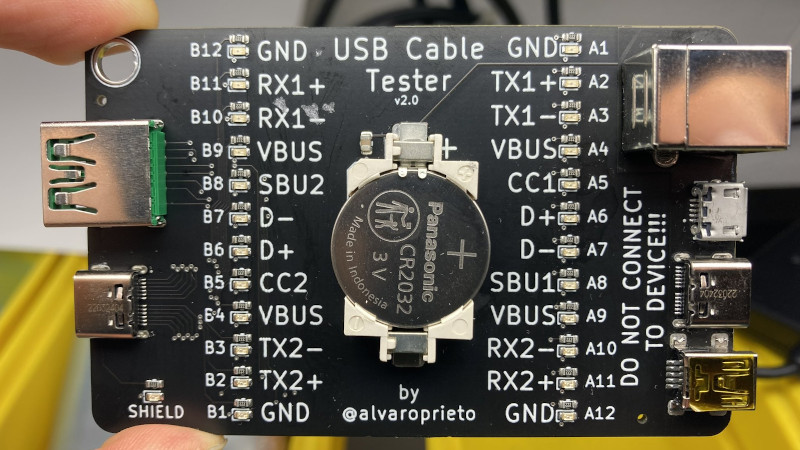
An OSHW USB cable tester, especially one inspired by open source hardware designs such as Álvaro Prieto’s universal USB cable tester, is simple, portable, affordable, and refreshingly honest. It does not promise to replace a certified compliance lab. It does not tell you that your cable can safely push 240 watts while streaming 8K video and making coffee. Instead, it answers the first practical question: which pins are connected?
That answer alone can save hours.
What Is an OSHW USB Cable Tester?
OSHW stands for open source hardware. In plain English, it means the design files, documentation, and project details are made available so people can study, build, modify, distribute, and improve the hardware. For a USB cable tester, that openness matters because the device itself is not mysterious black-box magic. You can inspect how it works, understand its limits, order or fabricate a board, swap components, repair it, or adapt the design for your own workshop.
A typical OSHW USB cable tester is a printed circuit board with multiple USB connectors, LEDs, resistors, and a small battery such as a coin cell. You plug one end of a cable into one side of the tester and the other end into the matching connector on the opposite side. If a line is connected, the related LED lights up. If a line is missing, the LED stays dark. If the pattern looks strange, congratulations: your “perfectly good” cable may have been promoted to the suspicious cable bin.
The beauty is in the simplicity. Instead of dragging out a multimeter, hunting for tiny connector pins, and trying not to short anything with probes the size of medieval weapons, the tester gives you a fast visual readout. For common cable sorting, that is exactly what you need.
Why USB Cables Are More Confusing Than They Should Be
USB used to feel straightforward. You had a cable, a port, and a reasonable expectation that plugging things together would do something useful. Then the cable drawer evolved. Today, a cable with the same USB-C connector shape may support charging only, USB 2.0 data, USB 3.2 data rates, DisplayPort Alternate Mode, USB Power Delivery, Thunderbolt compatibility, or some mysterious combination that appears only under a full moon.
The connector shape does not tell the whole story. A USB-C plug can hide many different internal wiring configurations. A short cable that came with a phone charger may carry power beautifully but transfer files at old-school speeds. A thicker cable may be designed for high-speed data, but not necessarily high-current charging. Some cables contain e-marker chips that communicate cable capabilities to connected devices, while simpler cables do not.
That is why cable labeling is so important. USB-IF guidance now emphasizes clearer power and data markings for USB-C to USB-C cables, including 60W or 240W power labels and data-rate markings for cables beyond basic USB 2.0 capability. In the real world, however, many people still own piles of older, unlabeled, third-party, inherited, bundled, or suspiciously cheap cables. A tester helps bring order to that chaos.
What a Handy USB Cable Tester Can Actually Tell You
It Can Show Basic Continuity
The main job of a simple OSHW USB cable tester is continuity testing. In other words, it helps show whether a pin on one connector is electrically connected to the expected pin on the other connector. For many practical jobs, that is enough to identify broken, incomplete, or charge-only cables.
For example, if you plug in a USB-C cable and only the power and ground lines appear active, you may be looking at a cable intended mainly for charging. If the USB 2.0 data lines appear, it should support basic data transfer. If additional SuperSpeed lines light up, the cable may be wired for faster data modes. The LED pattern becomes a quick map of what is inside the cable jacket.
It Can Help Identify Cable Types
A good universal USB cable tester may support several connector combinations, such as USB-A, USB-B, mini-USB, micro-USB, and USB-C. That makes it useful beyond modern laptops and phones. If you work with 3D printers, Arduino boards, older cameras, audio gear, test equipment, keyboards, external drives, or embedded devices, you probably still meet mini and micro USB cables more often than you would like to admit.
Instead of guessing which cable came from which device, you can quickly test the wiring. This is especially useful when a cable powers a device but refuses to transfer data. That situation is so common it deserves its own support group.
It Can Expose Broken or Damaged Lines
Cables fail. They bend near the connector, get crushed in bags, collect lint, meet office chairs, survive pets, and endure the ancient human ritual of “pull it out by the cable, not the plug.” A tester can reveal missing connections that explain intermittent behavior.
For a technician, this can prevent misdiagnosis. A development board that will not enumerate over USB may not be defective. A camera that refuses file transfer may not need a driver. A keyboard that behaves like it has entered witness protection may simply be connected by a bad cable.
What It Cannot Tell You
A simple OSHW USB cable tester is useful because it is simple, but that simplicity comes with boundaries. It usually cannot verify high-speed signal integrity, real-world power handling, voltage drop under load, USB Power Delivery negotiation, e-marker contents, shielding quality, or compliance with official USB specifications.
That distinction is important. A cable may show the right pin connections and still perform poorly at high data speeds. It may technically connect the right conductors but use thin wire that causes too much voltage drop during charging. It may include an e-marker, or it may not. It may work with one dock and fail with another because USB-C and Thunderbolt ecosystems are wonderfully powerful and occasionally as moody as a cat near bathwater.
For power testing, you need a USB power meter or analyzer that can measure voltage, current, watts, and accumulated energy. For high-speed data validation, you need more advanced equipment. For formal product claims, you need compliance testing. The OSHW tester belongs earlier in the troubleshooting chain: fast screening, sorting, and sanity checking.
Why Open Source Hardware Makes This Tool Better
Open source hardware is not just a feel-good label. For a bench tool, openness has practical value. When the schematic and board files are available, users can verify the circuit, understand how the LEDs are connected, inspect connector pinouts, and decide whether the design fits their needs.
If you build your own version, you can choose the PCB color, adjust silkscreen labels, add test pads, modify connector placement, or design an enclosure. If you teach electronics, the tester becomes a lesson in continuity, connector standards, PCB routing, current limiting resistors, and practical debugging. If you run a repair shop, you can make several units and keep one near every workstation.
There is also a trust advantage. With open hardware, the design does not hide behind marketing language. You can see what the board tests and what it does not test. That is refreshing in a USB world where “fast charging cable” can mean anything from “perfectly fine” to “a noodle with ambition.”
How This USB Cable Tester Works
The basic principle is wonderfully direct. A small battery sends current through selected cable conductors, and LEDs indicate completed circuits. Each LED corresponds to a specific signal path. When the matching conductor exists inside the cable, the LED lights. When it does not, the LED stays off.
Some designs arrange connectors so one side of the board provides a common connection while the other side breaks out individual lines through LEDs and resistors. This makes it possible to test many cable formats with one compact board. The result is not a full USB protocol analyzer. It is more like a truth serum for cable wiring.
The user experience is simple: plug in the cable, read the lights, compare the result to what you expect. A USB-A to USB-C cable should show a different pattern than a USB-C to USB-C cable. A USB 2.0-only cable should show fewer active lines than a full-featured cable. A broken cable may show missing or inconsistent results.
Who Should Keep One in the Toolkit?
Makers and DIY Electronics Builders
If you build projects with microcontrollers, single-board computers, sensors, dev boards, and USB-powered gadgets, cable confusion is practically part of the hobby. A tester lets you confirm whether a cable can carry data before you blame firmware, drivers, bootloaders, solder joints, or cosmic rays.
Repair Technicians
Repair professionals often need fast answers. A customer says a device will not charge or connect. Before opening the device, testing the cable is the sensible first move. A cable tester turns that first move into a five-second check.
IT Teams and Office Tech Support
Offices accumulate USB cables like desk drawers are trying to start a museum. Sorting them with a tester can reduce support tickets, especially for webcams, docks, external drives, conference room gear, and mobile devices.
Travelers and Remote Workers
If you depend on a small kit of cables while traveling, knowing which cable does what is valuable. The wrong USB-C cable can turn a simple presentation setup into a public demonstration of silent panic.
Practical Examples: Where the Tester Saves the Day
Imagine you are flashing firmware to a microcontroller board. The board powers up, but your computer does not detect it. Without a cable tester, you may reinstall drivers, change software, restart the machine, question your career choices, and eventually discover the cable was charge-only. With a tester, you check the cable first and move on with your dignity mostly intact.
Or say you are connecting an external SSD. It works, but transfers crawl. A cable tester may reveal that the cable has only USB 2.0 data wiring. It is not broken; it is just the wrong cable for the job.
Another example: you are preparing a field kit with power banks, test devices, adapters, and cables. A quick testing session lets you label cables before they go into the bag. Future you will be grateful. Future you may even stop blaming past you, which is personal growth.
How to Use a USB Cable Tester Safely
The most important rule is simple: use the tester only with cables, not with live devices. Some simple cable tester designs intentionally short or route pins in ways that are safe for passive cable testing but unsafe for phones, laptops, chargers, hubs, or development boards. Plugging an actual device into the wrong side of a continuity tester can damage equipment.
Before using any OSHW tester, read the project documentation and board labels. Check the battery orientation. Confirm which connectors are meant for which cable ends. Do not connect external power unless the design specifically supports it. If the tester is an exposed PCB, keep it away from metal tools, loose screws, and conductive clutter.
Choosing or Building the Right Tester
When selecting or building a USB cable tester, look for clear silkscreen labels, support for the connector types you use most, readable LED placement, available design files, and good documentation. A compact board is great for travel, but a slightly larger board may be easier to read on a bench.
If you build one yourself, order quality connectors. USB-C receptacles can be small and fussy, and poor soldering can create the same problems the tester is supposed to detect. Use appropriate resistors for the LEDs, verify the battery holder, and inspect the PCB carefully before first use. The tool is simple, but simple tools still deserve clean assembly.
USB Cable Tester vs. USB Power Meter vs. Protocol Analyzer
These tools overlap in theme but not in purpose. A USB cable tester checks wiring continuity. A USB power meter measures electrical behavior during charging or operation, such as voltage, current, power, and sometimes energy over time. A USB protocol analyzer inspects digital communication between host and device. A compliance test setup evaluates whether a product meets detailed official requirements.
For most toolkits, the cable tester comes first because it answers the easiest question quickly. If the wiring is wrong, there is no point running advanced tests. If the wiring looks right but the problem remains, then you move to power measurement, data testing, device logs, or deeper analysis.
Label Your Cables After Testing
A tester becomes even more powerful when paired with labels. After testing, mark cables by function: “charge only,” “USB 2.0 data,” “USB 3.x data,” “known good for dev boards,” “SSD cable,” or “do not trust with anything important.” You can use heat-shrink labels, cable tags, paint markers, or tiny adhesive flags.
This turns one afternoon of sorting into months of convenience. It also prevents the classic cable drawer reset, where every cable eventually returns to looking equally trustworthy and equally guilty.
Experience Notes: Living With a Handy OSHW USB Cable Tester
After using a USB cable tester as part of a regular electronics toolkit, the biggest surprise is not how advanced it feels. It is how often it prevents unnecessary troubleshooting. Many technical problems begin with a confident assumption: “The cable is fine.” Unfortunately, that sentence has ruined more afternoons than bad coffee.
In day-to-day use, the tester becomes a habit. Before connecting a cable to a new development board, test it. Before packing a cable for travel, test it. Before blaming a USB dock, test the cable. The process is so fast that it removes the friction from basic verification. You no longer need to set up a computer, mount a drive, open a terminal, or perform the sacred ritual of unplugging and replugging three times while staring intensely at the port.
One practical experience is cable sorting. Many people keep a box of cables collected from phones, chargers, keyboards, old gadgets, conference swag, and mysterious purchases made at 1:00 a.m. That box can contain excellent cables, useless cables, and cables that work only when they feel emotionally supported. A tester helps divide them into categories. Some become trusted bench cables. Some are labeled for charging. Some are recycled. The drawer becomes calmer. The technician becomes calmer. The universe improves slightly.
Another useful experience is debugging embedded projects. USB-powered boards often fail in ways that mimic software problems. A charge-only cable can make a board power up without appearing as a serial port. A damaged data line can make connections intermittent. A weak or questionable cable can cause resets when a board draws more current. The tester does not diagnose every electrical issue, but it quickly eliminates many bad assumptions.
The tester also changes how you buy cables. Once you can see the difference between cable wiring types, marketing claims become easier to question. A cable described as “premium fast cable” may not be useful for data. A short, plain-looking cable may be excellent. A thick cable may still not support the function you need. Testing builds intuition, and intuition saves money.
For shared workspaces, the value increases. In a lab, makerspace, school, or repair bench, cables move around constantly. A known-good cable can disappear into someone else’s project box faster than a 10 mm socket in an auto shop. Keeping a tester nearby lets users verify cables before use and encourages better labeling. It also reduces the number of “broken” devices that are actually victims of bad cables.
There is one small behavioral benefit too: it teaches humility. USB is not just a connector shape. It is a family of power, data, signaling, and negotiation standards packed into cables that often look identical. A tester reminds you to verify first and theorize second. That mindset is useful far beyond USB.
The main lesson from using an OSHW USB cable tester is simple: not every problem needs a complex tool. Sometimes the best tool is a small board with LEDs that tells you, without drama, whether the wires go where they should. In a toolkit full of expensive instruments, that kind of honesty is refreshing.
Final Thoughts
A handy OSHW USB cable tester is one of those tools that feels obvious after you use it. It will not replace a power analyzer, protocol analyzer, or compliance lab. It will not read every e-marker chip or guarantee high-speed performance. But it will help you identify cable wiring, spot broken connections, sort your cable collection, and avoid embarrassing troubleshooting detours.
For makers, technicians, IT teams, repair shops, educators, and anyone with a suspiciously large USB cable drawer, it is a small investment with a large practical payoff. Open source hardware makes it even better because you can inspect, build, modify, and trust the design on your own terms.
In short, a USB cable tester is not the flashiest tool in the kit. It is the quiet one that saves the day before anyone notices there was a problem. And honestly, every toolkit needs at least one quiet hero with LEDs.













