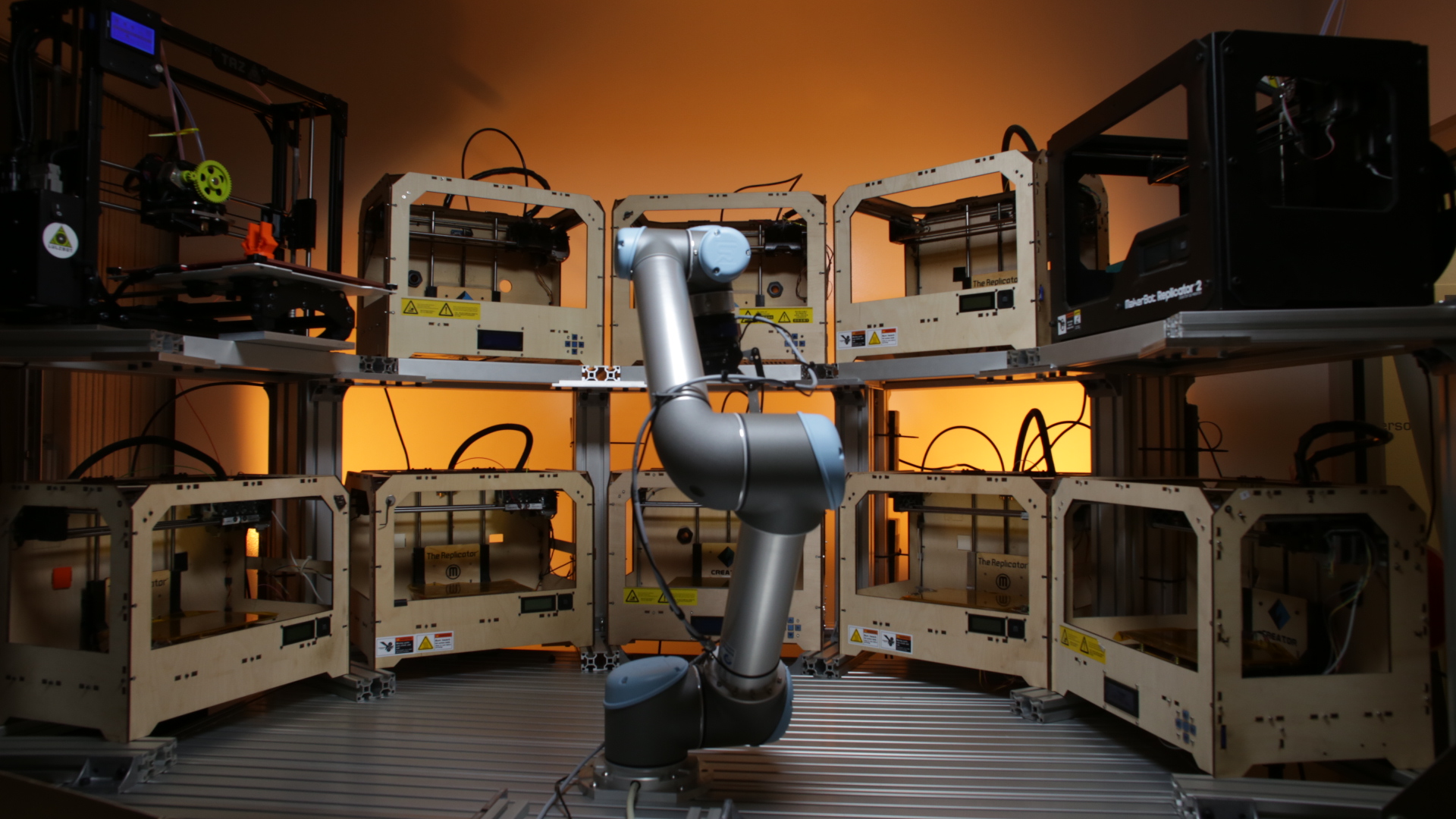
Once upon a time, running a 3D printer felt like owning a tiny, temperamental dragon. You fed it filament, watched it breathe hot plastic, and hoped it did not wake up grumpy at layer 63. Today, the story is changing. Automating 3D printers with robots is turning desktop machines, resin printers, and industrial additive manufacturing systems into faster, cleaner, more reliable production cells.
The big idea is simple: let people do the thinking, designing, quality planning, and problem-solving, while robots handle the repetitive work. That means removing finished parts, swapping build plates, loading materials, feeding print queues, tracking jobs, and moving parts into washing, curing, inspection, or packing. In other words, automation helps 3D printing grow from “cool prototype machine in the corner” into a serious manufacturing workflow.
For businesses, schools, dental labs, engineering teams, makerspaces, and print farms, robotic 3D printer automation is not just about looking futuristic. It is about throughput, consistency, labor efficiency, uptime, and fewer moments where someone says, “Wait, who was supposed to clear printer number seven?”
What Does Automating 3D Printers With Robots Actually Mean?
Automating 3D printers with robots means connecting the printer to hardware and software systems that reduce manual intervention. The robot may be a six-axis collaborative arm, a gantry system on rails, a conveyor belt, a toolhead-based part ejector, or an automated build-plate handler. The software may include print farm management, job scheduling, remote monitoring, material tracking, error detection, and production reporting.
In a small shop, automation might be as basic as a printer that ejects a finished PLA part after the bed cools, then starts the next file in the queue. In a larger production environment, automation can involve fleets of printers, robotic arms, barcoded build plates, automated resin systems, post-processing stations, quality checks, and dashboards that track every part from digital file to shipping box.
The Three Main Layers of 3D Printer Automation
First, there is machine automation. This includes automatic bed leveling, filament runout detection, material switching, print recovery, and controlled heating. Modern printers are already much smarter than older hobby machines, which is excellent news for anyone who remembers manually leveling a bed with a piece of paper and a prayer.
Second, there is handling automation. This is where robots become especially useful. They can remove finished prints, swap plates, load trays, unload build chambers, move parts to post-processing, or clear beds for the next job.
Third, there is workflow automation. This includes quoting, file preparation, production scheduling, job assignment, fleet monitoring, material inventory, traceability, and reporting. Software is the traffic controller. Without it, the robot is just an expensive arm doing jazz hands beside a printer.
Why Robots Are a Natural Fit for 3D Printing
3D printing is powerful because it can produce complex shapes without molds, tooling, or long setup times. But the process often includes repetitive manual tasks. Someone has to remove parts. Someone has to clean resin prints. Someone has to reload filament or resin. Someone has to restart jobs. Someone has to check whether a print failed at 2:14 a.m. while everyone else was asleep like responsible adults.
Robots are built for repetitive, predictable tasks. They do not get bored clearing build plates. They do not forget which printer finished first. They do not complain about night shifts. When properly designed and guarded, robotic systems can help additive manufacturing teams operate longer hours with more consistent results.
This is why 3D printer automation is becoming more common in print farms, dental labs, product development departments, automotive suppliers, aerospace tooling teams, medical device prototyping labs, and service bureaus. The goal is not to replace creativity. The goal is to remove bottlenecks so creative and technical people can spend less time babysitting machines and more time improving products.
Real-World Examples of Automated 3D Printing
One of the clearest examples is the automated print farm. A traditional print farm may have dozens or hundreds of machines, but human operators still handle part removal, printer cleaning, job restarts, and scheduling. An automated print farm adds software and robotics to keep machines running with less downtime.
Some automated farms use robotic systems on rails to move between printers, remove plates, collect parts, and prepare machines for the next job. Others use tilting build plates, special low-adhesion surfaces, conveyor belts, or toolhead movements to eject completed parts. The best solution depends on printer type, material, part geometry, volume, budget, and how much mechanical tinkering the team can tolerate before coffee becomes a food group.
Formlabs has promoted automation for resin printer fleets through systems that reduce idle time and improve back-to-back production. Resin-based automation can include automated part removal, fleet scheduling, and higher-volume resin delivery. This matters because resin printing can produce detailed parts, dental models, prototypes, and production components, but post-processing and job turnover can consume a lot of operator time.
Prusa has shown the value of automated farm concepts with systems designed for 24/7 production, traceability, and reduced downtime. Print farm automation is especially attractive for small-batch manufacturing because it keeps the flexibility of 3D printing while pushing the process closer to traditional production efficiency.
Bambu Lab-style ecosystems demonstrate another automation path: faster printers, material management, multi-color or multi-material systems, remote monitoring, and print farm software. Automatic material systems can switch between filaments, reduce manual spool changes, and help printers produce more complex parts without constant supervision.
Industrial systems such as HP Multi Jet Fusion show automation from another angle. Powder-bed production requires controlled workflows for printing, cooling, unpacking, powder handling, and post-processing. These systems are not simply “press print and walk away” machines; they are production ecosystems built around repeatability, throughput, and process control.
Robotic Arms, Gantries, Conveyors, and Auto-Ejection: Which Works Best?
There is no single perfect robot for every 3D printer. Choosing the right automation method is like choosing the right pizza topping: context matters, and someone in the room will have strong opinions.
Robotic Arms
Robotic arms are flexible and powerful. A six-axis robot can open doors, remove plates, pick up parts, place trays, load post-processing stations, or even carry an extruder for large-format robotic additive manufacturing. Collaborative robots, often called cobots, are popular because they can be easier to integrate around people when proper risk assessments and safety measures are used.
The downside is complexity. Robotic arms need fixtures, grippers, programming, calibration, safety planning, and maintenance. For a high-volume operation, that investment can be worthwhile. For a single hobby printer in a garage, it may be hilariously excessive unless the real goal is to impress neighbors.
Gantry Robots and Rail Systems
A gantry or rail-mounted robot can serve multiple printers in a row. This works well for farms because the robot does not need the full flexibility of a six-axis arm. It mainly needs to move accurately between machines, grab plates, clear beds, and place finished work in storage or post-processing areas.
Gantry systems can be cost-effective for repetitive layouts. However, they require careful planning. Printer spacing, bed height, door clearance, cable routing, part bins, and emergency access all matter. A neat print farm is not just pretty; it is easier to automate.
Conveyor Belts
Conveyor-style 3D printers can automatically move finished parts away from the print area. This allows continuous or repeating production. Conveyor printers can also print very long parts at an angle, which is useful for certain geometries.
The limitation is that belt systems are not ideal for every material or model. Adhesion, part shape, belt wear, and dimensional consistency all need attention. Still, for simple batches, they can be wonderfully practical.
Auto-Ejection Systems
Auto-ejection is one of the most accessible forms of 3D printer automation. After a print cools, the printer or an accessory system pushes, tilts, slides, or releases the part from the bed. Some systems use special build surfaces that hold the part during printing but release it after cooling. Others rely on the printer toolhead to nudge parts into a bin.
This method can be surprisingly effective for small and medium print farms. The key is reliability. A part that ejects cleanly 98 percent of the time still creates a mess if the remaining 2 percent causes the next print to start on top of a plastic pancake. Automation must be boringly dependable. Exciting automation usually means something has gone wrong.
The Software Side: The Robot Needs a Brain
Hardware gets the spotlight, but software makes automation useful. A robot can clear a bed, but the system also needs to know what to print next, which printer is available, which material is loaded, whether the previous job passed inspection, and where the finished part should go.
Print farm management platforms help teams monitor printers, queue jobs, assign files, track materials, and reduce idle time. Manufacturing execution systems for additive manufacturing can go even further by connecting quoting, order management, scheduling, nesting, traceability, production reporting, and quality documentation.
This is important because professional 3D printing is not only about making parts. It is about making the right parts, with the right material, on the right machine, at the right time, with enough documentation to prove it. That sentence may not fit on a motivational poster, but it does fit nicely into a production manager’s daily reality.
Benefits of Automating 3D Printers With Robots
Higher Printer Utilization
The most obvious benefit is uptime. Many printers sit idle after finishing a job because no one is available to remove the part and start the next one. Automation reduces that dead time. In a business running dozens of machines, even a few extra productive hours per printer per day can create a major increase in output.
Lower Labor Bottlenecks
Automation does not eliminate skilled labor; it redirects it. Instead of manually scraping beds, operators can focus on quality control, design improvements, maintenance, customer communication, and production planning. The job becomes less about hovering over machines and more about managing a manufacturing system.
More Consistent Processes
Robots perform the same motion the same way. That consistency can reduce handling damage, missed steps, and random variation. In professional environments, repeatability is a big deal. A customer does not want one part that looks aerospace-grade and another that looks like it was rescued from a hot sidewalk.
Better Scalability
A manual workflow may work perfectly with three printers. At thirty printers, it becomes a scheduling puzzle. At one hundred printers, it can become chaos wearing a lanyard. Automation helps teams scale without increasing labor at the same rate as machine count.
Improved Traceability
When printers, robots, and software are connected, each job can be tracked more carefully. Teams can log material batches, machine settings, print times, operator actions, inspection results, and delivery status. This is especially useful for regulated or quality-sensitive industries.
Challenges Nobody Should Ignore
Automating 3D printers with robots sounds exciting, but it is not magic. The first challenge is part variability. Different prints have different shapes, adhesion levels, support structures, and fragility. A robot that handles a simple bracket may struggle with a tall, delicate lattice structure.
The second challenge is failure detection. A printer may finish a job, but that does not mean the job succeeded. Spaghetti failures, layer shifts, under-extrusion, resin defects, warped corners, and support failures can confuse automation. Cameras, sensors, AI monitoring, and human review can help, but the system needs a plan for bad prints.
The third challenge is safety. Robots, heated beds, moving gantries, resin chemicals, powders, fumes, and sharp tools all require responsible risk management. Workspaces should use guarding, emergency stops, ventilation, training, lockout procedures, and clear access rules. Automation should make a shop safer, not turn it into a mechanical escape room.
The fourth challenge is return on investment. A robot cell costs money. Integration costs money. Downtime during setup costs money. Maintenance costs money. Automation makes sense when the value of additional uptime, lower labor bottlenecks, better consistency, and increased capacity outweighs the cost and complexity.
How to Start Automating a 3D Printing Workflow
The smartest way to begin is not by buying the shiniest robot. Start by mapping the workflow. Identify where time is lost. Is the bottleneck part removal? Material loading? Slicing? Scheduling? Failed prints? Post-processing? Shipping? The best automation target is usually the task that is repetitive, frequent, measurable, and painful.
Step 1: Standardize the Printers
Automation is easier when printers are consistent. A farm with twenty different machines, bed sizes, firmware versions, and mystery modifications may be charming, but it is hard to automate. Standardizing printer models, build plates, materials, and profiles makes robotic handling more predictable.
Step 2: Standardize the Parts
Batch production is easier to automate than random one-off geometry. If a shop prints the same product repeatedly, automation can be tuned around that part. If every job is different, software and quality checks become more important.
Step 3: Add Monitoring Before Motion
Before adding robots, add visibility. Use cameras, print tracking, job queues, material logs, and alerts. If a team cannot reliably monitor printers manually, a robot will not magically fix the problem. It may simply automate the confusion at higher speed.
Step 4: Automate the Smallest Useful Task
Start with auto-ejection, automated queues, material tracking, or remote job management. Once those pieces work, consider build-plate handling, robotic arms, or post-processing automation. Small wins build confidence and reveal the real requirements of the workflow.
Step 5: Measure Everything
Track printer utilization, failed prints, labor hours, material waste, maintenance time, average turnaround, and part quality. Automation should be judged by numbers, not vibes. Vibes are lovely, but they do not pay for servo motors.
Industries That Benefit From Robotic 3D Printer Automation
Dental labs can use automated resin printing workflows to produce models, surgical guides, splints, and other dental parts more efficiently. The ability to run printers overnight can help labs meet tight turnaround times.
Product development teams can accelerate prototyping by keeping machines active after engineers leave for the day. A queue that runs overnight can turn tomorrow morning into a small holiday for the design department.
Manufacturing companies can automate jigs, fixtures, end-use polymer parts, replacement components, and assembly aids. For low-volume, high-mix production, 3D printing automation can reduce the need for traditional tooling.
Education and research labs can manage shared printer fleets with less manual supervision. Automation helps reduce bottlenecks when many students or researchers need parts at the same time.
Service bureaus can improve quoting, scheduling, job tracking, and shipping workflows. Since service providers often juggle many customers and materials, software automation may be just as valuable as robotic hardware.
The Future: Printers That Behave Like Production Cells
The future of automating 3D printers with robots will likely combine smarter printers, better sensors, machine vision, AI-assisted monitoring, automated post-processing, and more connected production software. Instead of thinking about a 3D printer as a standalone machine, manufacturers will increasingly treat it as one station in a digital production cell.
Robots may load and unload printers. Cameras may inspect surfaces. Software may assign jobs based on printer availability, material type, nozzle size, maintenance status, and delivery deadlines. Automated systems may wash, cure, depowder, polish, label, and sort parts. Humans will still be essential, but their role will shift toward oversight, engineering judgment, quality strategy, and continuous improvement.
That shift is good news. The real promise of 3D printing has never been “make one tiny plastic boat very slowly.” The promise is flexible manufacturing: producing useful parts quickly, locally, and with less dependence on expensive tooling. Robots help unlock that promise by making the process less manual and more repeatable.
Hands-On Experiences and Practical Lessons From Automating 3D Printers With Robots
Anyone who has spent time around a busy 3D printing setup learns one lesson quickly: the printer is only one part of the job. The real workflow includes slicing files, labeling builds, checking materials, cleaning plates, removing parts, inspecting quality, restarting jobs, and explaining to someone why their “urgent” part cannot violate the laws of thermodynamics. Automation helps, but it works best when the human process is already organized.
One practical experience is that part removal is usually the first automation dream and the first automation headache. Simple, flat parts are easy. Tall parts, flexible parts, delicate parts, and parts with elephant’s foot can behave differently every time. If the build surface releases too early, the print fails. If it releases too late, the robot struggles. The sweet spot is a controlled surface, predictable cooling, and part designs that are automation-friendly.
Another lesson is that printers need recovery space. If a robot removes a build plate, where does it go? If a part drops into a bin, can it be damaged by the next part? If a print fails, does the robot know not to continue? Good automation design includes boring details like bins, trays, labels, airflow, cable clearance, spare plates, and maintenance access. These details are not glamorous, but they decide whether the system runs for one demo or for six months.
Material management is another area where experience matters. In filament printing, wet filament can ruin an otherwise automated setup. A robot can start the next job perfectly, but if the filament is popping like breakfast cereal, the result will still be ugly. Dry boxes, spool tracking, automatic material systems, and consistent filament brands make automation more reliable. In resin workflows, clean handling, resin levels, temperature control, and post-processing timing are just as important.
Print farm operators also learn that automation should be introduced gradually. A fully robotic farm sounds amazing, but jumping directly into full automation can create too many variables. A better path is to stabilize print profiles, add monitoring, standardize machines, automate queues, test part ejection, then expand into robotic handling. Each step should make the workflow easier to understand, not more mysterious.
One of the most valuable habits is designing parts for automation. Rounded edges, consistent contact surfaces, reduced support complexity, predictable orientation, and clear labeling can make robotic handling easier. Designers should ask, “Can this part be printed, removed, cleaned, inspected, and packed without special treatment?” That question can save hours later.
Finally, the best automation culture treats robots as teammates with very literal personalities. A robot will do exactly what it is told, even if what it is told is a terrible idea. It will not improvise around a loose screw, a shifted bin, a curled print edge, or a spool tangle unless the system is designed to detect and respond. Human oversight remains essential. The goal is not to abandon the printers; it is to build a workflow where people intervene less often and with better information when they do.
Conclusion
Automating 3D printers with robots is one of the most important steps in the evolution of additive manufacturing. It turns printers from isolated machines into connected production assets. With robotic part removal, automated build-plate handling, material management, print farm software, and smart monitoring, teams can increase uptime, reduce repetitive labor, improve consistency, and scale production more confidently.
The best approach is practical, not flashy. Start with the workflow. Standardize what can be standardized. Automate the most repetitive bottleneck first. Measure results. Improve safety. Then scale. A robotic 3D printing system should not feel like a science fair volcano with Wi-Fi. It should feel like a reliable production tool that quietly keeps making parts while humans focus on higher-value work.
In the end, robots do not make 3D printing less creative. They make it more useful. They clear the beds, queue the jobs, move the plates, and let the printers keep humming. That leaves humans free to design better products, solve harder problems, and maybe, just maybe, stop checking failed prints at midnight.
Note: This article is based on current publicly available information from reputable additive manufacturing companies, robotics resources, workflow automation providers, and workplace safety guidance. It is written as original editorial content for web publishing.