
Note: This publication-ready article is based on real PCB fabrication practices, modern full-color PCB printing services, DFM guidance, and practical maker-to-production workflows.
When Circuit Boards Stopped Being Boring Green Rectangles
For decades, the printed circuit board had one main fashion instruction: please be green and do not embarrass the engineer. It carried electricity, held components, survived soldering, and generally lived inside a plastic enclosure where nobody praised its outfit. Then makers, hardware artists, badge designers, synth builders, open-source hardware teams, and product designers looked at the PCB and asked a dangerous question: what if the board itself could be the artwork?
That question gave birth to PCB art, a field where copper, solder mask, silkscreen, FR-4, exposed metal, board outline, and even component placement become visual design tools. At first, the palette was limited but surprisingly expressive. Green solder mask could become deep forest shading. Purple boards could look luxurious. ENIG gold could sparkle like a tiny treasure chest for electrons. Bare FR-4 could create warm translucent tones. White silkscreen could add sharp lines, labels, jokes, logos, moon phases, tiny cats, or whatever else a designer could fit without making the fabrication house sigh into its coffee.
But full-color PCB art changes the conversation. Instead of tricking standard PCB layers into behaving like an art supply cabinet, designers can now place rich illustrations, gradients, photos, product graphics, educational diagrams, color-coded pinouts, and brand visuals directly onto the board. The challenge is that a PCB is not a poster. It must still be drilled, plated, soldered, inspected, assembled, packaged, shipped, and sometimes dropped on a workbench by someone who insists they were being “careful.” Bringing full color PCB art to production means respecting both sides of the job: the artwork must look good, and the circuit board must still behave like a circuit board.
What Full-Color PCB Art Actually Means
Full-color PCB art usually refers to a circuit board that includes a printed color graphic beyond the traditional one-color silkscreen. Modern services often use a white solder mask as the base, then apply a UV-cured color print on top. The white base matters because color printed over a dark, red, blue, black, or green board can shift dramatically. Anyone who has tried to print yellow on a black T-shirt without an underbase knows the pain. The yellow does not become “sunshine.” It becomes “mustard lost in a cave.”
UV printing solves several problems that older art experiments struggled with. PCB fabrication is not gentle. Boards may experience heat during reflow, localized heat during hand soldering, cleaning, handling, and abrasion. UV-cured inks can be tougher than casual craft inks and better suited to a production environment. The result is not always identical to paper printing, because the board surface, ink thickness, solder mask color, texture, and light angle all influence the final look. Still, it is a major leap from the old method of combining copper exposure, mask openings, and a single legend color like a person trying to paint a sunset using only a fork and optimism.
In production, full-color PCB art can serve real engineering purposes. A development board can use color to separate voltage rails, buses, sensor zones, or connector groups. A robotics controller can show motor channels with matching colored callouts. A kit board can display assembly steps directly on the PCB. A badge can combine branding, instructions, and visual identity without requiring a separate sticker. A music hardware panel can use graphics that look less like a utility invoice and more like something a human wants to touch.
The Traditional PCB Art Palette: Copper, Mask, FR-4, and Silkscreen
Before full-color printing became accessible, PCB artists built images from normal manufacturing layers. Copper could appear bright, dull, gold, silver, or hidden under solder mask depending on surface finish and design choices. Solder mask provided the dominant board color. Silkscreen added high-contrast lines, icons, text, and patterning. The raw substrate could appear where mask was removed, producing another tone. This layer-based approach remains important because it teaches the core lesson of PCB art: every visual decision is also a manufacturing decision.
For example, exposing copper for decorative shine may look wonderful, but exposed copper requires an appropriate finish. ENIG gives a clean gold appearance, while HASL has a more uneven solder-coated look. Removing solder mask near fine-pitch components can increase soldering risk. Placing silkscreen over a solder pad can interfere with solder wetting. Creating delicate mask slivers may look crisp in software but disappear or peel during fabrication. In the CAD preview, everything is perfect. In the real world, manufacturing tolerance walks in wearing steel-toed boots.
Traditional PCB art is still valuable even when full-color printing is available. The best production boards often combine both: a reliable functional PCB layer stack, a clear solder mask strategy, controlled copper features, and a color print used where it adds value. Full-color printing should not be treated as a license to ignore the board underneath. It is a new layer in the design story, not a magic blanket that hides poor planning.
Why Production Is Harder Than a One-Off Prototype
A single prototype can get away with a surprising amount of nonsense. Maybe the art is slightly misregistered. Maybe the color is darker than expected. Maybe a logo lands close to a via. Maybe the silkscreen is clipped but still charming in a “handmade robot” sort of way. Production is less forgiving. If you order 500 boards and the alignment is wrong on all of them, that is not a quirk. That is inventory with trust issues.
The main production challenge is repeatability. A full-color PCB must look consistent across panels, batches, and reorders. The designer must consider registration between the printed image and the physical PCB features. Pads, holes, LEDs, buttons, edge connectors, and board cutouts must match the artwork. If a printed button label sits half a millimeter too far left, users may notice. If a printed component outline overlaps a solder pad, the assembler may notice even faster, possibly while saying words not approved for the product manual.
Production also demands clear file communication. A standard PCB order may include Gerbers, drill files, pick-and-place files, a bill of materials, assembly drawings, and fabrication notes. Full-color artwork may require additional image files, positioning references, or special instructions. The manufacturer needs to know which side gets printed, whether the print is single-sided or double-sided, whether normal silkscreen should still be applied, and how the artwork aligns with the board outline. A beautiful PNG thrown into a ZIP file with no explanation is not a production package. It is a tiny mystery novel.
Start With the Manufacturing Process, Not the Illustration
The smartest way to bring full color PCB art to production is to begin with the manufacturing process. Before drawing the final artwork, confirm the fabricator’s requirements. Does the service require a white solder mask base? Does it support full-panel printing? Does it print on one side or both sides? Does the bottom-side artwork need special orientation? Are glossy and matte finishes available? Does glossy ink add thickness? Are there restrictions near pads, holes, cutouts, castellations, test points, or high-temperature regions?
These questions sound unromantic, but they prevent expensive surprises. Matte UV printing may be smoother and less likely to create height concerns. Glossy printing may look more dramatic but can add unevenness. If the board will be assembled with surface-mount parts, solder paste, and reflow, the design should avoid placing decorative ink where it could interfere with solder joints or inspection. If the board is a front panel for a synthesizer, touch surface durability and alignment around controls may matter more than impedance. If it is a dev board, readability and pinout clarity may matter more than photorealistic flair.
Designers should create the artwork at the actual board size and align it to mechanical references: board outline, mounting holes, connector centers, display windows, switch cutouts, and fiducials if relevant. It is wise to include a positioning image that shows the full-color artwork overlaid on the PCB outline and critical features. That image acts like a polite map for the fabrication team. Without it, someone may have to guess where the dragon, logo, or color-coded UART label belongs. Never make manufacturing guess where the dragon goes.
Gerbers Still Rule the Kingdom
Even with full-color artwork, Gerber files remain central to PCB fabrication. Gerbers describe copper, solder mask, paste, silkscreen, drills, board outlines, and other essential layers. A Gerber viewer is not optional; it is the designer’s reality check before money leaves the building. The design may look correct in the EDA tool, but exported manufacturing files are what the board house will actually use.
For PCB art, reviewing Gerbers is especially important because visual tricks often push normal assumptions. A decorative copper pour might create unexpected clearance issues. A mask opening intended for color contrast might expose copper too close to a pad. A silkscreen element may overlap a solder mask opening. A board outline imported from a drawing program may contain tiny segments, odd arcs, or non-manufacturable details. In production, the question is not “Does my art look good in the editor?” The question is “Can this exact exported package be fabricated repeatedly without drama?”
A good production package should include version labels on the board and in the file names. When art revisions and circuit revisions happen at the same time, confusion grows quickly. Use clear names such as revB_colorprint_top_v03.png and revB_fab_notes.pdf. Add a visible revision mark somewhere discreet on the board. Future you will appreciate this. Future you is often the poor soul trying to figure out why the blue batch has the fixed connector pinout but the red batch has the older logo and the mysterious extra cat.
Design Rules: The Uncool Hero of Pretty Boards
Design for manufacturing is what separates a production-ready PCB art project from a decorative gamble. Standard DFM checks cover trace width, spacing, drill size, annular rings, solder mask expansion, copper-to-edge clearance, silkscreen clearance, board outline, and panelization concerns. Full-color artwork adds visual expectations, but it does not remove these rules.
Solder mask clearance deserves special attention. The solder mask opening determines where pads are exposed for soldering. Too little clearance can allow mask to cover part of a pad, making soldering unreliable. Too much clearance can expose nearby copper and increase the risk of bridging. Fine-pitch parts, BGAs, test points, connectors, and high-current pads may require different approaches. Decorative art should never force the solder mask strategy into unsafe territory.
Silkscreen rules matter too. Traditional silkscreen should not sit on exposed pads, inside solderable openings, or under components where it becomes unreadable. Even when full-color printing is used, the same concept applies: keep decorative ink away from functional soldering areas unless the manufacturer explicitly approves the use case. A board can be gorgeous and still fail because ink landed where solder needed to flow. That is the electronics equivalent of wearing a tuxedo into a swimming pool.
Color Accuracy: Expect Translation, Not Perfection
Designers coming from web or print backgrounds often expect color to behave predictably. PCB color printing is more complicated. The final appearance depends on the white solder mask base, ink chemistry, curing process, surface texture, viewing angle, and the difference between screen color and physical pigment. A bright gradient on a monitor may become slightly muted on the board. Fine dithering may be visible under close light. Dark artwork may hide subtle details. Tiny text may be less legible than expected.
The solution is not despair. The solution is testing. Order a small color calibration coupon before committing to a production run. Include brand colors, gradients, skin tones if relevant, tiny text, line widths, QR codes if needed, icons, and sample photos. Place the coupon on the same solder mask and finish intended for the product. Evaluate it under normal lighting, not only under the dramatic desk lamp that makes everything look like a startup commercial.
For functional boards, prioritize contrast and readability. Color-coded pin labels should be obvious. Warning marks should stand out. Assembly graphics should remain clear after components are installed. If the artwork is purely decorative, you can be more adventurous. If it helps users assemble, debug, or operate the product, clarity beats subtlety.
Practical Examples of Full-Color PCB Art in Production
Development Boards
Full-color printing can make development boards easier to understand. Instead of tiny white labels scattered like breadcrumbs, designers can create colored zones for power, analog input, digital I/O, communication ports, and programming headers. A beginner can instantly see where things belong. An experienced engineer can debug faster. The board looks friendly without sacrificing function.
Conference Badges
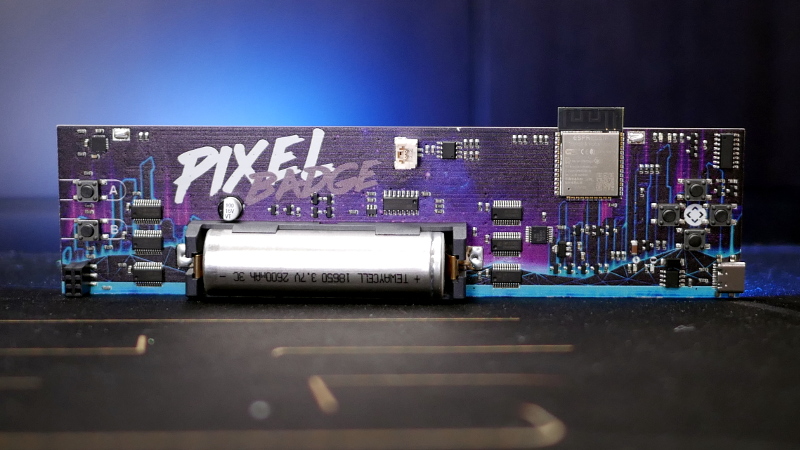
Electronic badges are the natural habitat of PCB art. They combine identity, play, electronics, and community. Full-color production allows badges to include mascots, sponsor art, maps, game elements, and instructions directly on the board. The trick is to protect soldering and assembly zones while letting the visual design shine around LEDs, buttons, displays, and connectors.
Music Gear and Front Panels
Synth modules, guitar pedals, MIDI controllers, and audio gadgets often use PCBs as panels. Full-color printing can make these products look polished without separate metalwork or stickers. Designers must pay close attention to holes, knobs, washers, nuts, and mechanical wear. Art around controls should allow for real hardware tolerances, because knobs have no respect for your perfect Illustrator file.
Educational Kits
Learning boards benefit enormously from printed diagrams. A full-color PCB can show signal flow, polarity, component orientation, safe connection zones, and step-by-step assembly hints. Instead of forcing beginners to cross-reference a PDF, the board becomes its own guide. That reduces confusion and makes the product feel more thoughtful.
A Production Workflow That Actually Works
Begin with a clear goal. Is the full-color artwork decorative, instructional, functional, or brand-driven? Then choose a manufacturer that supports the required printing process and read the design rules before building the final art. Create the PCB layout and mechanical outline first, because the art must obey the board, not the other way around. Export clean reference drawings. Build the artwork at true scale. Keep critical graphics away from solder pads, holes, routing edges, and parts that will cover them.
Next, generate Gerbers and inspect every layer. Check the board outline, copper, mask, silkscreen, drills, and paste. Confirm that solder mask openings make sense. Verify that no decorative feature accidentally creates a manufacturing problem. Create a positioning reference showing the color print aligned with the PCB. Add fabrication notes explaining the print side, orientation, finish preference, and any special requirements.
Order prototypes before production. This is non-negotiable unless your hobby is learning expensive lessons in bulk. Inspect the first boards for alignment, color, gloss, scratch resistance, solderability, readability, and assembly compatibility. Build a few samples. Reflow them if the production process requires reflow. Hand solder them if users will hand solder the kit. Clean them if the assembly process includes cleaning. Then look again. Some problems only appear after the board has lived a little.
When the prototype passes, lock the files. Do not make “one tiny art adjustment” after approval without repeating the review. Tiny changes are where gremlins rent apartments. Use revision control, keep approved files archived, and make sure purchasing, engineering, design, and manufacturing all refer to the same release package.
Common Mistakes That Turn PCB Art Into PCB Oops
The first mistake is designing for the screen instead of the fabrication process. A monitor can display hairline details, soft transparency, and perfect color. A PCB printer has physical limits. Increase contrast, simplify tiny details, and test real samples.
The second mistake is ignoring alignment tolerance. Artwork that must line up perfectly with holes, LEDs, or edge cuts should include breathing room. Use rings, borders, and shapes that tolerate slight variation. If a circular printed outline surrounds a drilled hole, make the outline forgiving enough that a small shift still looks intentional.
The third mistake is mixing normal silkscreen and full-color print without clear instructions. If the fabricator does not know which markings should appear, some may be removed, duplicated, or hidden. Keep the communication clean.
The fourth mistake is forgetting assembly. Components cover art. Soldering can discolor nearby areas. Flux residue can dull surfaces. Washers and standoffs can scratch print. Test clips need access. A board is not finished when it looks good bare; it is finished when it still looks and works correctly after assembly.
The fifth mistake is skipping documentation. Production teams need notes. Reorders need notes. Future maintainers need notes. Your memory is not documentation; it is a charming unreliable narrator.
Why Full-Color PCB Art Is More Than Decoration
The most exciting part of full-color PCB art is not that boards can look cooler, although they absolutely can. The bigger opportunity is communication. Electronics are intimidating to many people because bare PCBs look like secret maps drawn by caffeinated spiders. Color can make those maps readable. It can guide assembly, teach concepts, prevent wiring mistakes, distinguish product versions, support branding, and make hardware feel approachable.
In consumer products, the PCB is often hidden. In maker tools, dev kits, badges, educational products, lab gear, and boutique electronics, the board is part of the experience. A well-designed full-color PCB can turn a product from “functional object” into “memorable object.” That matters. People keep beautiful boards. They share photos. They learn from them. They trust products that look carefully designed, especially when the design choices also improve usability.
Production Notes from the Bench: Experience Lessons for Full-Color PCB Art
The first experience lesson is simple: print tests are cheaper than pride. Every designer believes their artwork is clear until the first real board arrives and the subtle gray label has become a whisper. On a monitor, color lives in a glowing palace. On a PCB, it lives on cured ink over solder mask, surrounded by copper, holes, parts, and manufacturing tolerances. A small test coupon with swatches, line widths, fonts, gradients, and alignment targets can save an entire production run. Treat it like a rehearsal dinner before the wedding, except the cake is made of fiberglass.
The second lesson is that mechanical references are your best friends. Mounting holes, board edges, connector centers, display cutouts, and button locations should guide the art. Do not align important graphics by eyeballing screenshots. Use the actual board outline and exported mechanical data. If the artwork surrounds an LED, leave enough margin that a small registration shift still looks centered. If a logo sits near a routed edge, give it room. Board routing has tolerance. Ink placement has tolerance. The universe has tolerance, mostly for chaos.
The third lesson is to design for the assembled board, not the naked board. A bare PCB may show a gorgeous illustration, but components will cover parts of it. Headers cast shadows. Displays hide backgrounds. Screws scrape around mounting holes. Heat sinks dominate visual space like tiny metal apartment buildings. Before production, create an assembled preview and ask what the user will actually see. Sometimes the best art belongs in the empty areas around components, not underneath the parts that will immediately bury it.
The fourth lesson is that labels are art too. Full-color printing tempts designers to focus on illustrations, but practical labels can be beautiful. Color-coded pinouts, polarity marks, voltage warnings, and assembly callouts can look polished while reducing user error. A board that says “5V” clearly near a header may prevent a sad little puff of smoke. That is not just design; that is mercy.
The fifth lesson is to keep production communication painfully clear. Include the color artwork file, Gerbers, drill files, positioning image, fabrication notes, and revision information in a tidy package. State which side receives color printing. State whether normal silkscreen should remain. State whether matte or glossy finish is preferred. State any areas that must not be printed. Do not assume the manufacturer understands your artistic intent from a filename like final_final_REAL_final2.png. That filename has betrayed civilizations.
The sixth lesson is to build and abuse a few prototypes. Solder them, clean them, touch them, install hardware, put them under normal lighting, photograph them, and inspect them after handling. If the product is a kit, give one to someone who did not design it and watch where they hesitate. If the color art helps them assemble faster or make fewer mistakes, it is working. If they ignore it or misread it, revise it.
The final lesson is that full-color PCB art is at its best when beauty and function cooperate. The goal is not to paste a poster onto a circuit board. The goal is to make the board communicate, delight, and survive production. When the artwork respects the manufacturing process, the result feels almost magical: a real electronic object that carries signals, solves problems, and looks like it was invited to the party on purpose.
Conclusion
Bringing full color PCB art to production is a balancing act between imagination and discipline. The imagination creates the visual identity: gradients, illustrations, color-coded zones, branded panels, playful badges, educational layouts, and boards that people actually want to show off. The discipline makes sure those boards can be fabricated, assembled, inspected, soldered, shipped, reordered, and used without turning into colorful regret.
The winning approach is practical: understand the printing process, use the right base materials, follow DFM rules, review Gerbers carefully, communicate artwork placement clearly, prototype before scaling, and judge success on the assembled board. Full-color PCB art is not just about making electronics prettier. It is about making hardware more understandable, more memorable, and more human. And if it also makes a circuit board look like it got dressed for a tiny engineering gala, that is a bonus worth celebrating.













