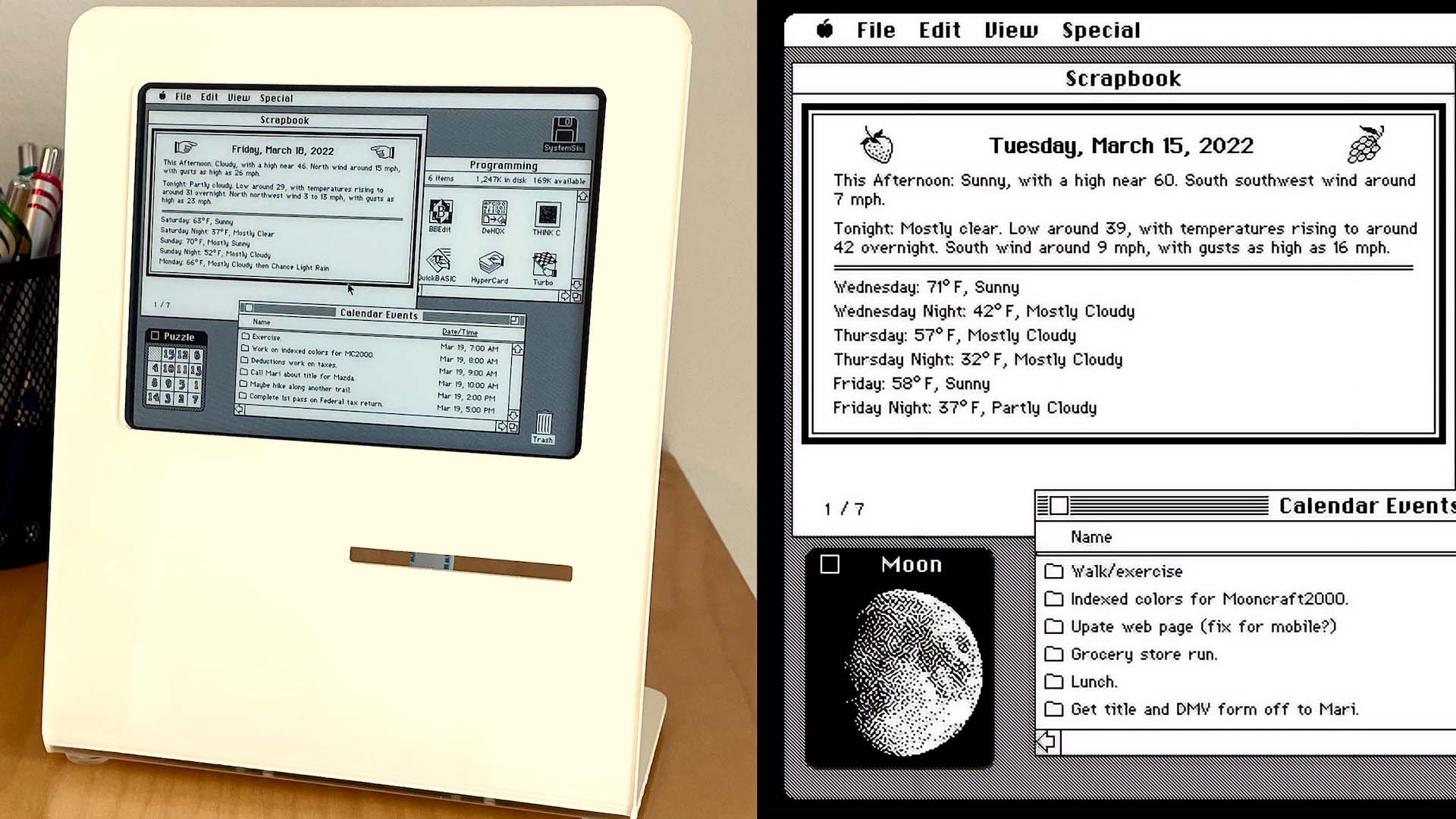
Every so often, a maker project appears that does not try to reinvent computing, defeat physics, or make coffee using machine learning. It simply looks at a beloved object from the past and says, “You know what? This still has charm.” That is exactly the spirit behind SystemSix, a Raspberry Pi-powered e-ink “desk accessory” created by John Calhoun as a loving tribute to the original Macintosh era.
At first glance, SystemSix looks like a miniature classic Mac sitting politely on a desk, perhaps waiting for someone to insert a floppy disk and complain about disk swapping. But this is not a working Macintosh emulator in a tiny case. It is a beautifully styled information display that borrows the visual language of early Mac OS: monochrome pixels, tidy windows, familiar icons, a Finder-like desktop, and the kind of friendly interface that made the 1984 Macintosh feel less like a machine and more like a clever little coworker.
The phrase “desk accessory” is doing double duty here. In modern terms, SystemSix is a literal desk accessory: a small object that sits on your desk and displays useful information such as calendar events, local weather, the date, trash-day reminders, and the phase of the moon. In classic Macintosh terms, Desk Accessories were tiny utility programs that could run alongside the main application before the Mac had true multitasking. That historical wink is what makes the project so satisfying. It is not just retro decoration. It is a tiny design joke with solder joints.
What Is SystemSix?
SystemSix is an e-ink calendar and information display built around a Raspberry Pi 3 and a 5.83-inch Waveshare e-ink panel. The display is mounted in a laser-cut acrylic stand shaped to evoke the compact Macintosh family. The software is written in Python and generates a static desktop image that updates automatically rather than responding to mouse clicks or touch input.
That limitation is part of the charm. SystemSix looks like something you could use, but it behaves more like a framed daily printout from a parallel universe where the classic Mac never stopped being adorable. It pulls in calendar data, shows a weather forecast, changes its layout over time, and can even make the trash icon appear full on a selected day as a reminder to take out the garbage. That last feature is delightfully Macintosh: practical, visual, and just silly enough to make you smile.
The display also includes a moon phase graphic rendered with Atkinson-style dithering, a black-and-white image technique associated with the early Macintosh look. On a 1-bit screen, where pixels are either on or off, dithering creates the illusion of shades and texture. The result is not photorealistic, but it has personality. It looks like the moon was invited to a MacPaint party and arrived wearing a pixelated tuxedo.
Why the Original Macintosh Still Inspires Makers
The original Macintosh, introduced in January 1984, changed personal computing by bringing the graphical user interface to a broad consumer audience. Instead of memorizing commands and typing them into a blank prompt, users could point, click, drag, save, move, and delete through visual metaphors. Folders looked like folders. Trash looked like trash. Documents looked like little pages. It was computing with training wheels, but the wheels were designed so elegantly that many of the ideas still roll today.
The early Mac was not powerful by modern standards. The first model had 128 KB of RAM, a built-in 9-inch monochrome display, a single floppy drive, and a Motorola 68000 processor. Today, a browser tab showing a recipe for banana bread might use more memory than an entire early Macintosh system. Yet the Mac’s constraints forced designers and engineers to be disciplined. Every pixel mattered. Every icon had to communicate quickly. Every menu, window, and alert box had to earn its space.
This is why retro Macintosh-inspired projects continue to resonate. The classic Mac was not merely a computer; it was a complete design language. Its interface combined structure and friendliness. The hardware had a face-like shape. The software greeted users with icons that felt hand-drawn and approachable. Even its limitations became aesthetic strengths. Black-and-white pixels, compact windows, and small utilities created a world that felt understandable.
The Genius of Classic Mac Desk Accessories
Before modern multitasking became ordinary, the Macintosh needed a clever way to let users perform small side tasks without leaving their main application. The solution was Desk Accessories. These were small utilities available from the Apple menu, including Calculator, Alarm Clock, Notepad, Scrapbook, Key Caps, Puzzle, and Control Panel.
The idea was simple: while working in MacWrite, MacPaint, or another main application, users could pop open a calculator, jot down a note, check the time, look up keyboard characters, or store reusable snippets. These accessories were not full applications in the modern sense. They were compact, specialized helpers designed to complement the main task. In a time when memory was scarce and screens were small, this was a smart compromise.
SystemSix borrows that concept in spirit. It is not multitasking software, but it behaves like a helpful side companion. It gives you the information you might glance at during the day without demanding attention. In that sense, it understands something modern devices often forget: not every screen needs to scream. Some screens can simply sit quietly and be useful.
A Design Tribute, Not Just a Nostalgia Machine
Many retro projects succeed because they trigger memory. SystemSix goes further because it also respects design details. It uses classic Mac-inspired windows, icons, menus, and layouts to create the illusion of a small desktop. Calendar events can appear like folder names in a Finder-style window. Weather can live inside a Scrapbook-like panel. The moon phase can appear as if it were an old Desk Accessory.
This matters because nostalgia without accuracy can feel like a cheap costume. A random gray box with a smiley face might remind you of an old Mac, but the illusion breaks quickly. SystemSix pays attention to the visual grammar of the original interface: the black-and-white palette, the pixel spacing, the compact typography, the window chrome, the icon rhythm, and the balance between utility and whimsy.
That attention is especially important because the early Macintosh interface was shaped by legendary contributors. Susan Kare’s icons and fonts helped make the Mac approachable to nontechnical users. Bill Atkinson’s work on QuickDraw and MacPaint influenced the visual style of early graphics software. Andy Hertzfeld and other members of the original Mac team contributed to the system software and the Desk Accessory concept. SystemSix is not copying those achievements; it is tipping its tiny acrylic hat to them.
Why E-Ink Is the Perfect Medium for a Macintosh Homage
E-ink is not fast. It refreshes slowly, often with visible flashing. It is not ideal for video, animation, scrolling dashboards, or anything that expects instant feedback. In other words, it is not trying to be an iPad. Thank goodness. We already have enough glowing rectangles begging for our attention like caffeinated toddlers.
For a project like SystemSix, e-ink is nearly perfect. It is crisp, readable, paper-like, and comfortable to glance at. A calendar, weather display, or daily status board does not need to update sixty times per second. It needs to be legible, low-distraction, and pleasant. The slow refresh becomes acceptable because the information changes only occasionally.
The black-and-white nature of affordable e-ink panels also fits the classic Mac aesthetic. Early Macintosh displays were monochrome, and the interface made the most of that limitation. Instead of chasing color gradients, designers used patterns, icons, outlines, shadows, and dithered images. SystemSix uses the same design logic. It turns technical constraint into visual identity.
The Magic of 1-Bit Design
Modern screens are absurdly capable. They show millions of colors, high refresh rates, deep blacks, HDR highlights, and enough pixels to make old monitors feel like cave paintings. Yet there is still something magnetic about 1-bit design. With only black and white, every decision becomes clear. There is no hiding behind gradients, soft shadows, or decorative blur. The pixel either lives or it does not.
Classic Macintosh graphics used this limitation beautifully. Icons had to be instantly readable at tiny sizes. Fonts had to feel friendly without sacrificing clarity. Windows had to be organized enough for beginners but efficient enough for real work. That discipline is one reason old Mac screenshots remain recognizable decades later.
SystemSix takes advantage of the same visual rules. Its moon phase graphic, rendered through dithering, reminds us that suggestion can be more interesting than perfection. Its small icons and windows show that interface design does not require excess to be expressive. A few pixels can carry a surprising amount of personality when placed with care.
What SystemSix Teaches About Modern Interface Design
Although SystemSix looks backward, it says a lot about what still works today. First, strong visual metaphors remain powerful. A full trash icon as a garbage-day reminder is more memorable than yet another notification badge. A calendar displayed in a Finder-like list feels playful while remaining useful. A moon phase shown as a tiny accessory window turns raw data into a daily ritual.
Second, constraints can make products better. The original Macintosh had severe limits, but those limits encouraged focus. SystemSix has similar constraints: a slow-refresh display, monochrome graphics, a small screen, and noninteractive behavior. Instead of fighting those limits, it embraces them. That is a lesson many modern apps could use. Not every feature needs to become a platform, a subscription, or a “reimagined productivity ecosystem.” Sometimes a useful little thing is enough.
Third, emotional design matters. People love objects that make them feel something. SystemSix is useful, but its usefulness alone is not the point. A plain digital calendar could show the same information. The difference is that SystemSix makes the information feel warm, personal, and connected to computing history. It turns a desk display into a conversation piece.
Retrocomputing Without the Maintenance Headache
Vintage computers are wonderful, but owning one can be an adventure. Old capacitors leak. CRTs can fail. Floppy drives get moody. Plastic yellows. Replacement parts become treasure-hunt items. Sometimes the machine works perfectly, and sometimes it behaves like it has opinions about your life choices.
SystemSix offers a gentler path into Macintosh nostalgia. It does not require maintaining a 1980s machine or hunting for rare disks. It does not ask you to restore a compact Mac motherboard or repair an analog board. Instead, it captures the feeling of the classic Mac and places it into a modern, low-maintenance object.
That makes it appealing not only to retrocomputing enthusiasts but also to designers, makers, Apple fans, and anyone who appreciates thoughtful desk objects. It is the kind of project that can live beside a keyboard, notebook, coffee mug, or soldering iron and still look intentional. It says, “I care about computing history,” without requiring you to explain why there is a 40-year-old beige computer humming in the corner.
Specific Examples of SystemSix’s Charm
The Full Trash Icon Reminder
One of the cleverest details is the configurable trash-day feature. On a chosen day, the trash icon appears full. This is funny because it uses an old desktop metaphor for a real-world chore. It is also practical. A normal reminder notification is easy to dismiss. A full trash can staring at you from a tiny Mac-like display is harder to ignore. It has judgment in its pixels.
The Moon Desk Accessory
The moon phase display works because it feels like something the original Macintosh could have had. It is not essential, but it adds character. The Atkinson-style dithering gives the moon a texture that fits naturally into the monochrome desktop. It is informative, decorative, and historically appropriate.
Finder-Inspired Calendar Events
Displaying calendar events as folder-like entries is a smart way to translate modern information into a classic visual metaphor. Instead of looking like a generic widget, the calendar becomes part of a tiny desktop world. It feels less like data and more like a place.
Random Classic Icons
The use of different layouts and classic icon selections gives the display variety. A static retro screen might be cute for a day, but changing compositions make it feel alive. Not interactive, exactly, but alive in the way a good desk calendar is alive: familiar, useful, and slightly different each morning.
Why the Project Appeals to Apple Fans
Apple’s best-known products often succeed because they blend hardware, software, and emotion. The original Macintosh did this in a way that felt revolutionary. The iMac later revived the all-in-one computer as a colorful consumer object. The iPod made music libraries feel pocketable. The iPhone turned multitouch into a daily habit. SystemSix belongs to a different category, but it understands the same principle: people do not only use technology; they form relationships with it.
For longtime Mac users, SystemSix recalls the friendliness of early personal computing. For younger users, it offers a window into why the Macintosh mattered. It shows that interface design history is not dusty trivia. The ideas behind windows, icons, menus, pointer interaction, copy-and-paste, and desktop metaphors still shape modern computing.
It also reminds us that Apple’s design influence extends beyond official products. Makers continue to reinterpret the Macintosh because the original design remains culturally legible. You can shrink it, emulate it, redraw it, rebuild it, or reference it in acrylic and e-ink, and people still understand the tribute.
Experiences Related to ‘Desk Accessory’ Pays Homage To Macintosh
Anyone who has spent time with an old Macintosh, an emulator, or even a collection of classic Mac screenshots knows that the experience is oddly calming. The screen is small. The colors are absent. The icons are simple. The machine does not try to predict your next purchase, push breaking news, or ask you to enable three new permissions before breakfast. It just sits there, neat and monochrome, like a well-behaved librarian with a tiny bitmap smile.
That is why a project like SystemSix feels more meaningful than a standard retro gadget. It recreates a particular feeling: the pleasure of a computer that seems understandable. Many people first encountered the Mac in a classroom, a design studio, a family office, or a computer lab where the mouse itself felt futuristic. Opening a window, dragging a file, or clicking a calculator was not ordinary yet. It felt like discovering that computers could be visual, friendly, and maybe even fun.
The best experience with a Macintosh-inspired desk accessory is not speed or productivity. It is the small pause it creates. You glance at the display in the morning and see your calendar presented as a tiny desktop. You notice the weather tucked into a nostalgic window. You see the moon rendered in chunky pixels and remember that not every image needs to be ultra-high-definition to be beautiful. Then you get back to work, slightly happier than before.
There is also a hands-on maker satisfaction in this kind of project. Building or studying SystemSix connects several enjoyable disciplines: retro interface design, Python scripting, Raspberry Pi setup, e-ink display handling, pixel art preparation, laser-cut enclosure design, and layout composition. None of those pieces alone is the whole story. The magic comes from the way they combine. Hardware gives the object a body. Software gives it behavior. Classic Mac design gives it soul.
For people who create desk setups, SystemSix also shows that personality matters. A workspace does not have to be a sterile arrangement of aluminum slabs and identical black accessories. A good desk can include objects that tell stories. A Macintosh-inspired e-ink display says something about taste, history, curiosity, and maybe a mild fondness for machines that once made cheerful startup sounds. It is decorative, but not empty. It is functional, but not boring.
There is a deeper lesson, too. The original Macintosh made computers feel approachable by turning abstract operations into visible objects. SystemSix makes daily information feel approachable by turning calendar events and forecasts into a playful desktop scene. That is a surprisingly modern idea. In an age of endless notifications, the calmest interface may be the one that updates quietly, asks for nothing, and looks like it escaped from 1986 with useful weather data.
Using a Macintosh-style desk accessory today is a reminder that technology can be charming without being loud. It can be useful without being addictive. It can honor the past without becoming trapped there. And yes, it can remind you to take out the trash with an icon, which may be the most practical use of nostalgia ever invented.
Conclusion: A Small Object With a Big Macintosh Heart
‘Desk Accessory’ Pays Homage To Macintosh is more than a clever headline. It captures why SystemSix works so well: it understands both meanings of the phrase. It is a real desk object, and it honors the classic Desk Accessories that helped early Mac users do small useful tasks in a limited computing environment.
By combining Raspberry Pi hardware, an e-ink display, Python-generated graphics, classic Macintosh visual references, and thoughtful daily information, SystemSix becomes a charming bridge between computing history and modern maker culture. It does not need to be interactive to be engaging. It does not need color to be beautiful. It does not need to run MacWrite to feel unmistakably Mac-like.
In a world full of screens that constantly demand attention, this little Macintosh-inspired display offers something refreshingly different: quiet usefulness, historical affection, and a reminder that great design can live in a handful of pixels. Sometimes the best tribute to the future of computing is a tiny black-and-white nod to its past.
Note: This article synthesizes real information from reputable technology, museum, design, and computing-history resources, including coverage of SystemSix, early Macintosh hardware, classic Mac OS Desk Accessories, e-ink display behavior, and original Macintosh interface design.