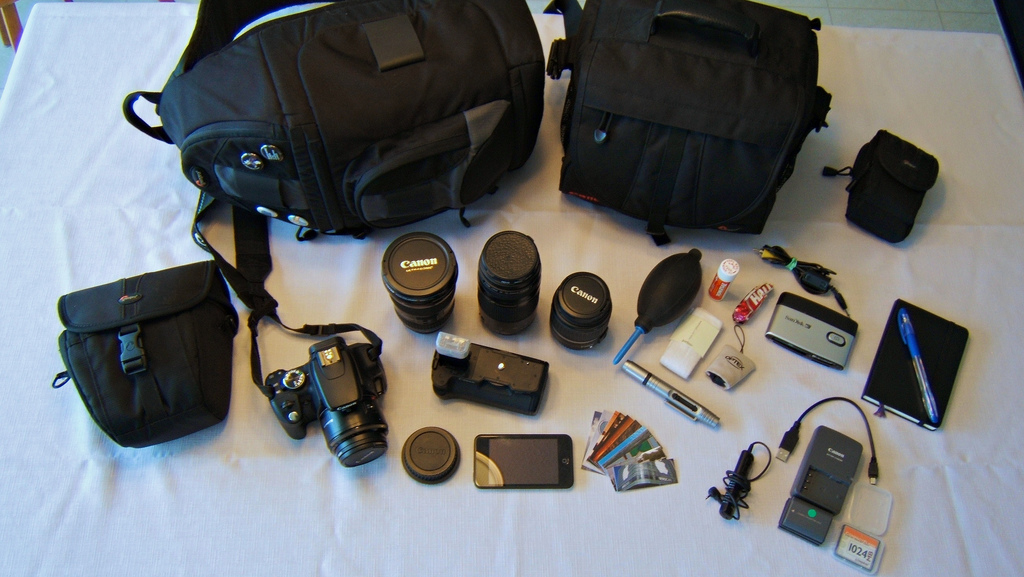
Upgrading a photography system can feel like walking into a candy store where every candy costs as much as a weekend vacation. There are shiny camera bodies promising more megapixels, lenses with names longer than a tax form, tripods built like small bridges, flashes, filters, bags, memory cards, hard drives, and software subscriptions all waving at your wallet like they know your middle name.
But a smarter photography upgrade is not about buying the newest thing. It is about solving the right problem. A new camera body may help if your autofocus cannot keep up with sports or wildlife. A better lens may transform portraits faster than any sensor upgrade. A sturdy tripod may improve landscape images more than another fancy menu button. And sometimes the best upgrade is not gear at all, but a better workflow, a backup system, or the discipline to stop shooting everything at ISO “panic.”
This guide walks you through 10 practical steps for choosing upgrades for your photography system. Whether you shoot family portraits, weddings, products, travel, wildlife, food, real estate, or moody coffee cups beside windows, the goal is the same: spend money where it improves your images, your reliability, or your creative freedom.
Step 1: Identify the Real Limitation in Your Current Photography System
Before upgrading anything, write down what is actually holding you back. Do not start with “I want a full-frame camera.” Start with the problem: “My indoor photos are noisy,” “My lens is not wide enough for small rooms,” “My portraits have distracting backgrounds,” “My files take forever to edit,” or “My tripod wobbles if a squirrel sneezes nearby.”
A useful test is to review your last 500 photos. Look for patterns. Are the images soft because of missed focus, slow shutter speed, low-quality optics, or shaky hands? Are the colors inconsistent because of lighting? Are you losing work because your storage system is a mess? Each problem points to a different upgrade.
If your images are dark and grainy indoors, a fast prime lens, flash, or continuous light may help more than a new body. If your wildlife photos show tiny birds in the center of the frame, you probably need reach, not more megapixels. If your client galleries are delayed because your laptop wheezes during editing, your best photography upgrade may be a faster computer or external SSD. Glamorous? Not always. Useful? Absolutely.
Step 2: Match Upgrades to the Type of Photography You Actually Shoot
A photography system is personal. A landscape photographer, a wedding photographer, and a YouTube creator may all use cameras, but they do not need the same upgrades. Buying gear without considering your genre is like buying hiking boots for a ballroom dance competition. Technically footwear, spiritually confused.
Portrait Photography
Portrait photographers often benefit from lenses with wide apertures, such as 50mm, 85mm, or 70-200mm options, depending on space and style. Lighting upgrades also matter: a flash, softbox, reflector, or simple off-camera lighting kit can create more dramatic improvement than another camera body.
Landscape and Travel Photography
Landscape shooters may prioritize wide-angle lenses, sturdy tripods, polarizing filters, neutral-density filters, weather-resistant bags, and reliable storage. Travel photographers must also consider weight. The best lens in the world is less useful if it stays in the hotel because it weighs more than your enthusiasm.
Sports and Wildlife Photography
For fast action, autofocus performance, burst speed, buffer depth, long lenses, and stabilization become more important. Wildlife photographers usually gain more from a quality telephoto lens and good support than from small body upgrades.
Video and Hybrid Content
If you shoot both stills and video, look at autofocus tracking, in-body stabilization, microphone input, headphone monitoring, heat management, codecs, flip screens, and power options. A video-focused upgrade may include lights, audio gear, a gimbal, or a power zoom lens rather than a traditional stills lens.
Step 3: Upgrade Lenses Before Camera Bodies in Most Cases
For many photographers, lenses deliver the most noticeable image-quality improvement. A sharper lens, a wider maximum aperture, better focal length coverage, or improved stabilization can change what you are able to shoot. Camera bodies come and go, but good lenses often stay useful through multiple body upgrades.
If you are still using only the basic kit zoom, consider adding one carefully chosen lens. A 50mm f/1.8, often called a “nifty fifty,” is popular because it is usually affordable, lightweight, bright, and great for portraits, details, low-light scenes, and learning composition. On crop-sensor cameras, a 35mm lens may provide a similar everyday field of view.
However, do not buy a lens just because the internet applauds it. A 50mm prime is not ideal for every photographer. Real estate shooters may need an ultra-wide lens. Bird photographers may need 400mm, 500mm, or 600mm reach. Product photographers may need a macro lens. Wedding photographers may need a reliable zoom pair, such as a 24-70mm and 70-200mm. Choose focal length based on your subjects, not online popularity contests.
Step 4: Upgrade the Camera Body Only When It Solves a Specific Problem
A new camera body can be a fantastic upgrade when your current body has reached a real limit. The keyword is “real.” If your camera cannot focus accurately on moving subjects, struggles badly in low light, lacks enough dynamic range for your work, overheats during video, or has only one card slot when you shoot paid events, a body upgrade may be justified.
Useful camera body improvements may include better autofocus, improved high-ISO performance, higher resolution, faster burst shooting, deeper buffer, in-body image stabilization, better weather sealing, stronger video features, or dual memory card slots. For professionals, reliability and backup features can matter as much as image quality.
But do not upgrade just because a new model arrived. Camera companies release new bodies often because that is their job. Your job is to make photographs. If your current camera still gives you clean files, reliable focus, and the features you need, a body upgrade may be the least efficient place to spend money.
Step 5: Consider Lighting as a Major Image-Quality Upgrade
Light is the raw material of photography. Buying better gear while ignoring light is like buying a fancy oven and refusing to learn what temperature does. For portraits, products, food, fashion, real estate, and events, lighting upgrades can dramatically improve results.
Start simple. A reflector can fill shadows outdoors. A speedlight can bounce off a ceiling for softer indoor light. A softbox or umbrella can make portraits look more polished. Continuous LED lights can help video creators and product photographers see results before pressing record. For small products, a light tent or diffusion material can reduce harsh reflections.
Lighting also teaches you control. Instead of waiting for “perfect natural light,” you learn to shape contrast, direction, color, and mood. That skill carries across cameras and lenses. A photographer who understands light can make modest gear look expensive. A photographer who ignores light can make expensive gear look like it was assembled during a power outage.
Step 6: Invest in Stability, Support, and Handling
Tripods, monopods, straps, cages, grips, and bags are not as glamorous as lenses, but they affect how often you get sharp, usable images. For landscapes, architecture, macro work, long exposures, product photography, and video, support gear can be essential.
When choosing a tripod, consider stability, height, weight, leg-lock design, material, folded size, and head type. Aluminum tripods are usually less expensive and stable for the price, while carbon fiber models are lighter and better for photographers who hike or travel. A good tripod head matters too. If adjusting the camera feels like wrestling a shopping cart with one bad wheel, you will avoid using it.
For event and travel photographers, a comfortable strap or harness may be a bigger quality-of-life upgrade than expected. If your gear hurts to carry, you will miss shots. If your bag is poorly organized, you will waste time searching for batteries while the perfect moment walks away, probably laughing.
Step 7: Upgrade Your Workflow, Storage, and Backup System
Photography does not end when you press the shutter. Your system includes memory cards, card readers, drives, editing software, monitor calibration, backup habits, and file organization. A weak workflow can ruin a strong camera setup.
Start with memory cards that match your camera’s requirements. For high-resolution bursts or 4K and higher video, card write speed matters. Speed class ratings, UHS ratings, Video Speed Class labels, and card type should match what your camera supports. Buying the fastest card available is not always necessary, but buying a card too slow for your camera can cause buffer delays, recording limits, or failed video capture.
Next, build a backup routine. At minimum, keep your photos in more than one place. For serious work, use a system with local storage, a second backup drive, and cloud or off-site backup. If you use Lightroom Classic, remember that catalog backups protect the catalog database, not necessarily the original photo files. You must back up both the catalog and the actual images.
A calibrated monitor, faster external SSD, reliable card reader, and organized folder structure may not make you feel like a superhero, but they help you deliver better work faster. And fewer “Where did I put that shoot?” emergencies means more time for creativity and less time negotiating with chaos.
Step 8: Check Compatibility Before You Buy
Every photography upgrade should fit your existing system. Check lens mount, sensor format, autofocus compatibility, stabilization behavior, filter size, battery type, memory card type, flash system, tripod plate, software support, and computer performance requirements.
For example, a lens designed for crop-sensor cameras may not fully cover a full-frame sensor. Some adapted lenses work well but may focus slower. A high-resolution camera may expose weaknesses in older lenses or require more storage. A new video camera may record files your aging laptop edits about as smoothly as cold peanut butter.
Also think about long-term ecosystem direction. If you plan to move from DSLR to mirrorless, avoid pouring too much money into gear that does not transfer well unless it serves an immediate purpose. Adapters can be useful, but they are not always magic bridges to perfection. Compatibility research is not exciting, but neither is returning a lens because it fits your camera only in your imagination.
Step 9: Rent, Borrow, Buy Used, or Trade In Before Committing
Major photography upgrades are expensive, so test before you marry the gear. Renting is especially helpful for lenses, specialty cameras, lighting kits, and travel needs. A lens may look perfect on a spec sheet but feel too heavy, focus too slowly, or simply not match your style.
Borrowing from a trusted friend, attending demo days, visiting a camera store, or buying used from a reputable dealer can reduce risk. Used gear can be a smart way to upgrade because many photographers sell excellent equipment after light use. Just check condition, shutter count when relevant, return policy, warranty options, and whether accessories are included.
Trade-in programs can also help fund upgrades. Before selling, compare trade-in value, private-sale value, and the convenience factor. Sometimes the highest price is not worth weeks of messages from strangers asking whether you will trade a professional lens for a scooter and two mystery batteries.
Step 10: Measure Results Before Buying the Next Upgrade
After upgrading, test the gear in real conditions. Do not judge a new lens by photographing your bookshelf at midnight unless your business is dramatic bookshelf journalism. Use it on the subjects you actually shoot. Compare keep rate, sharpness, focus accuracy, editing time, client response, creative options, and your comfort using it.
Create a simple upgrade review after 30 days. Ask: Did this upgrade solve the original problem? Did it create new problems? Am I using it often? Did it improve paid work, personal projects, or learning speed? Would I buy it again?
This habit prevents random gear accumulation. A photography system should become more focused over time, not heavier and more confusing. The best upgrade path is deliberate: solve one bottleneck, learn the new tool, evaluate results, then decide what comes next.
Practical Upgrade Examples
Example 1: The Beginner Portrait Photographer
Problem: Backgrounds look messy, indoor shots are dim, and portraits feel flat. Smart upgrades: a 50mm or 35mm prime lens, a reflector, and one flash with a softbox. Why it works: the lens helps separate subjects from the background, while controlled light improves skin tones, catchlights, and mood.
Example 2: The Travel Photographer
Problem: The camera bag is too heavy, and lens changes are annoying. Smart upgrades: a compact all-purpose zoom, lightweight prime, comfortable backpack, extra batteries, and portable backup drive. Why it works: travel photography rewards mobility. The best system is the one you actually carry.
Example 3: The Wildlife Photographer
Problem: Animals are too far away, and action shots are often missed. Smart upgrades: longer telephoto lens, monopod or gimbal head, faster memory cards, and eventually a body with stronger autofocus. Why it works: reach and tracking matter more than a fashionable camera body.
Example 4: The Paid Event Photographer
Problem: Missed moments, card anxiety, and low-light challenges. Smart upgrades: dual-card-slot body, fast zoom lenses, reliable flash system, spare batteries, and redundant storage. Why it works: paid work demands reliability. Backup gear is not paranoia; it is professionalism with a camera strap.
Common Upgrade Mistakes to Avoid
One common mistake is buying for imaginary future needs. If you have never photographed wildlife, do not start with a giant telephoto lens “just in case.” Another mistake is ignoring accessories that make the system usable: cards, batteries, straps, bags, filters, cleaning kits, and storage.
A third mistake is chasing specifications without understanding trade-offs. More megapixels mean larger files. Faster lenses may be heavier. Full-frame systems can cost more. Professional tripods may be sturdy but unpleasant to carry. Every upgrade has a cost beyond the price tag.
Finally, avoid thinking gear replaces practice. Better equipment expands possibilities, but it does not compose the image, read the light, connect with a subject, or choose the decisive moment. Your skill is still the engine. Gear is the steering wheel, tires, and occasionally the cup holder.
Field Notes: Real-World Experiences When Choosing Photography Upgrades
The most useful lesson from upgrading a photography system is that the “best” purchase is often surprisingly unglamorous. Many photographers dream of a new flagship camera, but the upgrade that changes their daily work might be a fast card reader, a better strap, or a second hard drive. These items do not produce dramatic unboxing videos, but they remove friction. And removing friction is one of the quiet secrets of becoming more consistent.
In portrait work, the first major improvement often comes from understanding focal length and light. A beginner may buy a new camera hoping for creamy backgrounds, only to discover that the kit lens at a narrow aperture still makes every background look busy. Switching to a fast prime lens can help, but the bigger breakthrough happens when the photographer learns to move the subject away from the background and place light intentionally. Suddenly, the same camera looks “better,” even though the sensor did not attend a motivational seminar.
For travel photography, experience teaches restraint. It is tempting to pack every lens because every destination feels like a once-in-a-lifetime opportunity. Then day three arrives, your shoulder files a formal complaint, and you start taking all photos with your phone because the camera bag feels like a punishment. A smaller system can produce better travel images because it keeps you alert, mobile, and willing to explore. The smartest upgrade may be a lighter lens, a weather-resistant sling bag, or a compact tripod that fits your actual walking style.
Event photographers learn another lesson quickly: reliability beats romance. A beautiful lens is wonderful, but spare batteries, extra cards, backup bodies, and a repeatable file-import routine are what keep disasters from becoming client emails with too many exclamation points. If you shoot weddings, performances, conferences, or paid portraits, redundancy is part of the system. Two smaller upgrades that protect your work may be wiser than one flashy purchase that leaves you vulnerable.
Wildlife and sports photographers often discover that technique and patience must grow alongside gear. A longer lens helps, but it also magnifies camera shake, tracking errors, atmospheric haze, and poor fieldcraft. After upgrading to a telephoto lens, many photographers realize they need a monopod, better autofocus settings, faster cards, and practice anticipating movement. The lens opens the door; skill walks through it.
Post-production upgrades are also underrated. A faster computer, calibrated monitor, organized catalog, and reliable backup system can change how confidently you work. When editing becomes smoother, you experiment more. When backups are automatic, you sleep better. When files are organized, old shoots stop vanishing into the digital swamp. A photography system is not only what hangs from your neck. It is everything that helps an image survive from capture to delivery.
The best experience-based advice is simple: upgrade after you can name the problem clearly. “I want better photos” is too vague. “I need sharper handheld low-light portraits at indoor events” is specific. That statement points toward a fast lens, flash, stabilization, or body with better high-ISO performance. The clearer the problem, the smarter the purchase. Your wallet will thank you. Your images will too, although they may express it silently.
Conclusion
Choosing upgrades for your photography system is not about collecting gear like shiny trophies. It is about building a toolkit that supports the images you actually want to make. Start with your limitations, match upgrades to your genre, prioritize lenses and lighting when they solve the problem, and upgrade the camera body only when its features directly improve your work.
Do not forget the less glamorous parts of the system: tripods, memory cards, batteries, storage, backups, editing performance, bags, and workflow. These pieces may not get applause, but they keep your photography life from turning into a circus with missing files.
The smartest upgrade is the one that removes a real obstacle, improves your consistency, and helps you create with more confidence. Buy slowly, test carefully, learn deeply, and remember: the best camera system is not the most expensive one. It is the one that helps you show up, shoot well, protect your work, and keep growing.