
Finding a PayPal username sounds like it should be as easy as finding your Instagram handle. Spoiler alert: PayPal likes to keep things a little more mysterious. Depending on what someone means by “PayPal username,” they may be talking about a PayPal.Me link, a PayPal profile name, a business name, an email address, or even a mobile number connected to an account.
The good news? You do not need a treasure map, a detective hat, or your cousin’s “tech guy” who still uses the same password from 2012. You just need to know where PayPal keeps account identifiers and how to search safely. This guide explains how to find your own PayPal username, how to identify someone else’s PayPal profile, what to do if you cannot find it, and how to avoid sending money to the wrong person.
Before we begin, one golden rule: never share your PayPal password, one-time security code, full card number, bank login, or screenshots that reveal sensitive account details. A PayPal username helps people pay you. Your login and security details help scammers ruin your afternoon.
What Is a PayPal Username, Really?
PayPal does not work exactly like social media. There is no universal public “@username” that every PayPal account must use. In everyday conversation, a PayPal username usually means one of four things:
- Your PayPal.Me handle: the custom name at the end of your PayPal.Me link, such as
paypal.me/YourName. - Your PayPal account email: the confirmed email address people can use to send you money.
- Your mobile number: if confirmed and connected to your account, it may be used for receiving payments.
- Your profile or business name: the name shown when someone searches for you or receives a payment request.
The most common meaning is the PayPal.Me username. If someone asks, “What’s your PayPal username?” they probably want your PayPal.Me link or the email address connected to your PayPal account. If they are sending money through PayPal’s Send and Request feature, they may also be able to search by name, PayPal username, email address, or mobile number depending on privacy settings.
How to Find Your Own PayPal Username
Finding your own PayPal username starts with figuring out which identifier you want to share. For casual payments, a PayPal.Me link is usually the cleanest option because it avoids exposing your email address. For business payments, an invoice or business profile may look more professional. For friends and family, your confirmed email or mobile number may be enough.
1. Look for Your PayPal.Me Link
Your PayPal.Me link is the closest thing PayPal has to a public username. It looks like this:
https://www.paypal.me/YourUsername
The part after paypal.me/ is your PayPal.Me username. For example, if your link is paypal.me/JaneDesigns, your PayPal username is usually considered JaneDesigns.
To find it, log in to your PayPal account on the website or app and check your profile, settings, or PayPal.Me section. Menu names may change depending on your country, device, and account type, but the general path is usually somewhere near your profile settings. You can also visit the PayPal.Me page while logged in. If you already created a link, PayPal may show it there. If you have not created one, you may be prompted to choose a custom link.
Choose carefully. A PayPal.Me handle may not be easy to change once it is created. In other words, do not pick PizzaKing1998 unless you are emotionally prepared to explain it on invoices in 2031.
2. Check Your PayPal Account Email Address
If you do not have a PayPal.Me link, your confirmed PayPal email address is another common way to receive money. To find it, log in to PayPal, go to Settings or Profile, and look for the Emails section. Your primary email address is the main email connected to your account.
You may have more than one email address attached to PayPal, but payments should be sent to a confirmed email address. If someone sends money to an unconfirmed or mistyped email, delays and confusion can follow. Nobody wants a payment floating around the internet like a lost sock in the laundry.
3. Check Your Confirmed Mobile Number
PayPal may also allow people to send money to a confirmed mobile number connected to your account. To check yours, open your account settings and look for the phone number or mobile number section. Make sure the number is current, confirmed, and actually belongs to you.
This is especially important if you changed phone numbers recently. A forgotten old phone number can create headaches, especially if someone tries to pay you using contact search.
4. Review Your Public Profile and Search Privacy Settings
PayPal has privacy settings that may control whether people can search for you by name, email, phone number, PayPal username, PayPal.Me link, or payment request features. If people cannot find your PayPal profile, your search privacy settings may be the reason.
To review them, log in and look under Settings, Profile, Data and Privacy, or search privacy controls. Depending on your account, you may be able to manage whether your personal profile information, PayPal.Me link, or payment request visibility is available to others.
For freelancers, creators, and small business owners, being searchable can make getting paid easier. For private users, limiting visibility may feel more comfortable. The best setting is the one that matches how you actually use PayPal.
How to Find Someone Else’s PayPal Username
Finding someone else’s PayPal username should be simple, respectful, and boring. Boring is good. Boring means nobody gets scammed, nobody sends money to a stranger named “TotallyRealMike,” and nobody has to write an awkward message that starts with, “So, funny story…”
1. Ask for Their Exact PayPal.Me Link
The safest way is to ask the person directly for their PayPal.Me link. A complete PayPal.Me link removes guesswork. Instead of trying to search several people with similar names, you can open the exact link they provide and verify the name, photo, or business details before sending money.
For example, ask: “Can you send me your PayPal.Me link?” That is better than asking, “What’s your PayPal?” because “PayPal” could mean an email, phone number, username, business account, invoice, or a vague hand gesture toward the internet.
2. Search Inside PayPal’s Send and Request Tool
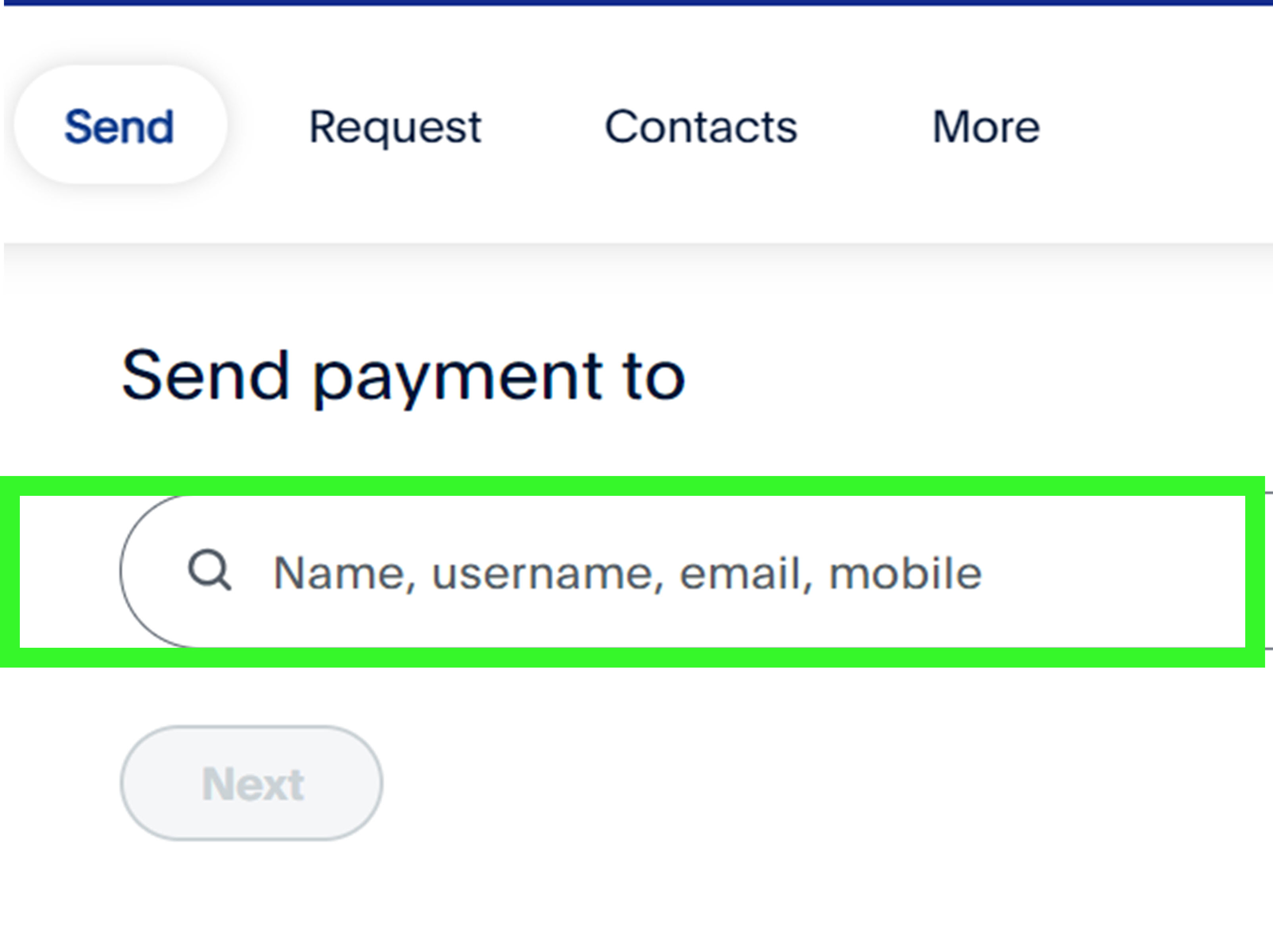
If you are logged in to PayPal, go to Send and Request. PayPal may let you enter the person’s name, PayPal username, email address, or mobile number. If the person is searchable, their profile may appear in the results.
Before you send money, check every detail on the confirmation screen. Look at the profile name, photo, business name, email clues, and payment type. If anything seems off, stop and verify with the person through a trusted communication channel.
3. Use an Invoice or Payment Request
If you are paying a business, seller, freelancer, or service provider, ask them to send a PayPal invoice or payment request. This is often safer than typing a username manually because the request comes through PayPal and shows the recipient details before you pay.
Still, be careful with email links. If you receive an invoice notification that feels suspicious, log in to PayPal directly through the official website or app instead of clicking random links. A real invoice or request should appear inside your PayPal account.
4. Check Their Website or Official Social Profile
Many creators, charities, freelancers, streamers, and small businesses publish their PayPal.Me links on official websites or verified social media profiles. If you find a PayPal link there, compare it with the person’s known brand name, profile photo, or business identity.
Do not rely on random comments, copied links, or screenshots from strangers. Scammers love pretending to “help” by dropping payment links that point to their own accounts. Very generous of them, in the same way a raccoon is generous with your trash can.
What If You Cannot Find a PayPal Username?
If you cannot find a PayPal username, there may be a completely normal reason. The person may not have created a PayPal.Me link. Their privacy settings may hide them from search. They may use a different email address for PayPal than the one you know. They may have a business account under a company name. Or, wild plot twist, they may not have PayPal at all.
Here is what to do:
- Ask for the exact PayPal.Me link, confirmed PayPal email, or mobile number.
- Ask the person to send you a PayPal money request.
- Use a PayPal invoice for business transactions.
- Verify the recipient before sending money.
- Do not guess usernames or send test payments to strangers.
If you are trying to recover your own account because you forgot the login email, use PayPal’s official account recovery option from the login page. Do not ask social media groups to “find your PayPal.” That is like yelling your house key might be under the mat.
Can You Change Your PayPal Username?
You may be able to update some account details, such as your email address, phone number, or account name, but changing a PayPal.Me handle is much more limited. PayPal.Me links are designed to be unique, so you should treat your chosen handle as semi-permanent.
If your PayPal.Me link is embarrassing, outdated, or no longer matches your business, you can check PayPal’s current options inside your account. In some cases, you may be able to turn off the link so people cannot use it to send you money. If you need a deeper change, contact PayPal support directly.
How to Choose a Good PayPal.Me Username
If you are creating a PayPal.Me link for the first time, choose something clear, professional, and easy to type. A great PayPal username should pass the “read it over the phone” test. If someone needs three attempts, two clarifying texts, and a small prayer to type it correctly, choose something simpler.
Good PayPal Username Ideas
- Your real name or a clean variation of it
- Your business name
- Your creator name or brand name
- A short, memorable version of your company name
- A name without confusing numbers, underscores, or odd spelling
PayPal Username Mistakes to Avoid
- Using inside jokes that clients will not understand
- Adding too many numbers or random characters
- Copying another brand’s name
- Using a name that looks like a scam account
- Choosing something you would hate to put on an invoice
For personal use, simple is fine. For business use, make the username match your brand as closely as possible. If your bakery is called Sweet Maple Studio, a PayPal.Me link like paypal.me/SweetMapleStudio is much better than paypal.me/CakeBossDragon777, unless your cakes genuinely breathe fire.
Safety Tips Before Sending Money to a PayPal Username
PayPal usernames and PayPal.Me links are convenient, but convenience can become expensive if you rush. Before sending money, slow down and confirm the recipient.
Check the Recipient Details
Always review the final payment screen. Make sure the name, business name, email, or profile photo matches the person you intend to pay. If you are paying for goods or services, choose the appropriate payment type when available. Friends and Family payments are generally meant for people you personally know, not online purchases from strangers.
Beware of Fake Payment Requests
Scammers may send fake invoices, suspicious money requests, or messages that pressure you to pay quickly. They may claim your account will be charged, your package will be canceled, or your computer has been hacked. Real companies do not need you to panic-click a sketchy payment link at 1:17 a.m.
If something looks suspicious, do not call phone numbers listed in strange invoices or emails. Log in to PayPal directly and check your account activity. Report suspicious requests through PayPal’s tools.
Do Not Share Private Account Information
Someone who needs to pay you only needs a payment identifier, such as your PayPal.Me link, confirmed email address, or mobile number. They do not need your password, security code, bank login, full card details, or identity documents.
If someone says they need those details “to verify the payment,” assume the payment is not the only thing they are trying to collect.
PayPal Username vs. PayPal Email: Which Should You Share?
If privacy matters, a PayPal.Me link is often more convenient than sharing your email address. It is clean, short, and designed for payment sharing. However, your PayPal.Me page may display profile information, so check how it looks before posting it publicly.
Your PayPal email address is also valid for receiving money, but it exposes an email you may use for login or business communication. If you do share an email, make sure it is confirmed in PayPal and spelled correctly. One typo can send your payment journey into a swamp.
For professional use, PayPal invoices are often the best option. They show payment details, item descriptions, amounts, and business information in a structured format. That makes life easier for both the sender and receiver, especially during tax season when everyone suddenly becomes passionate about documentation.
Real-World Experiences: What Usually Happens When People Look for a PayPal Username
In real life, most PayPal username confusion starts with one tiny sentence: “Just PayPal me.” That sounds simple until the sender realizes they do not know whether to use a name, email, phone number, PayPal.Me link, or business account. The recipient assumes the sender knows. The sender assumes PayPal will magically know. PayPal, being a payment platform and not a mind reader, waits patiently while everyone texts in circles.
One common experience is the freelancer-client situation. A designer finishes a logo, the client says, “Send me your PayPal,” and the designer replies with an email address. The client types the email wrong by one letter, sees a profile that looks unfamiliar, and almost sends money anyway. The fix is simple: send a PayPal invoice or a PayPal.Me link, then ask the client to confirm the business name before paying. It feels slightly formal, but it prevents the digital version of handing cash to someone who merely has a similar haircut.
Another common case happens among friends splitting dinner, rent, tickets, or group gifts. Someone says, “What’s your PayPal username?” The recipient sends a PayPal.Me link, and everyone pays in seconds. This is where PayPal.Me shines. It is clean, memorable, and easier than spelling an email address across a noisy restaurant while somebody is arguing about whether mozzarella sticks count as a shared appetizer.
Small businesses also run into username issues when their personal name differs from their brand name. A customer may search for “Bright Oak Prints” but the PayPal account displays “Amanda Wilson.” That mismatch can make customers nervous, even if everything is legitimate. The practical solution is to update business profile details, use invoices, and make sure the PayPal.Me link, website, and social media names all match as closely as possible.
Creators and donation-based communities have a different challenge: public links are convenient, but they also attract spam, fake requests, and impersonators. A creator may post a PayPal.Me link in a video description, then scammers copy the creator’s profile photo and post a similar-looking payment link in comments. The safest habit is to publish one official payment page and remind followers to use only links from verified profiles or the creator’s official website.
The most stressful experience is sending money to the wrong person. It usually happens because someone guessed a username, clicked an old link, or rushed through the confirmation screen. The lesson is boring but powerful: pause before paying. Check the full recipient details. Verify through a trusted message thread. For purchases, use the correct payment type. For strangers, do not use casual payment methods just because the seller promises a “discount.” Discounts are wonderful. Losing your money to a fake seller is less wonderful, unless your hobby is learning fraud prevention the expensive way.
The best PayPal username experience is the one where nothing dramatic happens. You find the right link, verify the recipient, send the payment, and move on with your day. No panic. No awkward refund requests. No “Who is this person I just paid?” moment. That is the goal: make payments simple, but not sloppy.
Conclusion
Finding a PayPal username is mostly about understanding PayPal’s different identifiers. Your PayPal.Me link is the closest thing to a traditional username, while your confirmed email address or mobile number can also be used to receive money. Someone else’s PayPal username can often be found through their exact PayPal.Me link, PayPal’s Send and Request search, an official invoice, or a payment request.
The safest approach is simple: do not guess. Ask for the exact payment details, check the recipient screen, and avoid suspicious links or pressure tactics. PayPal makes sending money quick, but quick should never mean careless. A few seconds of verification can save you from a long customer support adventure starring regret, coffee, and hold music.
Note: PayPal menus, privacy controls, and account features may change over time or vary by country and account type. Always verify payment details inside your own PayPal account before sending money.













