There are plenty of perfectly normal reasons to keep your mobile number private when making a call. Maybe you are calling a stranger from an online marketplace, contacting a client from your personal phone, checking on a repair quote, or simply trying to avoid your number being saved, searched, and passed around like a group-chat rumor with legs.
The good news: making your mobile number appear private is usually simple. The not-so-good news: it is not invisibility magic. Your wireless carrier can still process the call, emergency services may still receive identifying information, toll-free numbers may see call details, and some people automatically ignore calls labeled “Private,” “Blocked,” “Restricted,” or “No Caller ID.” In other words, hiding caller ID is a privacy tool, not a Harry Potter cloak.
This guide explains five easy ways to make your mobile number appear private, when each method works best, what to watch out for, and how to use caller ID privacy responsibly.
What Does It Mean to Make Your Mobile Number Appear Private?
When you make a phone call, your caller ID usually sends your phone number to the person or business receiving the call. If your number is saved in their contacts, they may see your name. If not, they may simply see your phone number, location label, or carrier-provided caller ID name.
Making your mobile number appear private means blocking that caller ID information from displaying on the recipient’s screen. Depending on the phone, carrier, and receiving network, your call may show as “Private,” “Anonymous,” “Blocked,” “Restricted,” or “Unknown.”
However, this is different from caller ID spoofing. Blocking your caller ID hides your number. Spoofing means changing the caller ID to show another number or misleading identity. Spoofing can be illegal when used to defraud, cause harm, or wrongfully obtain anything of value. So, for this article, we are focusing on legitimate privacy methodsnot shady villain-lair behavior.
1. Dial *67 Before the Number for One Private Call
The fastest way to hide your mobile number for a single call in the United States is to dial *67 before the phone number. This is called per-call caller ID blocking.
How to use *67
Open your phone keypad, type *67, then enter the full phone number you want to call. For example, you would dial something like *67-555-123-4567. Then press the call button as usual.
When the recipient gets the call, your number should not appear. Instead, they may see a label such as “Private Number,” “Blocked,” or “No Caller ID.” This method is useful when you only want to hide your number once, such as calling a seller, returning a one-time inquiry, or contacting someone without giving them your personal mobile number forever.
When *67 works best
*67 is ideal for occasional privacy. It does not change your phone settings permanently, and it does not require downloading an app. It is also easy to remember once you have used it a few times. Think of it as the sunglasses-and-baseball-cap version of caller ID privacy: quick, simple, and not overly dramatic.
Limitations of *67
There are a few catches. Caller ID blocking may not work when calling emergency services, toll-free numbers, or certain business numbers. Some recipients block anonymous calls automatically. Also, you must dial *67 every time you want your number hidden. Forget the code, and your number goes out wearing a name tag.
2. Turn Off Caller ID on iPhone
If you use an iPhone and want your number hidden on more than one call, check the built-in caller ID setting. Apple includes an option called Show My Caller ID, although availability depends on your carrier.
How to hide caller ID on iPhone
Go to Settings, tap Apps, choose Phone, then tap Show My Caller ID. If the toggle is available, turn it off. After that, your outgoing calls should appear private until you turn the setting back on.
On some iPhones or carrier plans, you may not see this option. That does not necessarily mean your phone is broken. It usually means your carrier controls caller ID blocking from the network side. In that case, you may need to use *67 for single calls or contact your wireless provider to request a caller ID blocking feature.
When iPhone caller ID blocking is useful
This method is helpful if you make frequent outgoing calls and do not want to enter a code every time. For example, freelancers, landlords, volunteers, caregivers, and small business owners sometimes use their personal phones for practical reasons but still want a layer of privacy.
Just remember: if every outgoing call appears private, some people may not answer. For important calls, you may need to send a text first, leave a clear voicemail, or temporarily turn caller ID back on.
3. Hide Caller ID on Android
Android caller ID settings vary by device manufacturer, Android version, carrier, and phone app. That sounds messy because, frankly, Android settings sometimes behave like a junk drawer with Wi-Fi. Still, the general path is usually similar.
Common Android caller ID steps
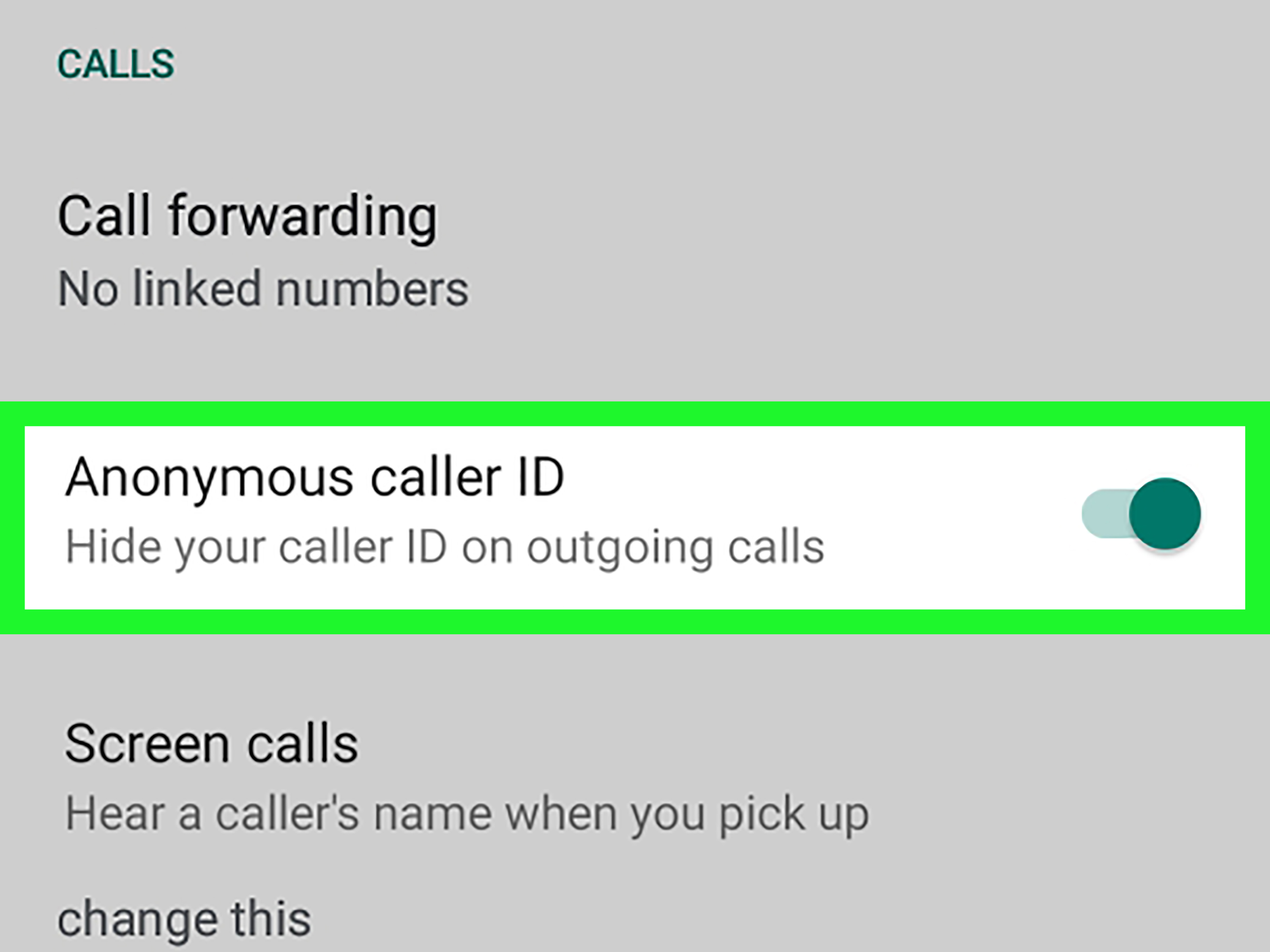
Open the Phone app, tap the three-dot menu or settings icon, then look for Settings, Calling accounts, Supplementary services, Additional settings, or Caller ID. Choose the option to hide your number if it is available.
On some Android phones, the setting may be labeled Network default, Hide number, or Show number. Select Hide number to make your mobile number appear private on outgoing calls.
Use #31# on some phones
Some mobile networks and devices also support #31# before a number to block caller ID for a single call. For example, you may dial #31#5551234567. Availability varies, so test it with a trusted contact before relying on it for an important call.
What if the Android option is missing?
If you cannot find the setting, your carrier may not allow device-level caller ID control. You can still try *67 for individual calls or contact your carrier to ask about permanent caller ID blocking.
4. Ask Your Carrier for Caller ID Blocking
If you want your mobile number to appear private by default, your wireless carrier may be able to add caller ID blocking to your line. Major U.S. carriers provide caller ID blocking options, though the exact process may vary by plan, phone type, and account settings.
Carrier-level blocking explained
Carrier-level caller ID blocking works from the network side rather than only from your phone. Once enabled, your outgoing caller ID may be blocked automatically. This is useful if you regularly need privacy and do not want to remember star codes or dig through settings before every call.
For example, AT&T explains that *67 can block caller ID for one call and that some users can set devices to block or display caller ID on all calls. T-Mobile explains that dialing *67 before the number can make the call appear private. Verizon also supports caller ID blocking options, including temporary and permanent blocking.
How to request carrier blocking
Log in to your carrier account, open the carrier app, or contact customer support. Ask specifically for outgoing caller ID blocking or permanent caller ID blocking. If you manage a family plan or business account, make sure you are changing the correct line. Nobody wants to accidentally make Grandma’s bingo calls anonymous.
How to unblock your number for one call
If permanent blocking is enabled, many carriers allow you to reveal your number for a single call using a code such as *82, depending on the service. Check your carrier’s instructions before relying on this, because star codes can vary by network and service type.
5. Use a Second Number Instead of Your Main Mobile Number
Sometimes the best way to keep your mobile number private is not to hide it during calls, but to avoid giving it out in the first place. A second number can protect your main mobile number while still letting people call or text you.
What is a second number?
A second number is an additional phone number that works through an app, VoIP service, business phone system, or separate SIM/eSIM. Services such as Google Voice, business phone platforms, and second-line apps can help separate personal calls from work, online selling, dating, travel, volunteering, or temporary projects.
With this method, the recipient may still see a number, but it is not your primary mobile number. That means you can screen calls, block contacts, turn notifications off, or retire the number later if it starts attracting spam.
When a second number is better than “Private”
A second number often gets better answer rates than a blocked caller ID. Many people ignore “Private Number” calls because they assume it is a scam, a robocall, or someone asking about their car’s extended warranty for the 900th time.
For small business owners, consultants, real estate agents, delivery coordinators, online sellers, and freelancers, a second number feels more professional. It protects your main number while still giving the recipient something recognizable to call back.
Important Things to Know Before Hiding Your Number
Private does not mean untraceable
Caller ID blocking is not a guarantee of total anonymity. Your carrier still handles the call. Emergency services may receive identifying information. Businesses may have call records. Law enforcement may be able to request information through proper legal channels. So, do not treat private caller ID like a secret identity.
Some calls will not go through
Many people and businesses use anonymous call rejection, spam filters, or call screening. If your call appears private, it may be ignored, silenced, or sent straight to voicemail. For important calls, consider leaving a clear message that explains who you are and why you called.
Do not use caller ID privacy for harassment
Hiding your number should be used for legitimate privacy, not deception, threats, harassment, impersonation, or scams. If the goal is to trick someone, pressure someone, or avoid accountability, step away from the dial pad and maybe drink some water.
Which Method Should You Choose?
Use *67 if you only need privacy once in a while. Use iPhone or Android caller ID settings if you want a convenient built-in option. Ask your carrier for caller ID blocking if you want a more permanent setup. Use a second number if you need privacy plus professionalism, especially when people need to call you back.
For most people, the best privacy strategy is a mix. Use your main number for trusted contacts, use a second number for public-facing situations, and use *67 for occasional one-off calls. That gives you flexibility without making every call look like it came from a mysterious cave.
Real-Life Experiences: What Actually Happens When You Make Your Number Private
In real life, making your mobile number appear private is less dramatic than people imagine. Nobody hears thunder. Your phone does not glow. The recipient simply sees “Private,” “Unknown,” or “No Caller ID,” and then decides whether answering feels worth the emotional risk. That decision is where the practical experience begins.
One common experience is calling someone from an online marketplace. Suppose you are selling a used desk, a bicycle, or a suspiciously heavy box of “miscellaneous cables” that every household somehow owns. You may not want strangers saving your personal mobile number. Dialing *67 before the call can help you ask a quick question without exposing your number. But if the buyer ignores private calls, you may need to message through the marketplace instead. In this situation, a second number often works better because it protects your main line while still looking like a normal call.
Another experience comes from freelancers and small business owners. Many people start by using their personal phone for client calls. At first, it feels efficient. Then clients begin calling during dinner, weekends, holidays, and that sacred five-minute window when the coffee is finally hot. Hiding caller ID can protect your personal number when returning calls, but it may look unprofessional if every client sees “Blocked.” A dedicated business number is usually cleaner. It creates a boundary without making the client feel like they are being contacted by a spy agency with invoice templates.
People also use private caller ID when contacting repair companies, apartment managers, schools, volunteer organizations, or local services. The benefit is control. Your number is not automatically handed to every database, callback list, or sticky note on someone’s desk. The downside is follow-up. If the person misses your call, they cannot call you back unless you leave a voicemail with your preferred contact method. That is why private calls work best when you are prepared to communicate clearly.
Caregivers sometimes learn this lesson quickly. Imagine calling a doctor’s office, pharmacy, or service provider on behalf of a family member. If your number is hidden, the office may not answer or may have trouble matching the call to the right record. In cases involving health, safety, appointments, or urgent logistics, showing your number may be more practical. Privacy is valuable, but so is being reachable when something actually matters.
There is also the social side. Some people see a private number and immediately assume spam. That reaction is not personal; it is survival. After years of robocalls, fake bank alerts, warranty scams, and mystery numbers, many people treat hidden caller ID like a raccoon at a picnic: maybe harmless, but nobody is inviting it closer. If you want your call answered, send a message first or use a second number with a clear identity.
The biggest lesson from everyday use is simple: caller ID privacy is about choosing the right tool for the moment. For a one-time call, *67 is quick. For frequent privacy, phone or carrier settings are easier. For ongoing communication, a second number is usually the most reliable. The goal is not to disappear; it is to share your personal number more carefully.
Conclusion
Learning how to make your mobile number appear private gives you more control over your personal information. Whether you use *67, iPhone settings, Android caller ID controls, carrier-level blocking, or a second number, the right method depends on how often you call, who you are calling, and whether you need them to call you back.
For quick privacy, use *67. For regular privacy, adjust your phone or carrier settings. For better long-term boundaries, use a second number. Most importantly, use these tools responsibly. Privacy is smart. Misuse is not. And ignored private calls? Unfortunately, those are still part of the deal.
Note: Caller ID privacy tools should be used for legitimate personal privacy, safety, and boundary-setting. They should not be used for harassment, impersonation, fraud, or any misleading activity that violates laws, carrier policies, or basic human decency.