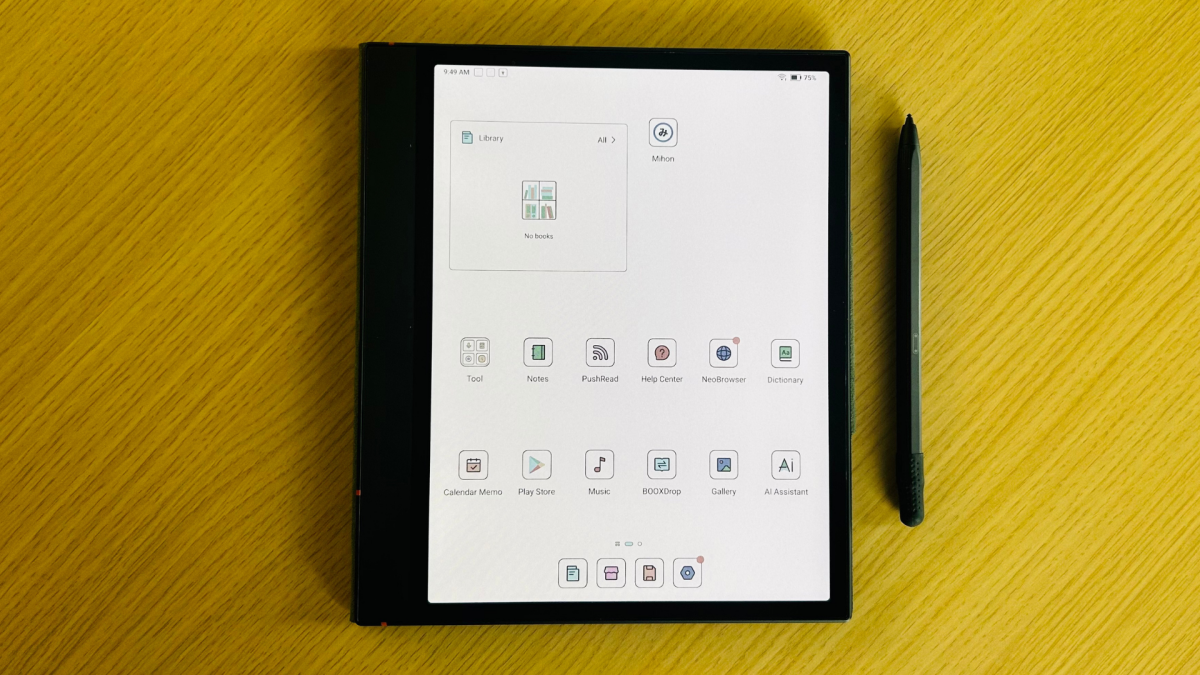
The Boox Note Air 4C is what happens when an e-reader, a digital notebook, and an Android tablet all sit at the same lunch table and decide to become one device. It is not a Kindle with a few extra tricks. It is not an iPad wearing a paper-texture costume. It is a 10.3-inch color E Ink productivity tablet built for people who read PDFs, annotate documents, sketch ideas, organize notes, and still want access to apps like Kindle, Libby, Google Drive, Dropbox, OneNote, Evernote, and a browser.
That makes this Boox Note Air 4C review slightly different from a normal e-reader review. You cannot judge this device only by page turns, battery life, or whether it fits in a jacket pocket. The Note Air 4C is designed for a bigger job: replacing a pile of notebooks, a basic e-reader, and maybe even some light tablet tasks. It does all of that surprisingly well, although not without a few charming E Ink quirks. Yes, ghosting happens. No, Netflix is not invited to this party.
Boox Note Air 4C at a Glance
The Boox Note Air 4C features a 10.3-inch Kaleido 3 color E Ink display with 300 ppi resolution for black-and-white content and 150 ppi for color. It supports 4,096 colors, which is enough for highlights, charts, comics, magazine layouts, planner stickers, and color-coded notes. It is not enough to make photos look like they came from an OLED phone. Think “pleasant printed newspaper,” not “Times Square billboard.”
Under the hood, the Note Air 4C runs Android 13 on an octa-core processor with 6GB of RAM and 64GB of internal storage. It also includes a microSD card slot, Wi-Fi, Bluetooth 5.1, a USB-C port with OTG support, built-in speakers, a microphone, a fingerprint reader in the power button, and a 3,700mAh battery. At about 420 grams and only 5.8 mm thick, it feels more like a premium notebook than a traditional tablet.
Design: Thin, Serious, and Very “I Have a Meeting at 9”
The Note Air 4C has a clean, professional design with a wide side bezel that gives your thumb somewhere to live. That sounds minor until you try holding a large e-reader with no grip area and realize your hand is doing gymnastics. The slim body makes it easy to slide into a backpack, tote, or laptop sleeve, and the included Boox Pen Plus attaches magnetically to the side.
This is not a device made for one-handed subway reading. A Kindle Paperwhite still wins the “standing in line at the pharmacy” category. But for reading at a desk, marking up PDFs on a couch, or reviewing meeting notes at a coffee shop, the Note Air 4C’s larger screen is a blessing. Academic papers, spreadsheets, manuals, textbooks, and business documents finally have room to breathe.
Display Quality: Color E Ink With Realistic Expectations
The main attraction is the color ePaper display. The Boox Note Air 4C uses Kaleido 3 technology, which adds a color filter layer over E Ink. The result is easy on the eyes and genuinely useful for reading visual content. Highlights look better. Comics are more enjoyable. Charts become easier to understand. Digital planners feel less like grayscale homework.
However, color E Ink is still color E Ink. It is soft, muted, and slightly grainy compared with an iPad, Samsung Galaxy Tab, or any modern laptop. If you expect bright comic-book colors, you may feel like someone turned the saturation knob down to “polite.” But if you want enough color to organize ideas without blasting your retinas, the Note Air 4C hits a smart balance.
Best Uses for the Color Screen
The color display is especially helpful for PDF annotation, textbooks, business reports, calendars, mind maps, and web articles with graphics. It also makes note-taking more organized because you can use different pen colors for headings, corrections, questions, and priority items. If your current notebook looks like a crime scene of sticky tabs, color coding on the Note Air 4C may bring peace to the kingdom.
Reading Experience: More Open Than a Kindle
As an e-reader, the Boox Note Air 4C is powerful because it does not lock you into one bookstore. Since it runs Android and supports third-party apps, you can install Kindle, Kobo, Libby, Hoopla, Instapaper, Pocket-style reading apps, RSS readers, cloud storage apps, and more. That flexibility is the main reason many readers consider Boox devices in the first place.
The built-in NeoReader app supports a wide range of formats, including PDF, EPUB, MOBI, AZW3, DOCX, TXT, CBR, CBZ, PPT, PPTX, and more. That makes the Note Air 4C far more file-friendly than many mainstream e-readers. If you read a mix of ebooks, comics, research papers, scanned documents, and work files, this device handles the mess better than most.
For novels, the large display can feel luxurious at home but less convenient for travel. For PDFs and textbooks, it is a major upgrade. The ability to use split-screen mode is another productivity win: you can read on one side and take handwritten notes on the other. Students, researchers, teachers, consultants, lawyers, writers, and professional note-hoarders should immediately understand the appeal.
Note-Taking: The Real Reason to Buy It
The Boox Note Air 4C is not just an e-reader with a pen. It is a serious digital notebook. The writing feel is smooth, quick, and satisfyingly paper-like. The Pen Plus supports 4,096 levels of pressure sensitivity, and the native Notes app includes multiple pen types, templates, layers, shapes, lasso tools, handwriting recognition, and organizational features.
For daily notes, the experience is excellent. You can create separate notebooks for meetings, classes, projects, journals, reading notes, recipes, client calls, or that mysterious “ideas” folder where ambitious plans go to nap. Templates include lined paper, grids, planners, to-do lists, and more structured layouts. The writing latency is low enough that most people will stop thinking about it after a few minutes.
Handwriting Recognition and AI Tools
Boox includes handwriting recognition and smart tools that can convert handwritten notes into text, clean up shapes, and improve organization. These tools are not magic, but they are useful. If your handwriting looks like a spider walked through wet ink, results may vary. Still, for reasonably legible notes, conversion is good enough for searching, exporting, and turning scribbles into usable text.
Android Apps: Freedom With a Learning Curve
The Note Air 4C’s Android 13 software is both its biggest advantage and its biggest source of occasional confusion. On the bright side, access to the Google Play Store means you are not trapped inside a tiny e-reader ecosystem. You can install reading apps, note apps, email, calendars, cloud storage, task managers, and reference tools.
On the not-so-bright side, Android apps are not always designed for E Ink. Some apps look great. Others need display adjustments. Boox gives you controls for contrast, refresh rate, dark color enhancement, animation filtering, and app-specific optimization. Power users will love this. Casual users may wonder why their e-reader suddenly has more settings than a spaceship.
Once configured, the flexibility is impressive. The Kindle app works well for Amazon readers. Libby is excellent for library books. Google Drive and Dropbox make document transfer easy. OneNote and Evernote are usable, though many people will prefer Boox’s native note app for handwriting. Web browsing is fine for reading articles and research, but it is not as fluid as an LCD tablet.
Performance: Good for E Ink, Not for Tablet Gymnastics
Thanks to the octa-core processor, 6GB of RAM, and Boox Super Refresh technology, the Note Air 4C feels fast by E Ink standards. Page turns, note-taking, app switching, and document navigation are generally smooth. Compared with simpler e-readers, it feels much more capable. Compared with an iPad, it feels slower because E Ink refreshes differently.
That difference matters. The Note Air 4C is excellent for reading, writing, annotating, organizing, and light productivity. It is not built for gaming, video streaming, heavy browsing, or image editing. You can open YouTube, but the experience is more “science experiment” than “movie night.” This device wants you to read a thoughtful article, not binge a cooking competition at 2 a.m.
Battery Life: Better Than a Tablet, Worse Than a Kindle
Battery life depends heavily on how you use the Note Air 4C. If you mostly read with Wi-Fi off and moderate front light, it can last several days or more. If you use Android apps, sync files, browse the web, keep Wi-Fi on, and use higher refresh modes, battery life drops much faster. That is the trade-off for having tablet-like flexibility on an E Ink device.
Compared with a Kindle Paperwhite, the battery life is unimpressive. Compared with an iPad, it is refreshing. The best way to think about it is this: the Note Air 4C is a productivity ePaper tablet, not a simple ebook reader. Charge it like a work device, not like a Kindle you forgot in a drawer for three weeks and somehow still works.
Boox Note Air 4C vs. Kindle Scribe, Kobo Elipsa 2E, and reMarkable
The Kindle Scribe is simpler and better for people who mainly live in Amazon’s ecosystem. It has a sharp black-and-white screen, strong battery life, and a less intimidating interface. But it lacks the same level of app freedom and file flexibility.
The Kobo Elipsa 2E is a strong alternative for readers who want a large e-reader with notebook features and better openness than Kindle. However, it is still more focused on reading than full Android productivity. The reMarkable line, especially the Paper Pro, offers a famously focused writing experience and a minimalist interface, but it does not give you the same app access as Boox.
The Boox Note Air 4C sits in the middle of all these devices. It is less simple than Kindle, less minimalist than reMarkable, and more powerful than most traditional e-readers. Its biggest strength is versatility. Its biggest weakness is also versatility, because more freedom means more settings, more choices, and occasionally more fiddling.
Who Should Buy the Boox Note Air 4C?
The Boox Note Air 4C is ideal for students, researchers, writers, consultants, project managers, teachers, lawyers, designers, and heavy readers who want one device for books, notes, PDFs, and apps. It is especially useful if your reading life is spread across Kindle, library apps, PDFs, cloud folders, and random documents sent by people who apparently fear file consistency.
You should consider buying it if you want a color E Ink tablet for serious note-taking, PDF annotation, reading across multiple platforms, and light productivity. You should avoid it if you want a cheap e-reader, a bright entertainment tablet, waterproof beach reading, or the simplest possible interface.
Pros and Cons
Pros
- Large 10.3-inch color E Ink display is excellent for PDFs, notes, and visual reading.
- Android 13 and Google Play Store access make it far more flexible than most e-readers.
- Strong native note-taking app with templates, layers, pen tools, and handwriting recognition.
- Supports many document formats and expandable storage via microSD.
- Thin, light, professional design with adjustable warm and cool front light.
- Split-screen mode is genuinely useful for studying, research, and work.
Cons
- Color is muted compared with LCD or OLED tablets.
- Battery life cannot match simpler Kindle-style e-readers.
- Android apps may require display tweaking.
- Interface can feel complex for beginners.
- Not ideal for video, gaming, or fast scrolling.
- Premium pricing makes it a serious purchase, not an impulse gadget.
Verdict: A Brilliant Niche Device for the Right Person
The Boox Note Air 4C is one of the most versatile color E Ink devices available. It succeeds because it understands a specific kind of user: someone who wants to read deeply, write often, annotate documents, sync files, and avoid the full chaos of a normal tablet. It is not perfect, and it is not for everyone. But for the right person, it can replace a Kindle, a stack of notebooks, a PDF reader, and part of a tablet workflow.
The key is expectation. If you want a media tablet, buy an iPad. If you want a tiny vacation e-reader, buy a Kindle or Kobo. But if you want a color e-reader and digital notebook in one, with Android app freedom and serious productivity tools, the Boox Note Air 4C is an excellent choice. It is nerdy, capable, slightly complicated, and surprisingly delightful. In other words, it is the rare gadget that may actually help you focus instead of giving you another glowing rectangle to doomscroll on.
Extended Experience Notes: Living With a Color E-Reader and Digital Notebook
The best way to understand the Boox Note Air 4C is to picture a normal weekday. In the morning, it can sit on a desk as a planner. You open a daily template, jot down three priorities, circle one meeting in red, and write a reminder to send a file before lunch. Unlike a paper planner, those notes can be searched, copied, exported, synced, or reorganized later. Unlike a phone, it does not tempt you with ten notifications and a video of a raccoon stealing cat food.
During work or school, the device becomes more useful. You can open a PDF on one side of the screen and a notebook on the other. This is where the large display earns its keep. A small e-reader can technically open PDFs, but reading dense documents on a tiny screen feels like trying to study through a keyhole. On the Note Air 4C, margins, diagrams, and footnotes are easier to manage. Color highlights add another layer of organization. Yellow can mean “important,” blue can mean “question,” and red can mean “future me, please handle this before it becomes a problem with shoes on.”
For reading, the experience changes depending on the material. Novels look clean and comfortable, though the large size makes casual one-handed reading less natural. Comics and magazines benefit from color, but the muted palette gives them a printed, subdued look. Articles from the web are excellent when saved or read through a clean reading app. The screen encourages slower reading, which sounds like a downside until you realize slower reading is often better reading.
The notebook experience is where the device starts to feel personal. Handwriting on the Note Air 4C has enough friction to feel controlled, and the ability to switch pen styles makes notes more expressive. A fountain pen tool can make ordinary meeting notes feel oddly elegant. A pencil tool is better for sketching. A marker works well for headings and diagrams. After a few days, the appeal becomes less about technology and more about habit. You reach for the device because it feels like a notebook, but behaves like a searchable filing cabinet.
There are still moments when the E Ink nature of the device reminds you to slow down. Web pages can ghost. Some Android apps look strange until optimized. Fast scrolling is never as smooth as on a regular tablet. But those limitations also create the product’s personality. The Note Air 4C is not trying to be the loudest screen in your life. It is trying to be the quietest useful one. For readers, note-takers, and document-heavy workers, that quiet usefulness is exactly the point.
Conclusion
The Boox Note Air 4C is a premium color E Ink tablet that combines the best parts of an e-reader, digital notebook, and light Android productivity device. Its color screen is not vivid like an iPad, but it is practical, comfortable, and perfect for highlights, diagrams, comics, and structured notes. Its stylus experience is smooth, its format support is broad, and its app access gives it an advantage over more locked-down competitors. The trade-offs are real: battery life is shorter than a basic Kindle, the interface has a learning curve, and it is not made for entertainment. Still, for anyone who reads seriously, writes often, and wants fewer paper notebooks without losing the joy of handwriting, the Boox Note Air 4C is a smart, capable, and genuinely useful device.
Note: This article is based on real product specifications, current market information, and reputable hands-on review coverage available for the Boox Note Air 4C. Prices, firmware features, and app performance may vary by region, retailer, and software update.