The RC2014 Z80 computer is the kind of machine that makes modern laptops look suspiciously overqualified. It does not stream 4K video, run a browser with 47 tabs, or interrupt your life with software updates at the exact moment you need to print a shipping label. Instead, it gives you something far rarer: a clear, physical, understandable computer that you can build, inspect, break, repair, expand, and actually understand.
At its heart, the RC2014 is a modular 8-bit computer kit built around the classic Zilog Z80 processor. It was originally designed to run Microsoft BASIC and to evoke the homebrew computer spirit of the late 1970s and early 1980s. That means no mystery motherboard covered in black-box chips, no hidden firmware maze, and no pretending that “the cloud” is a place where your files wear tiny halos. The RC2014 is a computer in the old-school sense: CPU, RAM, ROM, serial interface, clock, and expansion bus, all sitting there politely waiting for you to learn something.
This review looks at what makes the RC2014 special, who should buy it, what it feels like to build and use, where it shines, and where it asks for patience. Spoiler: if you love retro computing, electronics education, CP/M, BASIC programming, or the warm smell of solder in the morning, this little Z80 machine has serious charm.
What Is the RC2014 Z80 Computer?
The RC2014 is not a clone of one specific vintage computer. It borrows the mood of systems like the ZX81, Apple I, UK101, Superboard II, and S-100 bus machines, but it remains its own thing. That is one of its strongest qualities. Instead of trying to be a museum replica, it works as a modern homebrew platform inspired by early personal computing.
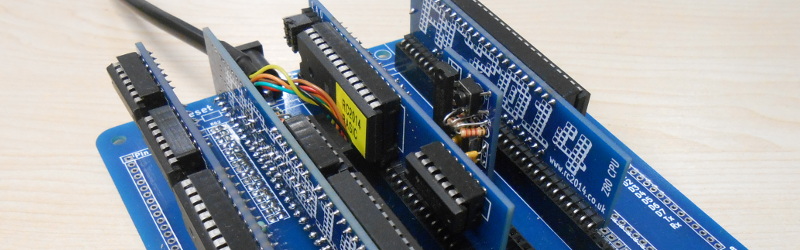
The standard RC2014 concept is modular. A typical system uses a backplane, and individual boards plug into it. One board may hold the Z80 CPU, another RAM, another ROM, another serial interface, and another clock or storage module. This layout makes the computer unusually readable. You can point at each card and say, “That is memory,” “That is serial communication,” or “That is the processor doing its tiny 8-bit dance.”
Depending on the model, the RC2014 may boot into Microsoft BASIC, Small Computer Monitor, CP/M 2.2, or RomWBW. The Classic-style systems are excellent for learning the fundamentals, while the Pro and expanded builds open the door to CP/M, Compact Flash storage, more RAM, and a much richer software environment.
Core Specifications and Design
The classic RC2014 configuration is commonly associated with a Z80 CPU running at 7.3728 MHz, 8K ROM, 32K RAM, and serial communication at 115,200 baud. More advanced kits, such as the RC2014 Pro, typically include 64K RAM, a Zilog SIO/2 serial module, Compact Flash storage, a pageable ROM module, and a larger enhanced backplane.
Why the Z80 Still Matters
The Z80 is one of the most important 8-bit processors in computing history. It powered home computers, embedded systems, industrial controllers, game machines, and hobby projects for decades. For learners, it remains a fantastic processor because it is powerful enough to be useful but simple enough to study without needing a degree, three espressos, and a therapist.
Modern CPUs are amazing, but they are not exactly beginner-friendly at the hardware level. The RC2014 brings computing back to a scale where address lines, data lines, ROM, RAM, clock signals, and serial ports feel visible and logical. You are not merely using a computer; you are having a conversation with its architecture.
The Backplane Is the Star
The RC2014’s backplane design is what separates it from many single-board retro kits. A single-board computer can be elegant, but the modular backplane turns the machine into a learning laboratory. Want to upgrade RAM? Add storage? Try a different serial board? Experiment with digital I/O? The RC2014 ecosystem encourages exactly that.
The use of standard 0.1-inch headers is a practical gift to hobbyists. It means the platform is friendly to prototyping, custom modules, and third-party add-ons. You can build a system that starts as a simple BASIC machine and eventually becomes a CP/M workstation with storage, extra firmware, terminal options, and more expansion than your desk may emotionally support.
Building the RC2014: Solder, Patience, and Small Victories
The RC2014 is sold as a kit, so assembly is part of the experience. This is not a plug-and-play consumer gadget. It is a “warm up the soldering iron and clear the kitchen table” kind of project. Fortunately, the design is friendly to builders. Most components are through-hole, chips are usually socketed on many kits, and the boards are spacious enough that you do not need the eyesight of a falcon or the hands of a watchmaker.
For someone with basic soldering experience, assembly is straightforward. For a complete beginner, it is still manageable, but the build should be approached carefully. Sort the resistors, check capacitor orientation, inspect solder joints, and do not rush. The RC2014 is forgiving, but it is still electronics. It will not reward “close enough” wiring with poetry and applause.
Documentation and Learning Curve
The official build guides and community documentation are useful, and the surrounding community has produced a huge amount of practical knowledge. Still, the RC2014 is not always as hand-holding as a modern beginner kit. That is partly because it is a real expandable computer, not a toy pretending to be educational.
The build teaches real lessons: how buses work, why clock signals matter, how RAM and ROM occupy address space, why serial communication settings must match, and how a machine boots from almost nothing into a working prompt. These lessons are far more satisfying when learned by building the machine yourself.
First Boot: The Joy of Seeing a Prompt
After assembly, the first boot is the moment of truth. You connect the RC2014 to a computer through a serial interface, open a terminal program such as PuTTY, Tera Term, or screen, set the correct baud rate, and apply power. If everything is right, the system responds with a prompt. It may be BASIC, a monitor, or a CP/M boot option depending on your configuration.
That first prompt feels absurdly exciting. Logically, it is just text on a screen. Emotionally, it is fireworks. You built a computer, and the computer has spoken. It may not say much, but honestly, neither did many computers in 1981.
Running BASIC
For many users, BASIC is the best first stop. It gives the RC2014 an immediate personality. You can type short programs, run loops, print messages, experiment with variables, and experience programming in a way that feels direct and uncluttered.
There is something refreshing about writing a ten-line BASIC program and seeing it run instantly. No package manager. No framework. No mysterious dependency named after a woodland animal. Just you, the prompt, and the machine.
Moving Into CP/M
The RC2014 becomes much more powerful when configured for CP/M, especially with Compact Flash storage. CP/M 2.2 opens access to classic software, programming languages, text tools, utilities, and games. It also gives the machine a more complete operating system feel.
With CP/M, the RC2014 changes from “cool educational kit” to “small retro workstation.” You can save files, transfer software, run assemblers, explore old development tools, and understand why CP/M was such an important operating system before MS-DOS became dominant.
Software Ecosystem: BASIC, CP/M, RomWBW, and Small Computer Monitor
The RC2014 software ecosystem is one of the main reasons the platform remains interesting. It is not just a board that blinks and then retires to a drawer. It has multiple firmware and operating system options, each offering a different style of computing.
Microsoft BASIC
Microsoft BASIC on the RC2014 is ideal for immediate interaction. It is simple, nostalgic, and surprisingly useful for learning. You can write small programs, test logic, and get a feel for how early home computers encouraged experimentation.
Small Computer Monitor
Small Computer Monitor is a more technical environment. It is useful for inspecting memory, loading code, experimenting with machine-level operations, and treating the RC2014 like a proper development target. It is less friendly than BASIC, but more revealing.
CP/M 2.2
CP/M is where many RC2014 users eventually want to go. It turns the machine into something that feels historically serious. Under CP/M, the RC2014 can run classic software and development tools. Add Compact Flash storage, and the usability improves dramatically.
RomWBW
RomWBW is another major option for expanded systems. It provides a ROM-based environment for Z80 and related platforms, with support for CP/M-style workflows, storage devices, and useful built-in software. For users who want a more capable retro-computing setup, RomWBW makes the RC2014 feel less like a bare experiment and more like a flexible vintage-style computer platform.
Expansion and Community Support
The RC2014’s greatest long-term strength is expansion. Official modules and third-party boards allow users to add storage, serial ports, digital input and output, video terminals, sound, memory upgrades, alternative CPUs, and prototyping boards. The ecosystem also overlaps with RC2014-compatible and RCBus designs, giving builders a wide path for upgrades.
This matters because many retro kits become boring after the first successful boot. The RC2014 does not. It invites you to keep going. Today you run BASIC. Tomorrow you add Compact Flash. Next week you try CP/M. Then you start wondering whether you can build a custom I/O board. Shortly after that, you are reading Z80 assembly language at midnight and telling yourself this is completely normal behavior.
Performance: Slow by Modern Standards, Fast Enough for Fun
Judged against a modern desktop, the RC2014 is hilariously underpowered. Judged against its intended purpose, it is quick, responsive, and satisfying. A Z80 running at around 7.3728 MHz is more than enough for BASIC programs, CP/M utilities, text interaction, simple games, assembly experiments, and hardware control tasks.
The RC2014 is not about raw speed. It is about transparency. Every limitation becomes part of the learning experience. Memory is finite. Storage matters. Serial speed matters. Efficient code matters. You begin to appreciate what early programmers achieved with so little hardware. It is humbling in the best possible way.
Who Should Buy the RC2014?
The RC2014 is an excellent choice for retro-computing fans, electronics hobbyists, educators, programmers curious about assembly language, and anyone who wants to understand computers below the operating-system level. It is also a strong kit for people who enjoy modular hardware and want a platform they can expand over time.
It is not the best choice for someone who wants an instant retro gaming console, a polished consumer product, or a no-solder beginner device. If your idea of a computer project is “open box, press button, done,” the RC2014 may feel demanding. If your idea of fun is “why is this serial terminal showing garbage characters,” welcome home.
Pros and Cons
Pros
- Excellent educational value for learning 8-bit computer architecture.
- Modular design makes the system easy to understand and expand.
- Strong software options including BASIC, CP/M, RomWBW, and Small Computer Monitor.
- Friendly through-hole assembly on many kits.
- Active ecosystem of official and third-party modules.
- Great platform for Z80 assembly, hardware hacking, and retro development.
Cons
- Requires soldering and careful assembly.
- Documentation can feel scattered for complete beginners.
- Serial terminal setup may confuse first-time users.
- Basic kits may need upgrades for CP/M and practical file storage.
- No modern convenience layer, which is either a weakness or the entire point.
RC2014 vs. Other Retro Computer Kits
Compared with many single-board Z80 kits, the RC2014 feels more expandable and more educational at the bus level. A compact single-board machine may be cheaper or tidier, but the RC2014’s modules make the architecture easier to see. Compared with vintage computers, the RC2014 is easier to maintain because it uses modern PCBs, available kits, and a living community.
It also avoids one of the biggest problems with original vintage hardware: age. Old computers are wonderful, but they often arrive with failing capacitors, tired keyboards, brittle plastic, and power supplies that deserve a cautious stare. The RC2014 gives you the vintage computing experience without requiring you to negotiate with 40-year-old hardware gremlins.
Final Verdict: Is the RC2014 Worth It?
Yes, the RC2014 Z80 computer is absolutely worth it for the right buyer. It is not merely a retro ornament. It is a practical, expandable, deeply educational computer kit that rewards curiosity. The build process teaches electronics. The boot process teaches architecture. BASIC teaches immediacy. CP/M teaches computing history. Expansion teaches hardware design. And the whole thing teaches humility, because one misplaced jumper can make a very confident adult question every decision they have ever made.
The RC2014 succeeds because it understands its mission. It does not pretend to be modern. It does not apologize for being simple. It offers a hands-on path into the roots of personal computing, where every byte matters and every module has a job. For learners, makers, programmers, and retro-computing fans, it is one of the most engaging Z80 computer kits available.
Hands-On Experience: Living With the RC2014 Z80 Computer
The best way to describe the RC2014 experience is this: it makes computing feel physical again. In modern computing, so much happens behind sealed aluminum, encrypted storage, cloud services, and software layers thick enough to stop a small meteor. With the RC2014, the computer is right there in front of you. The CPU is not an abstract brand name. It is a chip in a socket. The RAM is not a number in a settings panel. It is a board on the bus. The serial connection is not magic. It is the conversation line between your terminal and the machine.
Building the kit creates a different relationship with the computer. You do not simply own it; you earn it. Each resistor, socket, capacitor, and header becomes part of the story. When the machine finally boots, the prompt feels personal. It is not just a startup screen. It is proof that your solder joints, jumper settings, patience, and troubleshooting all survived contact with reality.
Using the RC2014 day to day is charmingly deliberate. You think before you type. You notice memory. You notice storage. You notice that a serial terminal is both simple and powerful. Running BASIC feels playful, especially when small programs appear instantly and behave exactly as written, including the bugs you lovingly created yourself. Moving into CP/M adds another layer of satisfaction. Suddenly the system feels like a small historical workstation, capable of running classic tools and saving real files.
The RC2014 also changes how you understand old software. Programs from the CP/M era were written for machines with tight limits, and using them on real Z80-style hardware makes their efficiency easier to appreciate. A text editor, assembler, or file utility that fits into tiny memory by modern standards begins to feel like a magic trick. It is a reminder that good software is not always large software.
The occasional frustration is part of the package. A terminal set to the wrong baud rate can produce nonsense characters. A jumper in the wrong position can make the machine seem dead. A cold solder joint can hide like a tiny villain under a header pin. But these problems are educational rather than meaningless. Each fix teaches something. Each mistake makes the machine less mysterious.
After spending time with the RC2014, the biggest surprise is how alive it feels despite being so simple. It invites tinkering. It encourages reading schematics. It makes assembly language tempting. It turns expansion into an adventure rather than a shopping decision. The RC2014 is not just a computer you use; it is a computer you grow into. That is rare, and it is exactly why this Z80 kit remains such a rewarding project.
Conclusion
The RC2014 Z80 computer is a beautifully honest retro-computing kit. It is educational, expandable, historically meaningful, and genuinely fun. It is not built for convenience; it is built for understanding. If you want to learn how classic computers work, experiment with CP/M, write BASIC or assembly, and enjoy a modular hardware platform with real personality, the RC2014 deserves a serious look.