Mouseflow is a capable behavior analytics platform, but it is not automatically the best fit for every website. Some teams want simpler heatmaps. Others need deeper product analytics, stronger customer feedback tools, or a free option that does not make the finance team break into a cold sweat.
That is where the best Mouseflow alternatives come in. The right platform can help you watch session replays, identify rage clicks, find form abandonment problems, study conversion funnels, and understand why visitors behave like they have accidentally entered an escape room.
In this guide, we compare four leading website heatmap tools and session replay software options: Hotjar, Microsoft Clarity, Fullstory, and Lucky Orange. Each has a different sweet spot, from free UX analytics for growing websites to enterprise-level behavioral analytics for digital products with more moving parts than a Swiss watch.
Why Businesses Look for Mouseflow Alternatives
Mouseflow already offers a strong mix of session recordings, heatmaps, funnel analysis, form analytics, feedback tools, and user journey insights. That makes it useful for conversion rate optimization and website UX research. Still, a solid feature list does not always mean a perfect match.
Teams usually explore alternatives for one of five reasons:
- They need a lower-cost or free behavior analytics platform.
- They want built-in surveys, interviews, or customer feedback tools.
- They need deeper product analytics for web apps or mobile apps.
- They run an e-commerce store and want conversion-focused features such as live chat, form analytics, and visitor segmentation.
- They need a simpler interface that lets non-technical marketers find answers without summoning a data analyst from a cave.
The key is to avoid choosing software based on the biggest feature checklist. Instead, choose the tool that best supports the decisions your team makes every week. A small marketing team may need visual proof that a call-to-action is being ignored. A SaaS product team may need to connect errors, frustration signals, funnels, and retention. An online store may need to see why shoppers add products to a cart, then disappear into the internet fog.
Quick Comparison: Which Mouseflow Alternative Is Best?
| Tool | Best For | Standout Strength | Potential Limitation |
|---|---|---|---|
| Hotjar | Marketing teams and UX research | Heatmaps, recordings, surveys, and feedback | May not be deep enough for complex product analytics |
| Microsoft Clarity | Budget-conscious websites and high traffic | Free session recordings and heatmaps | Limited native feedback and form-analysis tools |
| Fullstory | SaaS, product, and enterprise teams | Advanced digital experience and product analytics | Can be more than a small site needs |
| Lucky Orange | E-commerce and conversion optimization | Funnels, form analytics, surveys, and live chat | Less focused on enterprise product analytics |
1. Hotjar: Best for User Feedback and Straightforward UX Research
Hotjar remains one of the most recognizable names in user behavior analytics. It is now part of the Contentsquare platform, but its appeal is still familiar: it makes behavioral data easier to understand for marketers, designers, founders, and anyone who has ever looked at Google Analytics and thought, “Yes, but why are people doing that?”
Hotjar combines heatmaps, session recordings, feedback widgets, surveys, and user interviews into a fairly approachable workflow. That combination makes it a natural Mouseflow alternative for teams that need more than a visual map of clicks. You can observe behavior, then ask visitors what they were trying to accomplish or why they did not convert.
Why We Recommend Hotjar
Hotjar is especially helpful when a website problem is not purely technical. For example, a heatmap may show that visitors are scrolling past a pricing table. A recording may reveal that they hesitate at a confusing plan comparison. A survey can then ask whether the pricing is unclear, the benefits feel weak, or the visitor simply came looking for free pizza.
Its visual reports are easy to share with stakeholders. Instead of saying, “Our usability data indicates suboptimal CTA engagement,” you can show a heatmap with a big, empty cold spot sitting on top of your most important button. That tends to get attention.
Best Use Cases for Hotjar
- Landing page optimization
- Marketing website redesigns
- Customer feedback collection
- UX research for small and midsize businesses
- Teams that want heatmaps and surveys in one place
Choose Hotjar over Mouseflow when direct visitor feedback matters as much as behavior tracking. It is a strong option for teams that want to pair session replay data with surveys and qualitative UX research.
2. Microsoft Clarity: Best Free Mouseflow Alternative
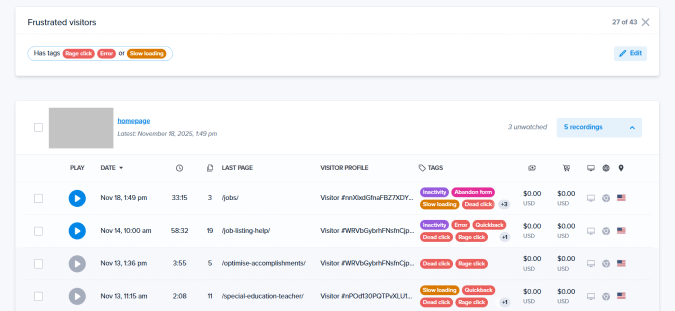
Microsoft Clarity is the obvious recommendation for businesses that want meaningful behavioral insight without adding another monthly software bill. It provides free session recordings, heatmaps, behavioral filters, and frustration signals such as rage clicks and dead clicks.
That makes Clarity an excellent starting point for content sites, small businesses, SEO teams, startups, and high-traffic websites. You can install the tracking script, connect your analytics workflow, and start watching real user sessions without treating every recorded visitor like a premium collectible.
Why Microsoft Clarity Stands Out
The biggest advantage is simple: Clarity gives many teams enough UX insight to make real improvements before they need a paid platform. It can show when visitors repeatedly click non-clickable elements, scroll aggressively in search of missing information, or abandon a page after an awkward interaction.
For SEO and content teams, this is particularly valuable. A page may rank well and attract traffic, yet still fail to lead visitors toward a newsletter sign-up, product page, or contact form. Clarity helps reveal whether readers are consuming the content, getting distracted by interface clutter, or clicking a decorative image because it looks suspiciously like a button.
Where Clarity Has Limits
Microsoft Clarity is not designed to replace every feature in Mouseflow. It is lighter on built-in surveys, feedback campaigns, advanced form analytics, and broader conversion-rate optimization workflows. It is better viewed as an exceptionally strong observation tool rather than a full customer-research suite.
Best Use Cases for Microsoft Clarity
- Websites that need free heatmaps and session replay
- SEO landing page analysis
- High-traffic blogs and publishing sites
- Early-stage startups testing user experience
- Teams that already use separate survey or analytics software
Choose Microsoft Clarity over Mouseflow when budget is the deciding factor and you mainly need reliable recordings, heatmaps, and friction signals. It is not flashy, but free, useful, and uncomplicated is a surprisingly powerful combination.
3. Fullstory: Best for Enterprise Product and Digital Experience Analytics
Fullstory is the heavyweight option on this list. While Mouseflow is heavily focused on website behavior analytics, Fullstory is designed for teams that need a broader view of digital experience across products, customer journeys, web applications, and mobile experiences.
It combines session replay with product analytics, funnels, journey analysis, user segmentation, frustration signals, dashboards, and deeper investigation tools. Rather than simply showing that visitors clicked around nervously, Fullstory helps product teams understand which behaviors correlate with failed conversions, support tickets, churn risk, or feature adoption.
Why We Recommend Fullstory
Fullstory works well when your website is not merely a brochure site. If you operate a SaaS platform, customer portal, marketplace, fintech dashboard, or complex online workflow, you may need more than heatmaps. You need to understand the sequence of actions that leads to success or failure.
Imagine a user trying to complete an onboarding flow. Traditional analytics might tell you that 38% of users exit during step three. Fullstory can help the team drill into the behavior behind that number: confused clicks, validation errors, repeated backtracking, delayed page interactions, or an entire group of users getting stuck after a specific device or browser event.
Another major strength is privacy control. Any organization using session replay should carefully configure data capture, mask sensitive fields, and review consent requirements. Fullstory is especially relevant for teams that need more detailed privacy controls and stronger governance around captured user experience data.
Best Use Cases for Fullstory
- SaaS platforms and web applications
- Enterprise customer journey analysis
- Product teams investigating adoption or churn
- Mobile and web experience analytics
- Organizations with advanced privacy and governance needs
Choose Fullstory over Mouseflow when your team needs product analytics and digital experience intelligence at a larger scale. It is likely excessive for a five-page local business site, but it can be enormously valuable when a broken workflow costs real revenue, retention, or customer trust.
4. Lucky Orange: Best for E-Commerce and Conversion Rate Optimization
Lucky Orange is built for businesses that want to turn visitor behavior into practical conversion improvements. It combines session recordings, dynamic heatmaps, conversion funnels, form analytics, surveys, live visitor views, segmentation, and live chat tools.
That mix makes Lucky Orange particularly useful for e-commerce stores, lead-generation sites, agencies, and marketers who want to identify a problem and act on it without bouncing between five separate platforms. One minute you can watch a shopper abandon a checkout form; the next, you can inspect the form field, review the funnel, launch a survey, or engage visitors through live chat.
Why Lucky Orange Is a Strong Mouseflow Alternative
Lucky Orange is highly action-oriented. Many behavior analytics tools are excellent at showing friction but leave the next move up to you. Lucky Orange gives marketers more built-in ways to respond. This makes it useful for teams focused on revenue, leads, and customer engagement rather than purely product research.
Its dynamic heatmaps are especially useful on pages with pop-ups, changing content, product variants, menus, and interactive checkout elements. Static heatmaps can miss the context behind interactions. Dynamic visualization helps reveal what visitors actually experience when a page behaves less like a printed brochure and more like a small digital circus.
Best Use Cases for Lucky Orange
- Shopify and e-commerce stores
- Checkout and cart abandonment analysis
- Lead-generation funnels
- Agencies managing multiple client websites
- Marketing teams that need live chat and feedback tools
Choose Lucky Orange over Mouseflow when your primary goal is conversion rate optimization. It is especially useful when heatmaps, recordings, form analytics, funnels, surveys, and visitor communication need to work together instead of living in separate software subscriptions.
How to Choose the Right Mouseflow Alternative
The best option depends less on which platform has the longest feature list and more on which questions you need answered. Start with the problems your team is trying to solve.
Choose Hotjar If You Need Better Qualitative Feedback
Hotjar is a great choice when you want to combine visual behavior data with surveys, feedback widgets, and UX research. It is especially useful for marketers, designers, and product owners who need to understand user intent, not just clicks.
Choose Microsoft Clarity If You Need Free UX Analytics
Clarity is ideal for businesses that want heatmaps and session recordings without worrying about traffic limits or a growing monthly bill. It works well as a first behavioral analytics tool or as a lightweight companion to GA4.
Choose Fullstory If You Need Deep Product Analytics
Fullstory is built for teams that need to connect user behavior with product performance, customer journeys, adoption, retention, and technical friction. It is best for complex digital products rather than simple marketing websites.
Choose Lucky Orange If You Need More CRO Tools in One Platform
Lucky Orange is a practical choice for e-commerce stores and lead-generation teams. It gives you a broad set of conversion tools that can help identify and address friction quickly.
How to Get Value From Any Session Replay Tool
Installing behavior analytics software is easy. Using it well is the hard part. The following process helps turn recordings and heatmaps into real website improvements:
- Use GA4 or your main analytics platform to identify pages with poor conversion, high exits, or low engagement.
- Review heatmaps to see where visitors click, scroll, hesitate, or ignore important content.
- Watch a focused sample of session recordings instead of randomly binge-watching visitors like a reality show.
- Create a clear hypothesis, such as “Visitors cannot find the delivery information” or “Mobile users think the product image is clickable.”
- Make one measurable change at a time.
- Track whether the change improves conversion rate, engagement, form completion, or customer satisfaction.
Also, treat privacy as part of implementation rather than an afterthought. Mask sensitive fields, review the data your tracking script captures, configure consent behavior correctly, and limit access to recorded sessions. Behavioral insight is valuable. Accidentally collecting information you did not need is not.
Final Verdict: The Best Mouseflow Alternative Depends on Your Goal
There is no single winner for every business. Hotjar is our recommendation for teams that want an accessible mix of heatmaps, recordings, and visitor feedback. Microsoft Clarity is the best free alternative for websites that want powerful baseline UX data. Fullstory is the strongest choice for advanced product analytics and enterprise digital experience analysis. Lucky Orange is the most practical pick for e-commerce and conversion-focused marketers.
The smartest approach is to begin with your highest-value user journey. It might be a checkout flow, lead form, onboarding sequence, pricing page, or article-to-product path. Then choose the platform that helps you understand that journey faster and improve it with the least amount of detective work.
Real-World Experience: What We Have Learned From Using Mouseflow Alternatives
In real projects, the biggest surprise is how often the “obvious” website problem is not the actual problem. A team may assume that visitors are leaving because the price is too high. Then session recordings reveal something much less dramatic: the shipping cost is hidden, the size guide opens in a strange new tab, or the checkout button looks disabled even when it is not.
Hotjar tends to shine when teams are still forming a habit of UX research. Its reports are easy to understand, and surveys can fill in the missing context. We have seen teams discover that visitors were not confused by the product itself; they simply wanted one unanswered detail, such as delivery timing, compatibility, return policies, or whether a service included setup. A tiny line of clarifying copy can sometimes beat a full redesign. That is good news for everyone except the person who spent three weeks preparing a 74-slide redesign presentation.
Microsoft Clarity is often the best first step because it lowers the barrier to experimentation. A growing content site can use it to learn whether users reach the newsletter form. A local business can see whether mobile visitors struggle to tap the phone number. An SEO team can use it to discover that readers are clicking a bolded phrase because they expect it to lead somewhere. These are not glamorous discoveries, but they are exactly the sort of details that quietly improve conversion performance.
Fullstory becomes more valuable as a product becomes more complex. In software products, a funnel chart alone can be frustrating because it tells you where users disappear but not what went wrong. Watching the related sessions can expose patterns that numbers hide: an error message that flashes too quickly, a filter that resets unexpectedly, a field that rejects a valid format, or a workflow that makes perfect sense only to the person who designed it. Those insights can save support teams from answering the same confusing question 400 times.
Lucky Orange is particularly effective for e-commerce because shopping behavior is wonderfully messy. Shoppers open product images, switch variants, compare pages, scroll back to shipping details, abandon a cart, return three days later, and occasionally click the logo six times as if it contains a secret discount portal. Lucky Orange’s combination of recordings, funnels, form analytics, surveys, and live engagement tools helps marketers connect those moments into a usable action plan.
The lesson across all four platforms is simple: do not collect behavior data just because it looks impressive in a dashboard. Start with one business question. Review enough evidence to find a pattern. Make one change. Measure the result. Then repeat. The best user behavior analytics tool is not the one with the most colorful heatmap. It is the one that helps your team stop guessing and start fixing the right things.