
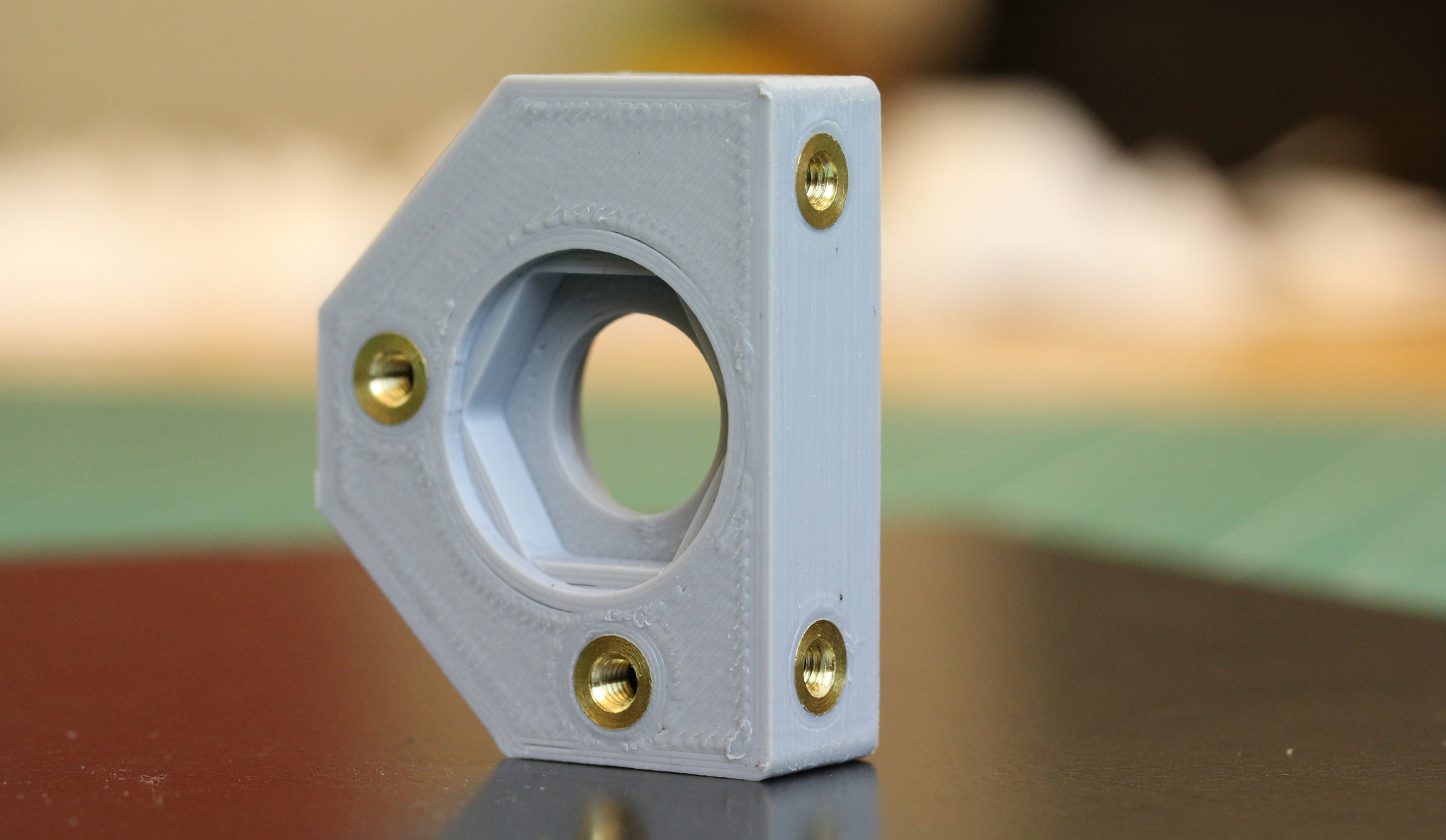
There comes a moment in every maker’s life when a 3D printed part looks perfect, feels strong, bolts together beautifully…and then the screw strips the plastic like it owes it money. That is the moment heat-set inserts enter the chat.
Heat-set inserts are small metal threaded sleeves, usually brass, that are installed into plastic parts using heat. Instead of forcing a screw directly into printed plastic, you melt the surrounding thermoplastic just enough for it to flow around the knurled outer surface of the insert. Once cooled, the insert becomes a durable metal thread locked inside the print. The result is a stronger, cleaner, reusable threaded connection that can survive repeated assembly without turning your carefully printed bracket into fancy spaghetti.
For anyone building functional 3D printed partsrobot frames, printer mods, camera mounts, enclosures, jigs, fixtures, drones, cosplay armor, electronics cases, or anything with “please don’t fall apart” energyheat-set inserts are one of the easiest upgrades you can make.
What Are Heat-Set Inserts?
Heat-set inserts are threaded metal components designed to be embedded into plastic. The inside has machine threads, such as M2, M3, M4, M5, #4-40, or 1/4-20. The outside usually has knurls, ridges, grooves, or opposing textures that give molten plastic places to flow and grip.
When installed correctly, the insert does two jobs at once. First, it gives your 3D printed part real metal threads, which are far more wear-resistant than printed or tapped plastic threads. Second, it distributes fastening stress into the surrounding plastic instead of concentrating it along a fragile printed thread profile.
That matters because 3D printed parts are not isotropic like machined metal. FDM prints have layer lines. Resin prints can be brittle. SLS nylon is strong but still plastic. A screw thread cut directly into any of these materials may work for light-duty use, but repeated tightening, vibration, or overenthusiastic “just one more quarter turn” behavior can ruin the hole.
Why Use Heat-Set Inserts Instead of Tapping Plastic?
They Handle Repeated Assembly Better
If a part will be assembled once and then left alone forever, tapping plastic may be acceptable. But if the part needs to be opened for maintenance, repaired, adjusted, upgraded, or repeatedly bolted together, heat-set threaded inserts are usually the better choice. Metal threads resist wear far better than plastic threads.
They Improve Strength and Reliability
A properly installed insert has better pull-out and torque resistance than a bare plastic thread. Pull-out strength is how hard it is to yank the insert straight out. Torque-out strength is how well it resists spinning in the hole when a screw is tightened. The knurled outer surface of the insert is what helps it lock into the plastic after cooling.
They Make Parts Look More Professional
There is also the “nice build” factor. A flush brass insert in a clean 3D printed boss makes a project look engineered rather than improvised during a caffeine emergency. It tells the world, “Yes, I measured twice, printed once, and only cried a little.”
Best Materials for Heat-Set Inserts
Heat-set inserts work best in thermoplasticsmaterials that soften when heated and harden again when cooled. Common FDM materials such as PLA, PETG, ABS, ASA, polycarbonate, and nylon can all accept heat-set inserts, though each material behaves differently.
PLA softens easily, which makes installation beginner-friendly, but it can deform if the insert is overheated or if the part later sits in a hot car. PETG is tougher and more temperature-resistant than PLA, but it can get stringy and gummy during installation. ABS and ASA respond well but require higher temperatures and good ventilation when printing. Nylon is strong and excellent for functional parts, but it may need more controlled installation because it can be slippery and heat-sensitive in its own charmingly stubborn way.
For resin 3D prints, be careful. Fully cured SLA and MSLA resins are thermosets, meaning they do not melt and reflow like FDM thermoplastics. Trying to install a hot insert into cured resin can crack, crumble, or burn the part. For resin prints, consider press-fit inserts, screw-to-expand inserts, glued inserts, captive nuts, or printed threads with proper clearance.
Tools You Need
You do not need a machine shop to use heat-set inserts. You need patience, a steady hand, and ideally a soldering iron that is not also being used to repair headphones from 2009.
Basic Tool List
- Heat-set inserts in the correct thread size
- 3D printed part with properly sized pilot holes
- Temperature-controlled soldering iron
- Heat-set insert installation tip, preferably flat-bottomed
- Tweezers or needle-nose pliers
- Small square, jig, or drill press-style insert press for alignment
- Scrap test print for calibration
- Matching screws for final assembly
A regular soldering iron tip can work, but a dedicated insert tip makes the process much easier. It holds the insert centered and applies heat evenly. For multiple inserts or small production runs, a vertical press or printed soldering iron jig can help keep every insert straight.
How To Design Holes for Heat-Set Inserts
The most important part of heat-set insert success happens before installation. It happens in CAD. A perfect installation tool cannot save a bad hole design, just as a racing spoiler cannot save a grocery cart.
Use Manufacturer Dimensions First
Always start with the insert manufacturer’s recommended hole diameter and depth. Different inserts have different outside diameters, lengths, tapers, knurl patterns, and installation requirements. An M3 insert from one supplier may not match an M3 insert from another supplier.
As a general rule, the printed pilot hole should be slightly smaller than the outside diameter of the insert so the plastic can melt and flow into the knurls. However, “slightly smaller” is not a universal number. Printer calibration, filament shrinkage, slicer settings, hole orientation, and material choice all affect the final hole size.
Make the Hole Deep Enough
The hole should usually be deeper than the insert length. This gives displaced plastic somewhere to go and prevents the insert from bottoming out before it becomes flush. If the hole is blind, add clearance beneath the insert. If the hole is through, make sure the screw length will not collide with internal geometry or push molten plastic into unwanted places.
Add Enough Plastic Around the Insert
A thin wall around an insert is an invitation for cracking, bulging, or a dramatic failure that makes you question your life choices. Bosses should be wide enough to support the insert. In many plastic design guidelines, the boss diameter is commonly two to three times the insert diameter, depending on material, load, and geometry.
Use Chamfers and Counterbores Carefully
A small chamfer at the opening of the hole can help guide the insert and reduce plastic mushrooming around the top. For flanged inserts, add a proper counterbore so the head sits flush. For standard non-flanged inserts, do not overdo the chamfer or you may reduce the amount of plastic gripping the upper knurls.
Step-by-Step: How To Install Heat-Set Inserts
Step 1: Print a Test Coupon
Before installing inserts into your real part, print a small test block with several hole sizes. This saves time, filament, and dignity. Try the manufacturer’s recommended diameter, then test slightly larger and smaller holes if needed. Record what works for your printer and material.
Step 2: Heat the Soldering Iron
Use a temperature-controlled soldering iron. For many materials, a useful starting point is near the filament’s printing temperature, sometimes slightly above it. The goal is to melt the plastic slowly and controllablynot to liquefy the entire boss like a tiny industrial fondue pot.
For PLA, lower temperatures often work well. PETG, ABS, ASA, and nylon generally need more heat. If the insert will not sink after gentle pressure, increase the temperature slightly. If plastic bubbles, smokes, collapses, or forms a crater, reduce the heat and slow down.
Step 3: Place the Insert Straight
Set the insert on the pilot hole in the correct orientation. Tapered inserts usually go narrow end first. Any-orientation inserts are more forgiving, but you should still check the supplier’s instructions.
Alignment matters. If the insert goes in crooked, the screw goes in crooked. Then the mating part does not sit flat. Then you start “adjusting” holes with a drill. Then civilization declines. Use a jig, a square, or a vertical press when accuracy matters.
Step 4: Apply Heat and Gentle Pressure
Touch the soldering iron tip to the insert and let the insert heat up. Press down gently. Do not force it. The insert should gradually sink as the surrounding plastic softens. If you need heroic pressure, the hole is too small, the iron is too cool, or the insert is not hot enough.
Keep the iron perpendicular to the part. Watch the insert, not your phone. Stop when the top of the insert is flush with the surface or just slightly below it, depending on your design.
Step 5: Remove the Iron and Let It Cool
Pull the soldering iron straight up. Do not wiggle it unless you enjoy accidentally decorating your part with melted plastic. Let the insert cool naturally. Avoid threading a screw immediately while the plastic is still soft, because the insert can shift or rotate before the plastic has locked around it.
Step 6: Test the Screw Fit
Once cool, install the screw by hand. It should thread smoothly. If it binds, the insert may be tilted, plastic may have entered the threads, or the screw may be too long. If the insert spins, the hole was too large, the plastic did not flow into the knurls, or the boss did not have enough surrounding material.
Common Mistakes and How To Avoid Them
Oversized Holes
If the hole is too large, the insert will slide in easily but may not lock. You might feel victorious for three seconds, right before the insert spins freely like a tiny brass fidget toy. Fix this by reducing the pilot hole diameter or choosing a larger insert.
Undersized Holes
If the hole is too small, the insert may require too much force, causing bulging, cracking, or melted plastic overflow. Increase the pilot hole slightly or use a deeper hole with more clearance for displaced plastic.
Too Much Heat
Overheating can deform the boss, collapse nearby features, or leave a glossy crater around the insert. Use controlled temperature and slow pressure. Heat-set insert installation should feel like guiding, not jousting.
Poor Print Orientation
Layer direction affects strength. If the screw load pulls along weak layer lines, the boss may split. For high-load parts, orient the print so the insert load is supported by continuous material where possible. Increase perimeters, add local reinforcement, and consider more infill around bosses.
Not Enough Cooling Time
An insert may look finished before the plastic has actually solidified. Give it a minute. Let the plastic cool and grip. Your patience will be rewarded with fewer spinning inserts and less muttering.
Design Tips for Stronger 3D Printed Threads
Use more wall loops around insert bosses. A boss with two weak perimeters and low infill is not a boss; it is a polite suggestion. For functional parts, use four or more perimeters, increase top and bottom layers, and add local reinforcement if your slicer supports modifiers.
Avoid placing inserts too close to edges. Leave enough material around the insert to resist cracking and torque. If space is limited, redesign the joint so the insert sits in a thicker region, add ribs, or use a longer insert with more surface area.
For parts that experience vibration, use threadlocker carefully. Standard threadlocker can attack some plastics, so choose a plastic-safe option when needed. In many cases, a properly tightened machine screw with a washer is enough.
Match the insert to the job. Short inserts are fine for light enclosures and electronics covers. Longer inserts are better for structural loads. Flanged inserts can help resist pull-through in some designs. Tapered inserts are easier to align and install, especially for beginners.
When Not To Use Heat-Set Inserts
Heat-set inserts are excellent, but they are not magic. Do not use them where the plastic around the insert cannot handle the load. Do not use them in very thin walls without redesigning the geometry. Do not use them in cured resin as if resin behaves like FDM plastic. Do not install them next to heat-sensitive features, tiny decorative details, or areas where a small amount of plastic deformation would ruin the part.
If the application involves high temperature, high vibration, safety-critical loads, or repeated heavy torque, test the design thoroughly. Consider metal brackets, captive nuts, molded-in nuts, threaded metal plates, or machined components where appropriate.
Real-World Examples
For a 3D printed electronics enclosure, heat-set inserts are ideal for the lid screws. The box can be opened repeatedly for wiring changes without destroying the screw holes. For a printer upgrade part, inserts make belt tensioners, fan mounts, and toolhead covers easier to service. For a camera rig, they allow accessories to be mounted and removed without chewing up plastic threads. For robotics, inserts help make modular parts that survive testing, crashes, rebuilds, and the occasional “why is it smoking?” moment.
In short, use heat-set inserts anywhere a screw connection needs to be clean, reusable, and stronger than raw plastic threads.
Additional Experience Notes: What You Learn After Installing a Lot of Inserts
The first few heat-set inserts usually teach humility. The process looks simple online: heat insert, push insert, admire insert. In real life, the first one may lean like a tourist holding up the Tower of Pisa. The second may sink too deep. The third may come out perfect, causing instant overconfidence. By the fifth, you learn the real trick: consistency matters more than force.
One useful habit is to print a tiny “insert calibration comb” for every filament brand you use. Make a row of holes in 0.1 mm increments around the recommended size. Label the sizes directly on the print. Install inserts and test them after cooling. This gives you a shop reference that is far more reliable than guessing. PLA from one brand, matte PLA from another, PETG, ASA, and nylon may all prefer slightly different hole sizes because they print, shrink, and soften differently.
Another lesson is that a dedicated insert tip is worth it. A normal conical soldering tip can work, but it tends to touch the inner threads unevenly and can tilt the insert. A flat insert tip supports the top face better and helps transfer heat evenly. If you install more than a handful of inserts, the proper tip pays for itself in reduced frustration, which is a real currency in any workshop.
For production-style work, even small batches, a simple press changes everything. A drill press with the power unplugged, a 3D printed arbor-style tool, or a purpose-built insert rig keeps the soldering iron vertical. This reduces crooked inserts and makes the final assembly feel more professional. It also helps when multiple inserts must align with a cover plate, PCB, or machined component. One crooked insert in a four-screw pattern can make the whole assembly fight you like a raccoon in a toolbox.
Surface finish also matters. If an insert leaves a raised plastic ring around the hole, add a small chamfer to the CAD model. If the insert sits proud, deepen the hole or add a counterbore. If it sinks too far, reduce pressure, lower the heat slightly, or create a flat stop in the installation process. You can also use a screw and washer after cooling to check that the mating surface sits flat.
Finally, treat heat-set inserts as part of the design, not as an afterthought. Plan the boss diameter, wall thickness, screw access, tool clearance, and assembly direction before printing. A beautiful part with unreachable insert holes is just a plastic puzzle with trust issues. When designed intentionally, heat-set inserts turn 3D printed parts into practical hardware that can be repaired, upgraded, and used in the real world without apologizing for being plastic.
Conclusion
Threading 3D printed parts with heat-set inserts is one of the best ways to make functional prints stronger, cleaner, and more reusable. The process is simple, but the details matter: choose the right insert, design the hole correctly, use enough surrounding plastic, control the soldering iron temperature, keep the insert straight, and let the plastic cool before assembly.
Once you get the technique dialed in, heat-set inserts feel like a superpower. Suddenly, your printed parts can use real machine screws. Enclosures become serviceable. Brackets become tougher. Prototypes become more professional. And your screw holes stop living in fear.
For makers, engineers, hobbyists, and small-batch builders, brass heat-set inserts are tiny parts with a big impact. They are inexpensive, widely available, and surprisingly satisfying to install. Just remember: test first, press gently, and never touch the hot brass to “see if it’s cooled.” It has not. It remembers what you did.













