Instagram DMs are where friendships are maintained, memes are exchanged like legal tender, and occasionally someone sends a message they do not want preserved forever in the digital museum of “Why did I say that?” That is where Vanish Mode on Instagram comes in.
Vanish Mode is Instagram’s disappearing-message feature for private chats. When it is turned on, messages, photos, videos, stickers, GIFs, voice notes, and other content sent in that mode disappear after they have been seen and the chat is closed. Think of it as Instagram’s version of writing a note on foggy glass: useful, temporary, and not meant to become part of your permanent chat history.
But Vanish Mode is not a magical invisibility cloak. It has rules, limits, screenshot alerts, availability quirks, and privacy realities users should understand before trusting it with anything important. This guide explains what Vanish Mode is, how to turn it on, how to turn it off, when to use it, when not to use it, and what real users should know before swiping up.
What Is Vanish Mode on Instagram?
Vanish Mode on Instagram is a chat setting that lets people send disappearing messages in a one-on-one Instagram conversation. Once both people have viewed the content and leave the chat, the messages disappear from the thread.
It was designed for casual, in-the-moment conversations. Maybe you want to send a goofy selfie, a quick reaction, a joke that does not deserve archival status, or a temporary detail like “I’m standing near the coffee shop in the blue jacket.” Vanish Mode gives those messages a shorter lifespan than a normal DM.
When Vanish Mode is active, the chat interface usually changes appearance, often becoming darker, so it is clear you are not in a regular conversation. Instagram also makes the mode visible to both people in the chat. In other words, you cannot secretly force someone into a disappearing-message conversation like a sneaky magician in a hoodie.
How Does Vanish Mode Work?
Vanish Mode works by creating a temporary messaging environment inside an existing Instagram DM. Any message sent while the mode is active is treated differently from a regular message.
What disappears?
Content sent in Vanish Mode can include text messages, photos, videos, voice messages, stickers, GIFs, reactions, and other chat content. After it is seen and the conversation is closed, it disappears from the chat thread.
What does not disappear?
Messages sent before Vanish Mode was turned on remain in the regular chat unless deleted separately. Messages sent after Vanish Mode is turned off also behave like normal Instagram DMs. Vanish Mode only applies while the feature is active.
Can the other person tell Vanish Mode is on?
Yes. Vanish Mode is visible to both people. Instagram shows that the mode is active, and the chat appearance changes. This transparency is important because disappearing messages affect both users in the conversation.
How to Turn On Vanish Mode on Instagram
Turning on Vanish Mode is simple, but the exact look of the app may vary slightly depending on your device, region, and app version.
Step-by-step instructions
- Open the Instagram app on your iPhone or Android device.
- Tap the Messages icon to open your Direct Messages.
- Choose a one-on-one chat with another Instagram user.
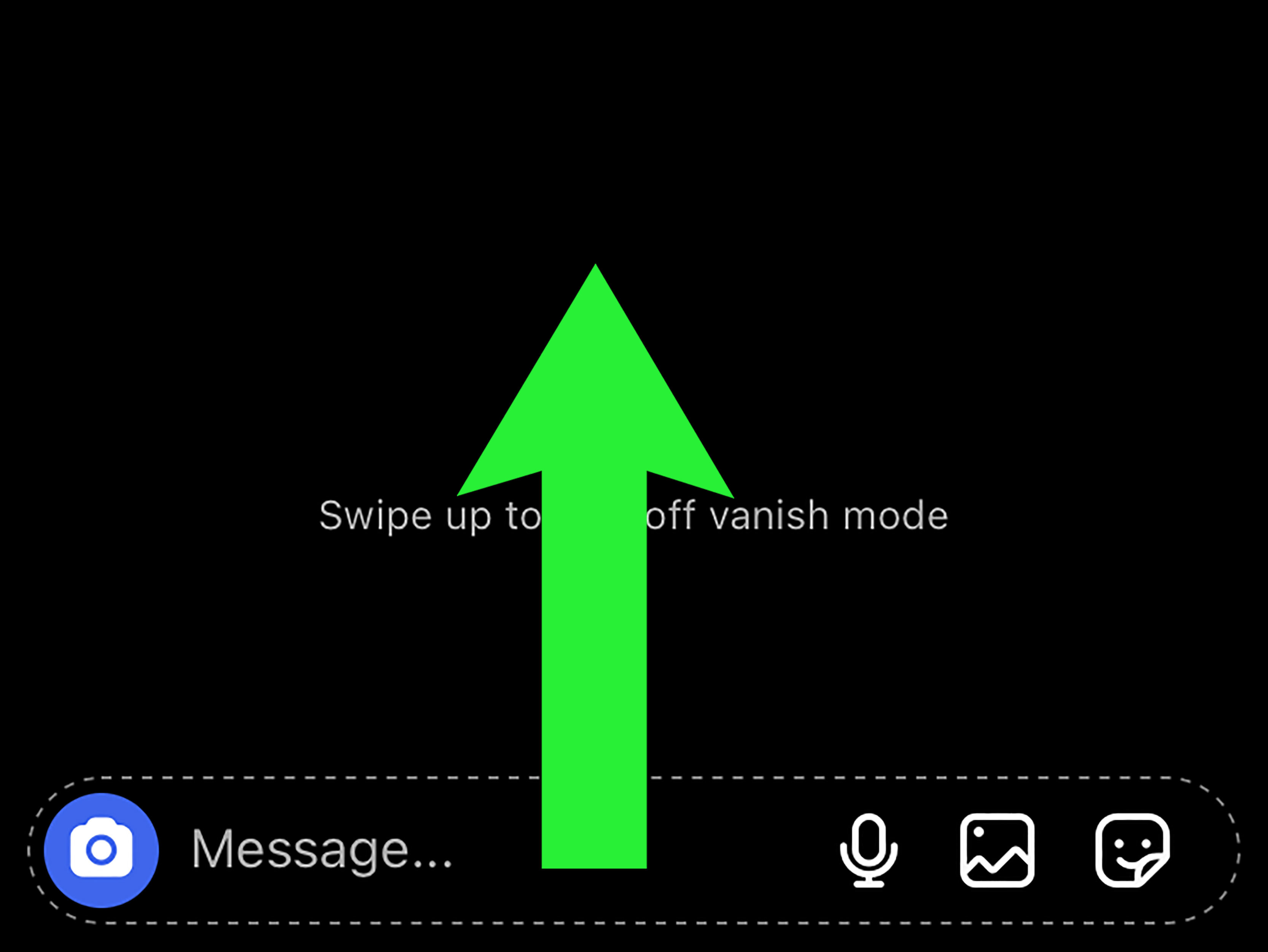
- Place your finger near the bottom of the chat screen.
- Swipe up inside the conversation.
- Release when Instagram indicates that Vanish Mode is turning on.
- Start sending messages in Vanish Mode.
Once it is active, the chat background may change, and Instagram will show that Vanish Mode is on. From that point forward, messages sent in that mode are designed to disappear after they are seen and the chat is closed.
How to Turn Off Vanish Mode on Instagram
Turning off Vanish Mode is just as easy as turning it on. Instagram did not make this a puzzle box, thankfully.
- Open the chat where Vanish Mode is active.
- Swipe up again from the bottom of the conversation.
- Release when Instagram shows the option to turn off Vanish Mode.
- The chat returns to normal messaging.
After Vanish Mode is off, new messages are saved in the chat like regular Instagram DMs unless you manually delete them or use another disappearing-message feature.
Why Can’t I Turn On Vanish Mode?
If Vanish Mode is not working, do not immediately assume Instagram has personally chosen chaos for your account. There are several common reasons the feature may not appear.
1. Your app is outdated
Instagram features often depend on the latest app version. If Vanish Mode is missing, update Instagram through the App Store or Google Play Store, then restart the app.
2. The feature may not be available in your region
Some Instagram messaging features roll out gradually or vary by country. If your friend has Vanish Mode and you do not, region or account-level availability may be the reason.
3. You are trying to use it in a group chat
Vanish Mode is generally designed for one-on-one Instagram chats. It may not work in group conversations.
4. You are messaging a Facebook or Messenger account
Instagram’s disappearing-message features may not work the same way in chats connected to Facebook or Messenger accounts. For best results, use a direct chat with another Instagram account.
5. Account restrictions may apply
If someone has blocked you, restricted you, or you are not connected in a way Instagram allows for the feature, Vanish Mode may not be available in that conversation.
Does Instagram Notify Screenshots in Vanish Mode?
Yes, Instagram can notify users when someone takes a screenshot or screen recording of a Vanish Mode chat. This is one of the feature’s most important privacy protections.
However, screenshot notifications should not be confused with perfect security. A person can still use another phone, camera, or device to capture the screen. They can also remember what you said, copy it manually, or describe it to someone else. Technology can reduce friction, but it cannot cure bad judgment. If a message would ruin your week if it escaped, Vanish Mode is probably not the right place to send it.
Is Vanish Mode Private?
Vanish Mode is more private than a regular saved chat in one specific way: messages disappear from the thread after they are viewed and the chat is closed. That makes it useful for temporary, casual communication.
But private does not mean untouchable. Instagram may retain certain information for safety, reporting, legal, or technical reasons. Users can also report conversations. If a message is reported, Instagram may review recent messages from the conversation to evaluate the report.
There is also an important timing note for 2026: Instagram has announced changes to end-to-end encrypted messaging support. Users who rely on encryption for highly sensitive conversations should check Instagram’s current Help Center and consider apps built specifically around encrypted messaging. Vanish Mode is about disappearing chat history, not guaranteed secrecy from every possible form of access.
Vanish Mode vs. Disappearing Photos and Videos
Instagram has more than one way to send temporary content, and the names can get confusing faster than a group chat deciding where to eat.
Vanish Mode
Vanish Mode affects the whole chat session while it is turned on. Messages sent during that session disappear after they are seen and the chat is closed.
Disappearing photos and videos
Instagram also lets users send photos or videos that can be viewed once or replayed, depending on the setting chosen before sending. These are specific media messages, not an entire chat mode.
The simple way to remember it: Vanish Mode changes the conversation environment, while disappearing photos and videos change one piece of content.
When Should You Use Vanish Mode?
Vanish Mode can be useful when you want a message to feel temporary, casual, or moment-based. It is not only for secrets. Sometimes it is just for messages that do not need to live forever.
Good uses for Vanish Mode
- Sending a silly reaction to a post or Story
- Sharing a temporary plan, location clue, or quick update
- Sending a meme you do not need saved for future historians
- Having a private conversation that does not need a long-term record
- Sharing casual thoughts that are relevant only in the moment
For example, if you are planning a surprise birthday dinner and want to send “She just walked into the restaurant” without leaving it in the chat forever, Vanish Mode can be helpful. It keeps the conversation lighter and less cluttered.
When Should You Avoid Vanish Mode?
Vanish Mode is convenient, but there are situations where you should not rely on it.
Avoid using Vanish Mode for important records
Do not use Vanish Mode for business agreements, payment details, legal discussions, medical information, school instructions, or anything you may need to reference later. If the message matters, save it somewhere appropriate.
Avoid using it for highly sensitive information
Vanish Mode is not a vault. It is better described as a self-cleaning chat room. That is useful, but it does not prevent every possible form of copying, recording, reporting, or account access.
Avoid using it to pressure someone
Because messages disappear, Vanish Mode can feel suspicious if used in the wrong context. If you are discussing something serious, be clear and respectful. A disappearing chat should not be used to dodge accountability.
Can Parents See Vanish Mode Messages?
Parents and guardians often worry about Vanish Mode because it can make conversations harder to review after the fact. If a teen uses Vanish Mode, the messages may disappear from the chat once viewed and closed.
That does not automatically mean something bad is happening. Teens may use disappearing messages for jokes, memes, harmless gossip, or quick reactions. Still, it is reasonable for parents to talk with teens about online safety, screenshot risks, privacy limits, and what to do if someone uses disappearing messages to make them uncomfortable.
The best approach is not panic-scrolling through every app setting like a detective in a crime drama. A better strategy is open conversation: explain that disappearing messages are not truly consequence-free, encourage teens to avoid sharing private photos or personal details, and remind them they can block or report anyone who makes them feel unsafe.
Can Businesses Use Vanish Mode?
Businesses should be careful with Vanish Mode. For brands, creators, freelancers, and customer service teams, disappearing messages are usually not ideal. You may need records of customer requests, order details, collaboration terms, complaints, or approvals.
That said, creators may occasionally use Vanish Mode for casual, off-the-record conversations with trusted contacts. But for professional communication, regular DMs, email, project management tools, or customer support platforms are better choices. Your future self will thank you when you are not trying to remember whether the client asked for “bold but elegant” or “gold but elephant.”
Safety Tips for Using Vanish Mode
Vanish Mode works best when you combine it with common sense. Here are practical tips to use it safely.
Only use it with people you trust
Disappearing messages are not a substitute for trust. If you would not trust someone with a regular message, do not trust them with a Vanish Mode message either.
Watch for screenshot alerts
If Instagram notifies you that someone captured the chat, take it seriously. It may be harmless, but it is also a sign that the conversation is no longer as temporary as expected.
Do not send passwords or financial information
Never send passwords, banking details, verification codes, private identification numbers, or sensitive personal data through Vanish Mode. Use secure, purpose-built tools for that kind of information.
Report unsafe conversations
If someone uses Vanish Mode to harass, threaten, pressure, or manipulate you, report the conversation and block the user. Disappearing messages should never be used as a shield for harmful behavior.
Common Questions About Vanish Mode on Instagram
Does Vanish Mode delete old messages?
No. Vanish Mode does not delete messages sent before it was turned on. It only applies to messages sent while the mode is active.
Can I recover Vanish Mode messages?
Usually, no. Once Vanish Mode messages disappear, they are not meant to be recovered by users. If you need to keep a record, do not use Vanish Mode.
Does Vanish Mode work on desktop?
Vanish Mode is primarily an Instagram mobile app feature. If you are using Instagram on a desktop browser, you may not see the same option.
Can the other person turn off Vanish Mode?
Yes. Vanish Mode is part of the shared chat experience. Either person may be able to exit it by swiping up or using the available turn-off option.
Is Vanish Mode the same as blocking someone?
No. Vanish Mode only affects how messages disappear in a chat. Blocking prevents someone from contacting or interacting with you in broader ways on Instagram.
Real-Life Experience: What Using Vanish Mode Actually Feels Like
Using Vanish Mode for the first time feels a bit like stepping into a side room inside Instagram DMs. The regular chat is still there, but suddenly the vibe changes. The darker background makes it obvious that you are not in normal messaging anymore. That visual cue is helpful because nobody wants to accidentally send “normal chat energy” into “this will disappear later” territory.
In everyday use, Vanish Mode is best for low-stakes conversations. For example, imagine a friend sends you a dramatic selfie while trying on sunglasses that are clearly too large for any human face. You want to respond with a joke, a GIF, and maybe a laughing voice note. Does that exchange need to be preserved forever? Absolutely not. Vanish Mode gives it the lifespan it deserves: brief, funny, and gone before it becomes evidence in a future roast session.
It is also useful for quick planning. Suppose you are meeting friends at a crowded event. You can send temporary updates like “I’m by the side entrance” or “Parking is a disaster, send snacks.” These messages are helpful in the moment but useless later. Vanish Mode keeps your chat cleaner, especially if you are the type of person whose DMs already look like a storage unit after a tornado.
However, the experience also teaches you its limits quickly. The moment you remember that someone can still take a photo of the screen with another device, Vanish Mode becomes less like a locked safe and more like a paper shredder in a room full of cameras. It reduces the chance of casual message saving, but it does not eliminate risk. That is why it works better for silly, temporary, or mildly private chats than for anything serious.
Another practical lesson: both people need to understand what is happening. If you turn on Vanish Mode in a conversation where the other person is not familiar with it, they may wonder why the screen changed or why messages are disappearing. A quick “Using Vanish Mode so this does not clutter the chat” can prevent confusion. Simple communication saves everyone from unnecessary detective work.
For creators, influencers, and small business owners, the experience is more complicated. Vanish Mode can feel tempting when you want to have casual chats with followers or collaborators, but it is usually not smart for anything involving deliverables, prices, deadlines, permissions, or customer issues. If someone says, “Yes, I approve the design,” you probably want that saved somewhere more permanent than a disappearing DM.
The best personal rule is this: use Vanish Mode for conversations that are temporary by nature, not conversations you are trying to hide because they are risky. There is a big difference. Temporary messages can be fun and useful. Risky messages are still risky, even if Instagram sweeps them out of the chat later.
In short, Vanish Mode is a handy feature when used with realistic expectations. It can make Instagram chats feel lighter, cleaner, and more spontaneous. Just remember that disappearing does not mean impossible to capture, and private does not mean consequence-free. Use it like a sticky note, not a bank vault.
Conclusion
Vanish Mode on Instagram is a useful disappearing-message feature for one-on-one chats. It lets you send temporary texts, photos, videos, and other content that disappears after it is viewed and the chat is closed. To turn it on, open an Instagram chat and swipe up. To turn it off, swipe up again.
The feature is great for casual jokes, quick updates, temporary plans, and messages that do not need to live forever. But it is not perfect privacy. Screenshots, screen recordings, other devices, reports, and memory still exist. Use Vanish Mode for convenience, not for anything that requires true security or a permanent record.
Note: Instagram features can vary by region, account type, device, and app version. Always check your current Instagram app settings for the latest available options.