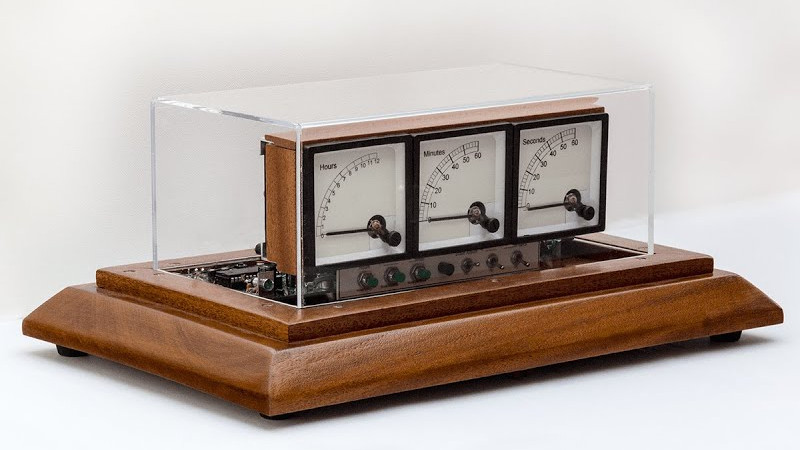
Some clocks whisper. Some clocks glow. Some clocks hang on the wall and quietly judge your ability to arrive anywhere on time. Then there is the voltmeter clock, a delightfully strange little machine that tells time with analog panel meters, swinging needles, custom gauge faces, and enough workshop charm to make a digital alarm clock feel like it forgot to wear pants.
A voltmeter clock looks great on display because it turns a simple everyday functionchecking the timeinto a miniature performance. Instead of reading numbers on an LCD screen, you watch three analog needles point to the hour, minute, and second. It feels like a lab instrument, a vintage radio, a submarine control panel, and a handmade desk sculpture all decided to meet for coffee and accidentally became useful.
The idea has been explored by electronics hobbyists, Arduino builders, Hackaday-style hardware fans, and makers who believe that a clock should do more than announce your lateness. A good voltmeter clock blends practical electronics with personality. It may use an Arduino, a PIC microcontroller, an AVR chip, or an ESP8266. It may keep time with a DS3231 real-time clock module, a crystal oscillator, or network time. It may live in a wooden case, a laser-cut enclosure, a 3D-printed frame, or something that looks suspiciously like it escaped from a retired physics lab.
And that is exactly why it works. The voltmeter clock is not just a timepiece. It is a conversation starter, a maker project, a design object, and a tiny celebration of analog movement in a world drowning in rectangles.
What Is a Voltmeter Clock?
A voltmeter clock is a clock that displays time using analog voltmeters or panel meters instead of traditional clock hands or digital digits. Most designs use two or three meters. A three-meter version usually assigns one gauge to hours, one to minutes, and one to seconds. The hour meter might be relabeled from 0 to 12, while the minute and second meters are marked from 0 to 60.
The clever part is that the meters are not measuring voltage in the usual workshop sense. They are being used as display devices. A microcontroller sends each meter a controlled signal, and the needle moves to the position that represents the current time. When the minute changes from 23 to 24, the minute needle creeps forward. When the seconds roll over, the second needle drops back to zero like it just remembered gravity exists.
Most builds rely on pulse width modulation, often called PWM. A microcontroller pin rapidly turns on and off, and the duty cycle determines the average energy sent to the meter. The analog needle responds to that average and settles at the correct position. In simple terms, the microcontroller does not need to generate a perfect analog voltage. It just needs to fool the meter in a very honest and engineering-approved way.
This trick is popular because analog panel meters are affordable, visually attractive, and easy to customize. Replace the factory voltage scale with a printed clock scale, add a handsome enclosure, calibrate the needle movement, and suddenly a plain voltmeter becomes a clock face with character.
Why the Voltmeter Clock Looks So Good on Display
The appeal of a voltmeter clock is partly nostalgia and partly mechanical theater. Digital clocks are efficient, but they rarely invite a second look. A voltmeter clock has motion, depth, shadows, printed scales, screws, bezels, and needles that sweep with a satisfying seriousness. It looks important even when it is merely telling you that lunch was supposed to start eight minutes ago.
It Has an Industrial Aesthetic
Analog meters belong to the visual language of test benches, radio equipment, control rooms, and electrical cabinets. Put three of them together and they instantly suggest precision. Even if the clock is sitting on a bookshelf next to a houseplant and a half-finished coffee, it looks like it might be monitoring a nuclear reactor. That is not a problem. That is the charm.
It Makes Time Visible
Digital clocks show time as information. Voltmeter clocks show time as movement. The needles give the passing seconds a physical form. The minute hand does not simply become a new number; it shifts position. The hour dial slowly advances. The clock becomes something you can observe, not just something you glance at.
It Rewards Craftsmanship
The best voltmeter clock projects are not only about code. They are about the faceplates, the typography, the enclosure, the finish, and the tiny decisions that separate “cool project” from “please clear a space on the mantel immediately.” Makers often repaint old meter faces, print custom decals, sand wooden cases, add toggle switches, or choose big chunky buttons because subtlety is not always invited to the workshop.
How a Voltmeter Clock Works
At the center of most voltmeter clock builds is a small microcontroller. Arduino Nano and Arduino Uno boards are common because they are beginner-friendly, inexpensive, and well supported. Some builders use PIC microcontrollers, modern AVR chips, or Wi-Fi-enabled boards such as the ESP8266. The controller reads the current time, calculates where each needle should point, and sends the proper output signal to each meter.
The Timekeeping Source
A clock needs a reliable way to know the time. Many hobby builds use a DS3231 real-time clock module because it is accurate, widely available, and communicates over I2C. The DS3231 includes temperature compensation, which helps reduce drift compared with simpler clock circuits. Add a coin-cell backup battery, and the clock can remember the time even when the main power is disconnected.
Other versions may use a crystal oscillator directly connected to a microcontroller. That can work well if the design is calibrated carefully. Wi-Fi versions can fetch time from an internet time server using NTP, which is a nice option if you enjoy the phrase “my clock is on the network” and do not mind adding wireless setup to a project that already has three dramatic needles.
The Display Method
Each analog meter is connected to a microcontroller output, often through appropriate resistors or signal-conditioning components depending on the meter rating. A 5V panel meter is convenient for Arduino-style projects because the output range is already close to what the hardware can provide. However, builders still need to pay attention to current limits, meter sensitivity, and calibration.
The firmware maps time values to output values. For seconds and minutes, the range is usually 0 to 59 or 0 to 60 depending on the dial design. For hours, the code may map 0 to 11, 1 to 12, or use a 24-hour display if the builder wants the clock to look like it belongs in a submarine with strong opinions.
Calibration Matters
Analog meters are wonderfully physical, which means they are also wonderfully imperfect. The needle may not start exactly at zero. The maximum reading may not line up perfectly. Two identical-looking meters may behave like distant cousins rather than twins. Good voltmeter clock software often includes minimum and maximum calibration values for each meter so the needle can be adjusted in code.
Calibration is where the project becomes satisfyingly hands-on. You set the meter to its lowest point, adjust the value, then set it to the highest point and adjust again. After that, the software maps the time smoothly between those two points. It is the electronics version of tailoring a suit, except the suit has wires and occasionally smells like solder.
Parts Commonly Used in a Voltmeter Clock
A typical voltmeter clock build may include three analog panel meters, a microcontroller board, a real-time clock module, a power supply, resistors, buttons for setting the time, wires, solder, and an enclosure. Some builders add LEDs for backlighting. Others add switches for display modes, brightness settings, or decorative drama.
The meters are the stars. Round meters bring an old radio look. Square meters feel more industrial. Rectangular meters give the clock a control-panel vibe. The best choice depends on the style of the final display. A polished hardwood enclosure makes the build look like heirloom lab equipment. A black acrylic case makes it feel modern. A 3D-printed housing says, “Yes, I own calipers, and no, I will not apologize.”
Custom Meter Faces
The custom face is the detail that makes or breaks the illusion. A voltmeter scale reading 0 to 5 volts is interesting, but a meter face labeled for hours, minutes, and seconds is the moment the project becomes a clock. Builders often remove the original scale plate, scan or measure it, design a new face in graphics software, print it, and reinstall it behind the needle.
Typography matters more than people expect. A vintage serif font can make the clock feel like an old laboratory instrument. A clean sans-serif face can make it look like boutique audio equipment. Cream-colored paper, black markings, and tiny tick marks add warmth. The goal is simple: make the viewer believe the meter was always meant to tell time.
Design Ideas That Make It Stand Out
A voltmeter clock already has visual charm, but thoughtful design choices can turn it into a centerpiece. The enclosure should support the personality of the meters. Wood is a favorite because it softens the technical look and gives the project a handmade feel. Mahogany, maple, walnut, plywood, and stained pine can all work well. Acrylic is another strong choice, especially if the builder wants a layered laser-cut design.
Backlighting is another excellent upgrade. Soft LED lighting behind or above the meters can make the needles readable at night and add a warm dashboard glow. The trick is restraint. A voltmeter clock should not look like it is auditioning for a gaming keyboard commercial unless that is the point.
Buttons and switches also affect the final look. Small rear-mounted buttons keep the face clean. Large front-panel buttons make it feel like equipment from a 1960s research facility. Toggle switches add instant personality, especially when paired with engraved labels. They may not be strictly necessary, but neither is putting a spoiler on a desk clock, and yet here we are admiring the courage.
Arduino, PIC, ESP8266, or Something Else?
For beginners, Arduino is the most approachable platform. It offers simple PWM output through analogWrite, easy libraries for DS3231 modules, and plenty of examples. An Arduino Nano is compact enough to hide inside the enclosure, while an Uno is easier to prototype on a breadboard.
A PIC microcontroller is a more traditional embedded option and can make the project compact and efficient. It may require more setup and programming knowledge, but it gives experienced builders a satisfying sense of control. Modern AVR chips can also handle the job elegantly, especially when the builder wants a custom board rather than a development module.
An ESP8266 or ESP32 adds Wi-Fi. That opens the door to automatic internet time synchronization, web-based configuration, or even a tiny status page. Of course, it also means your analog clock now has network behavior, which feels both brilliant and mildly ridiculous in the best possible way.
Common Challenges and Practical Fixes
Needle Jitter
Some meters may twitch or jitter if the PWM signal is too coarse, too slow, or poorly filtered. A small capacitor across the meter terminals or a simple low-pass filter can smooth the movement. Software averaging can also help. The goal is to keep the needle calm, unless the clock is intentionally going for “haunted oscilloscope chic.”
Rollover Drama
When seconds move from 59 back to 0, the needle quickly snaps back. Some people love this moment because it gives the clock life. Others prefer a smoother reset. Builders can adjust the behavior in software, add damping, or design the face so the rollover feels intentional rather than alarming.
Face Alignment
If the custom dial face is slightly rotated or off-center, the clock will look wrong even when the electronics are correct. Precise measurement, careful printing, and test fitting are essential. This is not the part to rush. The needle sees everything. The needle remembers.
Power and Heat
Most small analog meters draw little current, but the design still needs sensible power planning. Use a stable supply, avoid exceeding microcontroller pin limits, and keep wiring neat. Backlighting can consume more current than the meters themselves, so LEDs should be chosen and resisted properly.
Why Makers Love This Project
The voltmeter clock hits a sweet spot between accessible electronics and impressive results. It teaches PWM, timekeeping, calibration, enclosure design, and user interface basics without becoming impossibly complex. It is also forgiving. A beginner can build a simple version with an Arduino and three meters. An advanced builder can design custom PCBs, machine a hardwood case, write low-level firmware, and calibrate the needles like a watchmaker with a soldering iron.
It is also one of those rare projects that non-technical people instantly understand. You do not have to explain why it is cool. The needles move. The faces show time. The object looks unusual. Someone will ask, “Is that a clock?” and you get to say, with completely reasonable pride, “Yes, and it used to think it was a voltmeter.”
Display Placement: Where It Looks Best
A voltmeter clock belongs anywhere people can see it up close. It works beautifully on a desk, workshop shelf, office bookcase, maker-space counter, or living-room side table. It is not the best clock for reading from across a large room, unless the meters are oversized. Its strength is not long-distance legibility. Its strength is presence.
Place it where the light catches the meter glass and the needle movement can be noticed. A wood desk with warm lighting is perfect. A metal shelf with tools behind it adds industrial flavor. A clean modern office gives the clock contrast, making it look like a piece of functional art. Put it next to a normal plastic digital clock and the digital clock will immediately develop self-esteem issues.
Experience Notes: Living With a Voltmeter Clock on Display
The first experience of using a voltmeter clock is that you stop checking the time and start watching it. That sounds like a tiny difference, but it changes the whole relationship. A phone lock screen gives you numbers and disappears. A wall clock quietly loops. A voltmeter clock performs in small gestures. The second needle climbs. The minute needle waits with suspicious patience. The hour needle barely moves, like it is paid by the century.
On a desk, the clock becomes part of the workspace atmosphere. It pairs naturally with mechanical keyboards, notebooks, soldering stations, camera gear, audio equipment, and other objects that reward touch and attention. Visitors tend to notice it quickly because the human eye is drawn to needles and gauges. Even people who do not care about electronics usually understand that something unusual is happening. They lean in. They read the labels. They ask how it works. Then the clock wins, because any object that can start a conversation without making noise deserves respect.
One practical experience is that readability depends heavily on lighting and face design. Thin tick marks may look elegant in a design file but become harder to read under dim light. Larger numerals, high contrast, and clean spacing make the clock more usable. A cream background with dark markings gives a classic instrument feel and remains easy on the eyes. Glossy covers look great but can reflect lamps and windows, so placement matters.
Another real-world lesson is that the reset movement becomes part of the personality. When the seconds needle snaps back from 60 to zero, it can feel playful, dramatic, or slightly theatrical. Some people prefer smooth, damped movement. Others enjoy the little mechanical punctuation mark at the end of every minute. It is like the clock clearing its throat before continuing.
Maintenance is usually simple. Keep dust off the clear cover, avoid knocking the enclosure, and make sure the power supply is reliable. If the clock uses a real-time clock module with a backup cell, the battery will eventually need replacement. If it uses Wi-Fi time, network changes may require reconfiguration. Neither problem is dramatic, but both are easier to handle when the enclosure allows access without a full archaeological excavation.
The most satisfying part is that the voltmeter clock does not look mass-produced. Even when it is built from common components, it feels personal. The spacing of the meters, the color of the faceplates, the shape of the case, and the smoothness of the needle movement all reflect the builder’s choices. That gives it a warmth that ordinary clocks often lack.
In daily use, a voltmeter clock is not always the fastest way to read the exact time. That is not a flaw; it is the point. It slows the act of reading time just enough to make it interesting. It reminds you that electronics can be expressive, not merely efficient. And when a small object can make a room look smarter, a desk look cooler, and time look like it is being measured by a tiny science experiment, it has earned its spot on display.
Conclusion
A voltmeter clock looks great on display because it combines engineering, nostalgia, and craftsmanship in one compact object. It takes ordinary analog panel meters and gives them a new purpose, transforming voltage scales into time scales and simple needle movement into visual storytelling.
For makers, it is a rewarding electronics project with room for creativity. For design lovers, it is a handsome piece of functional decor. For anyone tired of bland digital clocks, it is proof that timekeeping can still have personality. Whether powered by Arduino, guided by a DS3231 module, synchronized over Wi-Fi, or built around a custom microcontroller, the voltmeter clock remains a wonderful reminder that the best displays do more than show information. They make you want to look.
Note: This article is written for web publishing in standard American English and synthesizes real maker-project concepts, electronics practices, and common voltmeter clock design approaches without inserting source links, as requested.