
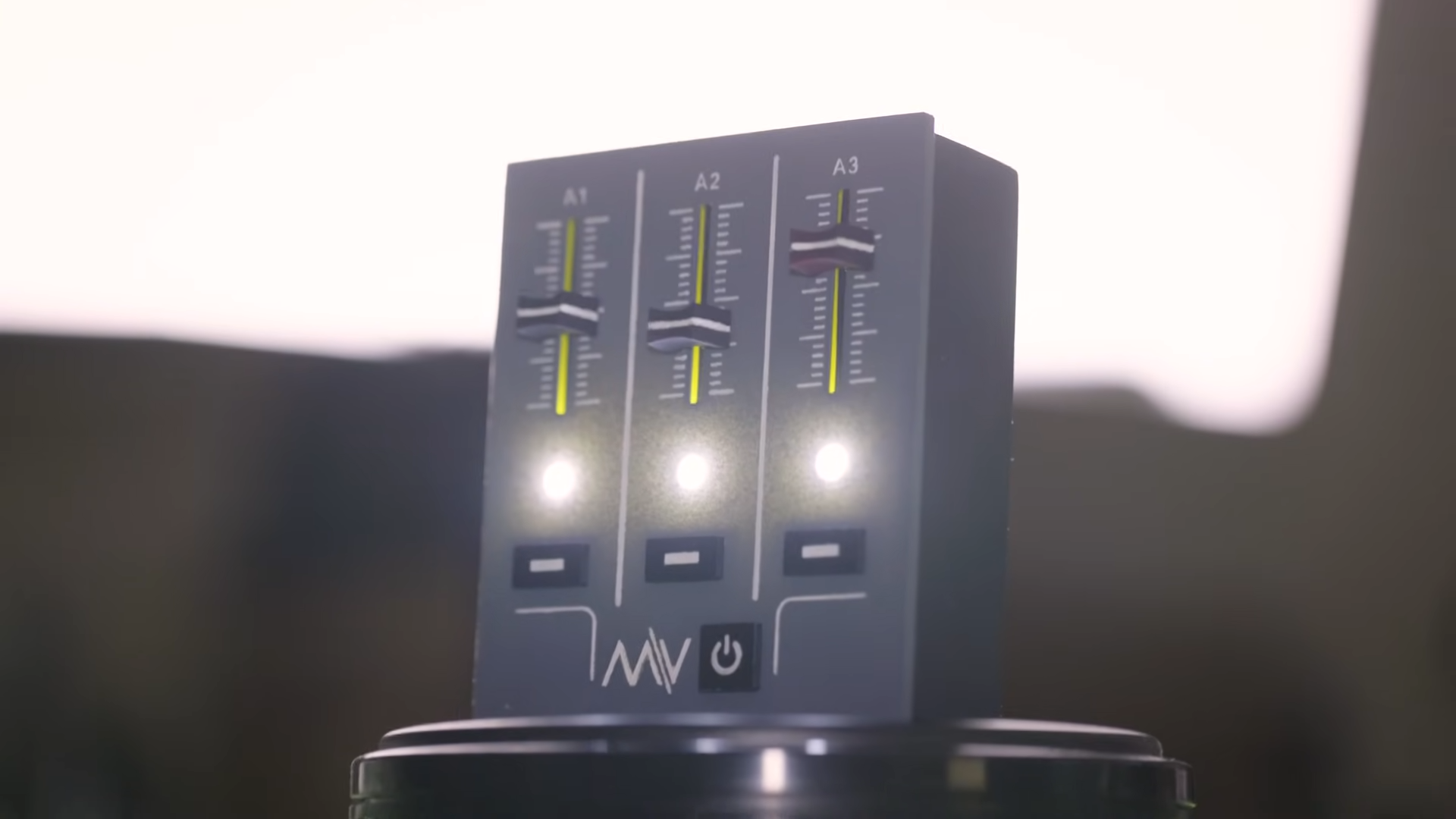
For years, digital design has played a funny little game with our hands. It draws a slider on a screen, paints it to look like hardware, gives it a cute thumb to drag, and then acts surprised when people still want the real thing. That is the tension at the heart of Volume Controller Rejects Skeumorphism, Embraces The Physical: the realization that pretending to be tactile is not the same as being tactile.
At first glance, a virtual volume slider seems perfectly sensible. It is familiar, compact, and easy to update in software. But familiarity can turn into theater. The graphic references a studio fader or a hardware mixer, yet your finger still lands on a sheet of glass, your eyes still have to check the position, and your brain still has to verify that the motion actually did what you intended. The interface looks physical while remaining stubbornly not physical. That is a clever illusion, but an illusion all the same.
The growing appeal of physical controls is not nostalgia dressed as design criticism. It is a practical response to the limits of screen-first interfaces. When a tool is touched often, adjusted quickly, and relied upon without ceremony, the body tends to vote for buttons, knobs, sliders, and switches. No matter how shiny the pixels get, your fingers are still old-school. They like edges. They like resistance. They like knowing where something is without filing a visual request first.
From Virtual Metaphor to Actual Object
The phrase behind this article comes from a hardware project that makes the argument beautifully with almost no speech at all. Instead of controlling PC audio with on-screen sliders, the maker built a physical audio control box with linear sliders and mute buttons. That move matters because it flips the usual relationship between hardware and software. Rather than using software to imitate hardware, it uses hardware to do the job software has been imitating.
That is the whole joke, really. Desktop operating systems have long offered volume controls that borrow the visual language of audio desks and analog mixers. They are skeuomorphic in spirit even when the graphics are flat and modern. The idea is borrowed from the physical world because humans understand physical controls quickly. But once a design borrows too much from reality without restoring the physical advantages of reality, it becomes decorative shorthand. It says, “Remember how satisfying this used to feel?” while offering none of the satisfaction.
A real volume controller cuts through that performance. It gives the user a thing with position, travel, friction, and spatial memory. It gives the hand a role again. Suddenly, volume is not a tiny task buried in a status bar, a keyboard shortcut you forgot, or a software panel hiding behind three windows. It is a device on the desk. It exists. It waits. It can be found in the dark. That is not old-fashioned. That is efficient.
Why Skeuomorphism Hits a Wall
Metaphor helps, until metaphor becomes makeup
Skeuomorphism has never been entirely foolish. In many contexts, it helps people understand a new system by mapping it to a familiar one. Buttons look pressable because buttons in the real world are pressable. A slider suggests a range. A dial suggests rotation. A toggle implies a change of state. Designers have leaned on these cues for decades because they reduce explanation. Good design often whispers, “You already know how this works.”
The problem arrives when visual metaphor substitutes for material truth. A digital knob can look like a knob, but it does not let you grip it, feel its position, or adjust it by muscle memory. It asks for the benefits of metaphor while skipping the responsibility of embodiment. In that sense, fake tactility is often less honest than plain flat design. At least a flat design admits it is software. A faux-physical control can overpromise.
That is why the most interesting reaction against skeuomorphism is not a return to sterile minimalism. It is a return to appropriate physicality. The question is no longer whether a control should look like a thing. The better question is whether the interaction should be a thing. If the answer is yes, no amount of shading, gloss, translucency, or “delightful motion” can replace actual hardware.
Why the Physical Still Wins
1. Physical controls reduce visual dependence
Touchscreens are wonderful for flexibility, but they are demanding. They require attention. A real slider or knob can often be located and adjusted with only partial vision, peripheral vision, or no vision at all. You feel where the control begins, where it ends, and roughly where it is set. That matters for anything used while multitasking: listening to music while typing, muting a call while presenting, lowering audio while gaming, or making fast adjustments during editing.
Digital volume control often adds a tiny tax to every interaction. You look down, acquire the control, drag carefully, confirm the change, and return your gaze to what you were doing. A physical controller shortens that loop. Your hand can do part of the work automatically. When people say hardware “feels faster,” they often mean the body has been invited back into the process.
2. Physical controls support precision and exploration
There is a reason sliders and knobs persist in audio, photography, vehicles, and creative software. They are good at handling ranges. A user can make broad changes quickly and then refine them with small movements. The best physical controls also communicate scale through resistance, spacing, and travel. Your fingers can sense change before your mind forms a sentence about it.
Volume is especially suited to this kind of control because it is continuous, frequently adjusted, and context-sensitive. You rarely want just “on” or “off.” You want a little less. A touch more. Enough to hear dialogue, not enough to annoy the room, enough for a meeting, not enough to blast your own ears. Software can represent that range, of course, but hardware lets the user shape it in a more embodied way. Volume is not merely selected; it is modulated.
3. Physical objects build trust
Trust in interface design is often discussed as clarity, consistency, and accessibility. Hardware adds another layer: confidence through presence. A mute button that can be pressed decisively feels different from a tiny icon whose active state must be visually verified. A volume slider with physical travel feels different from a digital control that may jump, lag, or respond differently depending on app focus.
That difference sounds small until you multiply it across daily life. Modern users spend hours navigating ambiguous software surfaces that constantly change shape. Menus move. Icons restyle themselves. Settings relocate like tenants avoiding rent. Physical controls push back against that instability. They say, “I am here. I do this. I will still do this tomorrow.” In a world of endlessly updated interfaces, that reliability feels luxurious.
Rejecting the Fake, Not the Familiar
It would be a mistake to read this as a crusade against digital interfaces. Screens are unmatched when a system must adapt, scale, personalize, or present dense information. Nobody wants a physical knob for checking email subject lines. Nobody is begging for a walnut-veneered spreadsheet. The real lesson is about choosing the right material expression for the right job.
Designers should stop asking whether something can be put on a screen and start asking whether it should stay there. A control deserves physical form when it is used constantly, adjusted incrementally, or needs to be available without hunting through layers. Volume is a perfect candidate. So are play and pause, mute, camera shutter actions, zoom on certain tools, and critical vehicle functions. These are not “legacy” interactions. They are high-frequency human behaviors.
That is also why the return of physical controls has shown up in so many places at once. Cameras have added dedicated buttons again. Automotive design has been forced to rethink all-screen interiors. Peripheral makers keep producing knobs, dials, macro pads, and mixer-like accessories for digital work. Even experimental interface research keeps circling back to tangible media, shape-changing surfaces, and hybrid systems that combine the flexibility of software with the confidence of touch. The trend is not anti-technology. It is anti-friction disguised as progress.
The Real Future Is Hybrid
The smartest path forward is not a dramatic purge of screens. It is a hybrid model in which screens handle complexity and hardware handles immediacy. Let software manage routing, profiles, automation, visualization, and multi-device syncing. Let hardware handle the things humans want to grab.
A physical volume controller is a near-perfect example of that division of labor. The computer can perform the invisible work: logarithmic scaling, device switching, per-app routing, Bluetooth handling, mixer logic, accessibility settings, and saved presets. The hardware can do the visible, tangible work: slide up, slide down, mute now. One layer is abstract and powerful; the other is direct and humane. Together, they form a system that feels more advanced than a screen-only approach, not less.
That is the irony many minimalist interfaces miss. Removing buttons can make a product look futuristic in screenshots, yet feel less advanced in real use. Actual sophistication is not how little an interface reveals. It is how gracefully it lets a person act. Sometimes the most elegant technology is the one that has the confidence to become an object again.
How Designers Should Apply This Lesson
Design for the hand, not just the eye
If an interaction happens repeatedly, think about reach, grip, travel, and position before thinking about gradients and animation. The hand is not a crude pointer attached to the brain. It is part of cognition. Good physical controls take advantage of that.
Use hardware for urgency and repetition
Emergency, frequent, and continuous controls should not be buried. The more often a person uses a function, the less acceptable it becomes to hide it behind taps, swipes, and overlays. Volume belongs in the category of repeat-use, low-drama, always-available actions.
Do not confuse clean visuals with clean UX
A flat black panel with no buttons may photograph beautifully. Living with it is another matter. Real usability is measured in effort, errors, interruption, and comfort, not in how calm the product looks in a launch video with cinematic lighting and suspiciously perfect fingernails.
Let software be software
Not every digital control needs to cosplay as old hardware. If a control is truly screen-native, design it honestly. If it wants the advantages of physicality, give it physicality. The middle ground of decorative mimicry is where many interfaces become cute but less convincing.
Conclusion
Volume Controller Rejects Skeumorphism, Embraces The Physical is more than a clever maker headline. It captures a broader shift in how people are evaluating modern interfaces. Users are increasingly less impressed by polished imitations of physical controls and more interested in controls that actually deliver the benefits those imitations once promised.
The point is not to romanticize knobs and sliders as sacred relics from the analog temple. The point is to remember why they existed in the first place. They were not ornamental. They were efficient, legible, and deeply compatible with the way human bodies move through the world. When digital systems ignore that, they often create extra friction and call it progress. When they learn from it, they become more intuitive.
In the end, a physical volume controller does something refreshingly humble: it lets volume be handled like volume again. No fake leather. No fake chrome. No fake studio nostalgia trapped inside a UI layer. Just a real control for a real task. Sometimes the most radical design move is to stop pretending and put the function back in your hand.
Experiences: What Happens When Volume Becomes a Thing Again
Using a physical volume controller changes the emotional tone of everyday computing more than most people expect. It sounds minor until you live with one. On a normal workday, volume adjustments happen in tiny bursts: a video starts louder than expected, a notification pings during a call, a song needs a slight boost, a game gets too intense, or a meeting suddenly requires muting. On-screen controls make each of these moments feel like micro-interruptions. You stop what you are doing, hunt for the right app or menu, adjust, confirm, and then return to the main task. It is not dramatic, but it is constant.
With a physical control, those moments feel less like interruptions and more like gestures. Your hand reaches over, nudges a slider, taps mute, and keeps moving. The action becomes part of the rhythm of working rather than a break from it. That shift is subtle, but it adds up over a day. The interface no longer demands a formal audience every time you want something quieter.
There is also a strange relief in spatial memory. After a few days, your hand begins to know where the control is without asking your eyes for directions. You can lower music while reading. You can mute audio during a surprise ad without minimizing anything. You can adjust game sound during a loading screen while still talking to a friend. The controller becomes desk furniture with a purpose, almost like a lamp switch or a favorite pen. It belongs to the environment, not just the software stack.
Creative work makes the benefit even clearer. Anyone editing audio or video, monitoring multiple outputs, or switching between speakers and headphones knows that sound is never one-and-done. It is always being tuned. A physical controller makes that tuning feel less clerical and more fluent. Instead of clicking through system panels like an accountant of decibels, you interact with sound in a way that feels immediate. The body gets involved, and the work feels smoother.
There is an accessibility dimension here, too. Physical controls can reduce cognitive load for people who find layered interfaces tiring, tiny hit targets frustrating, or screen-based confirmations easy to miss. They can be helpful for users with visual fatigue, attention limits, or just a healthy dislike of performing surgery on a glass rectangle every time the laptop gets too loud. Sometimes “better UX” is not a brilliant new paradigm. Sometimes it is simply a clearer path with fewer chances to fumble.
And then there is the joy factor, which designers occasionally pretend is not real unless it arrives via animation. Sliding a real control feels good. Pressing a solid mute button feels decisive. Even the tiny ritual of reaching for a known object creates satisfaction. That is not childish or irrational. Pleasure is part of usability. When a control feels natural, the product feels considerate. When it feels flimsy, hidden, or overly abstract, the product feels indifferent.
So yes, a physical volume controller can seem like a small rebellion. But in practice, it feels less like rebellion and more like common sense finally returning to the room. You do not miss the fake slider once the real one is sitting on your desk.













